Description:
Access level: public
Reference: SDOC-498608282-1353
Download: PDF
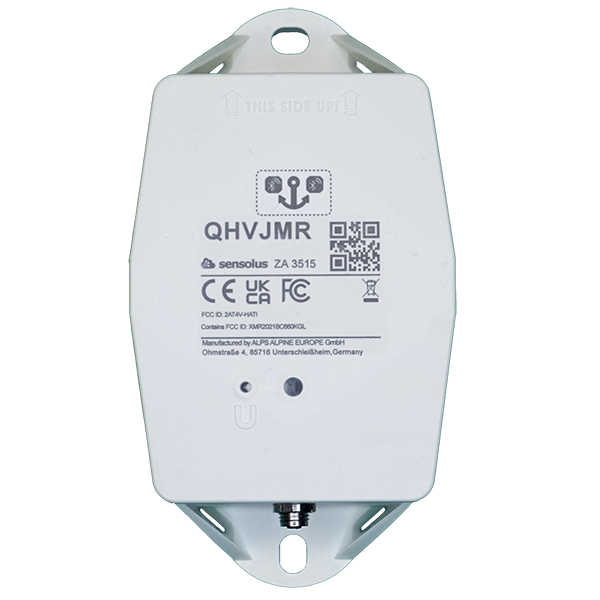
sensolus ZA 3515 Zone anchor - battery or net powered - NB-IoT/LTE-M www.sensolus.com | info@sensolus.com The battery powered zone anchor (with optional external power adaptor) for localization of assets equipped with Bluetooth tag trackers. Installed at a fixed location Scans Bluetooth Low Energy tag trackers NB-IoT LTE-M Back up battery IP67 Flame retardant IK 09 Net powered 130×72×36 mm 218g Connectivity NB-IoT and LTE-M • Energy efficient transceiver • Internal omnidirectional antenna • Bi-directional communication • NB-IoT and LTE-M bands: Europe/North America • Data recovery • OTA firmware upgrade (NB-IoT and LTE-M) Bluetooth Low Energy (BLE) • Bluetooth Low Energy 5.0 • Over the air firmware upgrade (BLE) Connectivity plan • ZA 3515 comes with the Extended connectivity plan Activation and mounting • Activation manual • Holes 7x9mm (⁹/₃₂ * ²³/₆₄ in) for screws or rivets. 115 mm (4¹⁷/₃₂ in) distance between the centers of the mounting holes. • Instructions for mounting the device are available in the Sensolus documentation center.sensolus ZA 3515 Zone anchor - battery or net powered - NB-IoT/LTE-M www.sensolus.com | info@sensolus.com Mechanics & Design Antennas All antennas are internal Water & dust resistance IP67 Size 130x72x36 mm (5⅛ x 2⁵³⁄₆₄ x 1²⁷⁄₆₄ in) Impact resistance IK09 Weight 218 gram (7.68 oz) Drop shock and vibration EN 60068 Color White Operating temperature -20°C to 60°C (-4°F to 140°F)* The specifics regarding operational temperature are contingent upon the application, installation circumstances, and environmental factors such as sunlight exposure. For further information, please reach out to Sensolus. Battery life can be affected when devices function for extended periods at the extremes of this range. Casing • PBT/PC 29 TM-Z2 FR UV LS • Flame retardant • UV-stabilized Power supply • 220-230 V Europe • 110-115 V North America • Power supply cable length 2 meter • AES encrypted firmware • Firmware upgrade allows only signed firmware images Back up battery Back up battery lifetime when scanning Utilize the Sensolus battery calculator to assess the lifespan of the backup battery, which varies based on the specific use case. Back up battery characteristics • User replaceable battery pack (Li-SoCl2) 12000 mAh • 2.94 gram (0.1037oz) lithium Certifications Regulatory • CE • FCC • IC Bluetooth 5.0 Declaration ID D068598 Environmental IK9 Electrical safety EN 62368-1sensolus ZA 3515 Zone anchor - battery or net powered - NB-IoT/LTE-M www.sensolus.com | info@sensolus.com User Interaction Device activation Magnetic activation LED feedback Green & red LED feedback on the device Synchronize remote settings • Instant: Magnet activation • Periodic: No user interaction needed Management Services Diagnostics • Battery lifetime prediction • Detailed energy consumption • Geolocation diagnostics • Installation • Communication quality Management • OTA firmware updates over NB-IoT,LTE-M and BLE • Remote configuration • Zone anchor localization with Sensolus smartphone app Application services • Bluetooth tag tracker scanning • Act as managed geobeacon Tag tracking scanning • Bluetooth tag tracker scanning • Act as managed geobeacon Discuss with Sensolus when more than 2000 Bluetooth tag trackers need to be scanned at once Firmware configuration Bluetooth tag tracker scanning configurations • Scan and send interval • Bluetooth tag tracker's RSSI scan threshold • Filter scanned Bluetooth tag trackers on UUID Use as geobeacon Enabled or disabled Security • Device unique encryption keys • End to end payload encryption Chacha 20 • AES encrypted firmware • Firmware upgrade allows only signed firmware images Accessories The ZA 3515 does not ship with a power adaptor. Sensolus has power adaptors for EU, UK and USA. • ADPT 8500 EU - ZA 3515 net power adaptor EU version • ADPT 8501 UK - ZA 3515 net power adaptor UK version • ADPT 8502 US - ZA 3515 net power adaptor US version
Description:
Access level: public
Reference: SDOC-498608282-1373
Download: PDF
sensolus ZA 3515 NB-IoT/LTE-M Zone Anchor www.sensolus.com | info@sensolus.com Battery-powered zone anchor for asset localization using Bluetooth tag tracker scanning. Features NB-IoT and LTE-M connectivity with optional AC power adapter support. Includes OTA updates, encrypted communications, and comprehensive diagnostics. NB-IoT LTE-M Bluetooth Low Energy 5.0 IP67 rated IK09 impact resistant Optional AC power adapter 130 × 72 × 36mm 218g (7.68 oz) Connectivity Cellular • NB-IoT and LTE-M • Europe/North America bands • Bi-directional communication • Internal omnidirectional antenna Bluetooth Bluetooth Low Energy 5.0 Capabilities • Tag tracker scanning • Managed geobeacon functionality • OTA firmware updates (NB-IoT, LTE-M, BLE) Power Primary Battery User-replaceable Li-SoCl₂ battery (12,000 mAh, 2.94g lithium) Optional AC Adapter • 220-230V (Europe) or 110-115V (North America) • 2 meter cable • 0.1W no-load consumption Physical Characteristics Dimensions 130 × 72 × 36mm (5⅛ × 2⁵³⁄₆₄ × 1²⁷⁄₆₄ in) Weight 218 grams (7.68 oz) Color White Material • PBT/PC casing • Flame retardant • UV stabilized Mounting Holes 7 × 9mm, 115mm center-to-center spacingsensolus ZA 3515 NB-IoT/LTE-M Zone Anchor www.sensolus.com | info@sensolus.com Environmental IP Rating IP67 Impact Resistance IK09 Operating Temperature -20°C to 60°C (-4°F to 140°F) Drop Shock and Vibration EN 60068 Management & Security User Interaction • Magnetic activation • LED feedback (green & red) • Remote configuration sync Diagnostics • Battery lifetime prediction • Geolocation diagnostics • Communication quality monitoring Security • Device-unique encryption keys • ChaCha20 end-to-end encryption • AES encrypted firmware • Signed firmware images only Configuration Configurable Features • Tag scanning intervals • Scanning thresholds • Remote configuration updates Certifications Regulatory • CE • FCC • IC Electrical Safety EN 62368-1 Environmental RoHS compliant, Drop shock testing in progress Mounting Options Supported Methods • Rivets • Bolts/screws • Double-sided tape • Tie wraps (6mm) • MS Polymer glue • Magnet mounting kits
Description:
Access level: public
Reference: SDOC-498608282-1355
Download: PDF
sensolus ZA 3515 de zone - batterie ou alimentation secteur - NB-IoT/LTE-M EU & US (sans adaptateur secteur) www.sensolus.com | info@sensolus.com L'ancre de zone alimentée par secteur avec batterie de secours pour la localisation des actifs équipés de trackers d'étiquette Bluetooth dans une zone dédiée. L'ancre de zone scanne en continu lorsqu'elle est alimentée par le secteur. Installé à un emplacement fixe Scanne les trackers d'étiquette Bluetooth Low Energy NB-IoT LTE-M Europe et Amérique du Nord Batterie de secours IP67 Ignifuge IK 09 Alimenté par le secteur 130×72×36 mm 212 g Connectivité NB-IoT et LTE-M • Émetteur-récepteur économe en énergie • Antenne omnidirectionnelle interne • Communication bidirectionnelle • Bandes NB-IoT et LTE-M : Europe/Amérique du Nord • Récupération de données • Mise à jour OTA du firmware (NB-IoT et LTE-M) Bluetooth Low Energy (BLE) • Bluetooth Low Energy 5.0 • Mise à jour du firmware par liaison radio (BLE) Plan de connectivité • Le TRACK 1105 est livré avec le plan de connectivité étendu Activation et montage • Manuel d'activation • Trous 7x9 mm (⁹/₃₂ * ²³/₆₄ po) pour vis ou rivets. Distance de 115 mm (4¹⁷/₃₂ po) entre les centres des trous de montage. • Les instructions pour monter l'appareil sont disponibles dans le centre de documentation Sensolus.sensolus ZA 3515 de zone - batterie ou alimentation secteur - NB-IoT/LTE-M EU & US (sans adaptateur secteur) www.sensolus.com | info@sensolus.com Mécanique et conception Antennes Toutes les antennes sont internes Résistance à l'eau et à la poussière IP67 Dimensions 130x72x36 mm (5⅛ x 2⁵³⁄₆₄ x 1²⁷⁄₆₄ po) Résistance aux chocs IK09 Poids 218 grammes (7,68 oz) Choc de chute et vibrations EN 60068 Couleur Blanc Température de fonctionnement -20°C à 60°C (-4°F à 140°F)* Les spécificités concernant la température de fonctionnement dépendent de l'application, des circonstances d'installation et des facteurs environnementaux tels que l'exposition au soleil. Pour plus d'informations, veuillez contacter Sensolus. La durée de vie de la batterie peut être affectée lorsque les appareils fonctionnent pendant de longues périodes aux extrêmes de cette plage. Boîtier • PBT/PC 29 TM-Z2 FR UV LS • Ignifuge • Stabilisé aux UV Alimentation électrique • 220-230 V Europe • 110-115 V Amérique du Nord • Longueur du câble d'alimentation 2 mètres • Firmware chiffré AES • La mise à jour du firmware n'autorise que les images de firmware signées Batterie de secours Durée de vie de la batterie de secours lors du balayage Utilisez le calculateur de batterie Sensolus pour évaluer la durée de vie de la batterie de secours, qui varie en fonction du cas d'utilisation spécifique. Caractéristiques de la batterie de secours • Bloc-batterie remplaçable par l'utilisateur (Li-SoCl₂) 12.000 mAh • 2,94 grammes (0,1037 oz) de lithium Certifications Réglementaire • CE • FCC • IC Bluetooth 5.0 ID de déclaration D068598 Environnemental Choc de chute en cours Sécurité électrique EN 62368-1sensolus ZA 3515 de zone - batterie ou alimentation secteur - NB-IoT/LTE-M EU & US (sans adaptateur secteur) www.sensolus.com | info@sensolus.com Interaction utilisateur Activation de l'appareil Activation magnétique Retour LED Retour LED vert et rouge sur l'appareil Synchroniser les paramètres à distance • Instantané : Activation par aimant • Périodique : Aucune interaction utilisateur nécessaire Services de gestion Diagnostics • Prédiction de la durée de vie de la batterie • Consommation d'énergie détaillée • Diagnostics de géolocalisation • Installation • Qualité de communication Gestion • Mises à jour OTA du firmware via NB-IoT, LTE-M et BLE • Configuration à distance • Localisation de l'ancre de zone avec l'application smartphone Sensolus Services d'application • Balayage de tracker d'étiquette Bluetooth • Agir comme balise géographique gérée Balayage de suivi d'étiquettes • Balayage de tracker d'étiquette Bluetooth • Agir comme balise géographique gérée Discutez avec Sensolus lorsque plus de 2.000 trackers d'étiquette Bluetooth doivent être balayés à la fois Configuration du firmware Configurations de balayage de tracker d'étiquette Bluetooth • Intervalle de balayage et d'envoi • Seuil de balayage RSSI du tracker d'étiquette Bluetooth • Filtrer les trackers d'étiquette Bluetooth balayés sur UUID Utilisation comme balise géographique Activé ou désactivé Sécurité • Clés de chiffrement uniques par appareil • Chiffrement de bout en bout de la charge utile ChaCha20 • Firmware chiffré AES • La mise à jour du firmware n'autorise que les images de firmware signéessensolus ZA 3515 de zone - batterie ou alimentation secteur - NB-IoT/LTE-M EU & US (sans adaptateur secteur) www.sensolus.com | info@sensolus.com Accessoires Le ZA 3510 n'est pas livré avec un adaptateur secteur. Sensolus dispose d'adaptateurs secteur pour l'UE, le Royaume-Uni et les États-Unis. • ADPT 8500 EU - Adaptateur secteur ZA 3510 version UE • ADPT 8501 UK - Adaptateur secteur ZA 3510 version UK • ADPT 8502 US - Adaptateur secteur ZA 3510 version US
Description:
Access level: public
Reference: SDOC-498608282-1352
Download: PDF
sensolus ZA 3515 Zonenanker - Batterie oder Netzbetrieb - NB-IoT/LTE-M EU & US (ohne Netzteil) www.sensolus.com | info@sensolus.com Der extern betriebene Zonenanker mit Backup-Batterie zur Lokalisierung von Assets, die mit Bluetooth-Tag-Trackern in einer dedizierten Zone ausgestattet sind. Der Zonenanker scannt kontinuierlich bei Netzbetrieb. An einem festen Standort installiert Scannt Bluetooth Low Energy Tag-Tracker NB-IoT LTE-M Europa und Nordamerika Backup-Batterie IP67 Flammhemmend IK 09 Netzbetrieben 130×72×36 mm 212 g Konnektivität NB-IoT und LTE-M • Energieeffizienter Sendeempfänger • Interne omnidirektionale Antenne • Bidirektionale Kommunikation • NB-IoT- und LTE-M-Bänder: Europa/Nordamerika • Datenwiederherstellung • OTA-Firmware-Update (NB-IoT und LTE-M) Bluetooth Low Energy (BLE) • Bluetooth Low Energy 5.0 • Drahtloses Firmware-Update (BLE) Konnektivitätsplan • TRACK 1105 wird mit dem Extended-Konnektivitätsplan geliefert Aktivierung und Montage • Aktivierungsanleitung • Löcher 7x9 mm (⁹/₃₂ * ²³/₆₄ in) für Schrauben oder Nieten. 115 mm (4¹⁷/₃₂ in) Abstand zwischen den Mittelpunkten der Montagelöcher. • Anleitungen zur Montage des Geräts sind im Sensolus Dokumentationszentrum verfügbar.sensolus ZA 3515 Zonenanker - Batterie oder Netzbetrieb - NB-IoT/LTE-M EU & US (ohne Netzteil) www.sensolus.com | info@sensolus.com Mechanik & Design Antennen Alle Antennen sind intern Wasser- und Staubschutz IP67 Abmessungen 130x72x36 mm (5⅛ x 2⁵³⁄₆₄ x 1²⁷⁄₆₄ in) Stoßfestigkeit IK09 Gewicht 218 Gramm (7,68 oz) Fallschock und Vibration EN 60068 Farbe Weiß Betriebstemperatur -20°C bis 60°C (-4°F bis 140°F)* Die Spezifikationen bezüglich der Betriebstemperatur hängen von der Anwendung, den Installationsumständen und Umgebungsfaktoren wie Sonneneinstrahlung ab. Für weitere Informationen wenden Sie sich bitte an Sensolus. Die Batterielaufzeit kann beeinträchtigt werden, wenn Geräte über längere Zeiträume an den Extremen dieses Bereichs betrieben werden. Gehäuse • PBT/PC 29 TM-Z2 FR UV LS • Flammhemmend • UV-stabilisiert Stromversorgung • 220-230 V Europa • 110-115 V Nordamerika • Netzkabellänge 2 Meter • AES-verschlüsselte Firmware • Firmware-Update erlaubt nur signierte Firmware-Images Backup-Batterie Backup-Batterie-Lebensdauer beim Scannen Verwenden Sie den Sensolus-Batterierechner, um die Lebensdauer der Backup-Batterie zu bewerten, die je nach Anwendungsfall variiert. Backup-Batterie-Eigenschaften • Vom Benutzer austauschbarer Batteriepack (Li-SoCl₂) 12.000 mAh • 2,94 Gramm (0,1037 oz) Lithium Zertifizierungen Regulatorisch • CE • FCC • IC Bluetooth 5.0 Erklärung ID D068598 Umwelt Fallschock in Bearbeitung Elektrische Sicherheit EN 62368-1sensolus ZA 3515 Zonenanker - Batterie oder Netzbetrieb - NB-IoT/LTE-M EU & US (ohne Netzteil) www.sensolus.com | info@sensolus.com Benutzerinteraktion Geräteaktivierung Magnetische Aktivierung LED-Rückmeldung Grüne und rote LED-Rückmeldung am Gerät Ferneinstellungen synchronisieren • Sofort: Magnetaktivierung • Periodisch: Keine Benutzerinteraktion erforderlich Management-Services Diagnose • Batterielaufzeitvorhersage • Detaillierter Energieverbrauch • Geolokalisierungsdiagnose • Installation • Kommunikationsqualität Verwaltung • OTA-Firmware-Updates über NB-IoT, LTE-M und BLE • Fernkonfiguration • Zonenanker-Lokalisierung mit Sensolus-Smartphone-App Anwendungsdienste • Bluetooth-Tag-Tracker-Scannen • Als verwalteter Geobeacon fungieren Tag-Tracking-Scannen • Bluetooth-Tag-Tracker-Scannen • Als verwalteter Geobeacon fungieren Besprechen Sie mit Sensolus, wenn mehr als 2.000 Bluetooth-Tag-Tracker gleichzeitig gescannt werden müssen Firmware-Konfiguration Bluetooth-Tag-Tracker-Scan-Konfigurat ionen • Scan- und Sendeintervall • RSSI-Scan-Schwelle des Bluetooth-Tag-Trackers • Gescannte Bluetooth-Tag-Tracker nach UUID filtern Verwendung als Geobeacon Aktiviert oder deaktiviert Sicherheit • Gerätespezifische Verschlüsselungsschlüssel • End-to-End-Payload-Verschlüsselung ChaCha20 • AES-verschlüsselte Firmware • Firmware-Update erlaubt nur signierte Firmware-Images Zubehör Der ZA 3510 wird nicht mit einem Netzteil geliefert. Sensolus hat Netzteile für EU, UK und USA. • ADPT 8500 EU - ZA 3510 Netzteil EU-Version • ADPT 8501 UK - ZA 3510 Netzteil UK-Version • ADPT 8502 US - ZA 3510 Netzteil US-Version
Description:
Access level: public
Reference: SDOC-498608282-1555
Download: PDF
sensolus ZA 3515 Zonenkanker - batterij of netstroom - NB-IoT/LTE-M EU & US (zonder voedingsadapter) www.sensolus.com | info@sensolus.com De extern gevoed zonenkanker met back-upbatterij voor lokalisatie van assets uitgerust met Bluetooth-tag-trackers in een toegewijde zone. De zonenkanker scant continu wanneer gevoed door het net. Geïnstalleerd op een vaste locatie Scant Bluetooth Low Energy tag-trackers NB-IoT LTE-M Europa en Noord-Amerika Back-upbatterij IP67 Vlamvertragend IK 09 Netgevoed 130×72×36 mm 212 g Connectiviteit NB-IoT en LTE-M • Energiezuinige zender-ontvanger • Interne omnidirectionele antenne • Bidirectionele communicatie • NB-IoT- en LTE-M-banden: Europa/Noord-Amerika • Dataherstel • OTA-firmware-update (NB-IoT en LTE-M) Bluetooth Low Energy (BLE) • Bluetooth Low Energy 5.0 • Draadloze firmware-update (BLE) Connectiviteitsplan • De TRACK 1105 wordt geleverd met het uitgebreide connectiviteitsplan Activering en montage • Activeringshandleiding • Gaten 7x9 mm (⁹/₃₂ * ²³/₆₄ in) voor schroeven of klinknagels. 115 mm (4¹⁷/₃₂ in) afstand tussen de middens van de montagegaten. • Instructies voor het monteren van het apparaat zijn beschikbaar in het Sensolus Documentatiecentrum.sensolus ZA 3515 Zonenkanker - batterij of netstroom - NB-IoT/LTE-M EU & US (zonder voedingsadapter) www.sensolus.com | info@sensolus.com Mechanica en ontwerp Antennes Alle antennes zijn intern Water- en stofbescherming IP67 Afmetingen 130x72x36 mm (5⅛ x 2⁵³⁄₆₄ x 1²⁷⁄₆₄ in) Slagvastheid IK09 Gewicht 218 gram (7,68 oz) Valschok en trilling EN 60068 Kleur Wit Bedrijfstemperatuur -20°C tot 60°C (-4°F tot 140°F)* De specificaties met betrekking tot de bedrijfstemperatuur zijn afhankelijk van de toepassing, de installatieomstandigheden en omgevingsfactoren zoals blootstelling aan zonlicht. Neem voor meer informatie contact op met Sensolus. De batterijlevensduur kan worden beïnvloed wanneer apparaten gedurende langere perioden aan de uitersten van dit bereik worden gebruikt. Behuizing • PBT/PC 29 TM-Z2 FR UV LS • Vlamvertragend • UV-gestabiliseerd Stroomvoorziening • 220-230 V Europa • 110-115 V Noord-Amerika • Stroomkabellengte 2 meter • AES-versleutelde firmware • Firmware-update staat alleen ondertekende firmware-images toe Back-upbatterij Levensduur back-upbatterij tijdens scannen Gebruik de Sensolus-batterijcalculator om de levensduur van de back-upbatterij te beoordelen, die varieert afhankelijk van de specifieke toepassing. Eigenschappen back-upbatterij • Door gebruiker vervangbaar batterijpakket (Li-SoCl₂) 12.000 mAh • 2,94 gram (0,1037 oz) lithium Certificeringen Regulatoire • CE • FCC • IC Bluetooth 5.0 Verklarings-ID D068598 Milieu Valschok in behandeling Elektrische veiligheid EN 62368-1sensolus ZA 3515 Zonenkanker - batterij of netstroom - NB-IoT/LTE-M EU & US (zonder voedingsadapter) www.sensolus.com | info@sensolus.com Gebruikersinteractie Apparaatactivering Magnetische activering LED-feedback Groene en rode LED-feedback op het apparaat Externe instellingen synchroniseren • Direct: Magnetische activering • Periodiek: Geen gebruikersinteractie vereist Beheerservices Diagnose • Voorspelling batterijlevensduur • Gedetailleerd energieverbruik • Geolocalisatiediagnose • Installatie • Communicatiekwaliteit Beheer • OTA-firmware-updates via NB-IoT, LTE-M en BLE • Externe configuratie • Zonenkanker lokaliseren met de Sensolus-smartphone-app Applicatiediensten • Bluetooth-tag-tracker scannen • Functioneren als beheerde geobeacon Tag-tracking scannen • Bluetooth-tag-tracker scannen • Functioneren als beheerde geobeacon Neem contact op met Sensolus wanneer meer dan 2.000 Bluetooth-tag-trackers tegelijkertijd gescand moeten worden Firmwareconfiguratie Scanconfiguraties Bluetooth-tag-tracker • Scan- en verzendinterval • RSSI-scandrempel van de Bluetooth-tag-tracker • Gescande Bluetooth-tag-trackers filteren op UUID Gebruik als geobeacon Ingeschakeld of uitgeschakeld Beveiliging • Apparaatspecifieke versleutelingssleutels • End-to-end payload-versleuteling ChaCha20 • AES-versleutelde firmware • Firmware-update staat alleen ondertekende firmware-images toe Accessoires De ZA 3510 wordt niet geleverd met een voedingsadapter. Sensolus heeft voedingsadapters voor de EU, het VK en de VS. • ADPT 8500 EU - ZA 3510 voedingsadapter EU-versie • ADPT 8501 UK - ZA 3510 voedingsadapter VK-versie • ADPT 8502 US - ZA 3510 voedingsadapter VS-versie
Description:
Access level: public
Reference: SDOC-498608282-1354
Download: PDF
sensolus ZA 3515 a de zona - batería o alimentación de red - NB-IoT/LTE-M EU & US (sin adaptador de corriente) www.sensolus.com | info@sensolus.com El ancla de zona alimentado externamente con batería de respaldo para localización de activos equipados con trackers de etiqueta Bluetooth en una zona dedicada. El ancla de zona escanea continuamente cuando está alimentado por la red. Instalado en una ubicación fija Escanea trackers de etiqueta Bluetooth Low Energy NB-IoT LTE-M Europa y Norteamérica Batería de respaldo IP67 Retardante de llama IK 09 Alimentado por red 130×72×36 mm 212 g Conectividad NB-IoT y LTE-M • Transceptor eficiente energéticamente • Antena omnidireccional interna • Comunicación bidireccional • Bandas NB-IoT y LTE-M: Europa/Norteamérica • Recuperación de datos • Actualización de firmware remota (NB-IoT y LTE-M) Bluetooth Low Energy (BLE) • Bluetooth Low Energy 5.0 • Actualización de firmware por aire (BLE) Plan de conectividad • El TRACK 1105 viene con el plan de conectividad extendido Activación y montaje • Manual de activación • Orificios 7x9 mm (⁹/₃₂ * ²³/₆₄ in) para tornillos o remaches. 115 mm (4¹⁷/₃₂ in) de distancia entre los centros de los orificios de montaje. • Las instrucciones para montar el dispositivo están disponibles en el centro de documentación de Sensolus.sensolus ZA 3515 a de zona - batería o alimentación de red - NB-IoT/LTE-M EU & US (sin adaptador de corriente) www.sensolus.com | info@sensolus.com Mecánica y diseño Antenas Todas las antenas son internas Resistencia al agua y al polvo IP67 Dimensiones 130x72x36 mm (5⅛ x 2⁵³⁄₆₄ x 1²⁷⁄₆₄ in) Resistencia al impacto IK09 Peso 218 gramos (7,68 oz) Choque por caída y vibración EN 60068 Color Blanco Temperatura de funcionamiento -20°C a 60°C (-4°F a 140°F)* Las especificaciones respecto a la temperatura de funcionamiento dependen de la aplicación, las circunstancias de instalación y factores ambientales como la exposición al sol. Para más información, por favor contacte con Sensolus. La vida útil de la batería puede verse afectada cuando los dispositivos funcionan durante periodos prolongados en los extremos de este rango. Carcasa • PBT/PC 29 TM-Z2 FR UV LS • Retardante de llama • Estabilizado UV Fuente de alimentación • 220-230 V Europa • 110-115 V Norteamérica • Longitud del cable de alimentación 2 metros • Firmware cifrado AES • La actualización de firmware solo permite imágenes de firmware firmadas Batería de respaldo Vida útil de la batería de respaldo al escanear Utilice la calculadora de batería Sensolus para evaluar la vida útil de la batería de respaldo, que varía según el caso de uso específico. Características de la batería de respaldo • Paquete de baterías reemplazable por el usuario (Li-SoCl₂) 12.000 mAh • 2,94 gramos (0,1037 oz) de litio Certificaciones Regulatorio • CE • FCC • IC Bluetooth 5.0 ID de declaración D068598 Ambiental Choque por caída en progreso Seguridad eléctrica EN 62368-1sensolus ZA 3515 a de zona - batería o alimentación de red - NB-IoT/LTE-M EU & US (sin adaptador de corriente) www.sensolus.com | info@sensolus.com Interacción del usuario Activación del dispositivo Activación magnética Retroalimentación LED Retroalimentación LED verde y roja en el dispositivo Sincronizar ajustes remotos • Instantáneo: Activación magnética • Periódico: No se requiere interacción del usuario Servicios de gestión Diagnósticos • Predicción de vida útil de la batería • Consumo de energía detallado • Diagnósticos de geolocalización • Instalación • Calidad de comunicación Gestión • Actualizaciones de firmware remotas por NB-IoT, LTE-M y BLE • Configuración remota • Localización de ancla de zona con la aplicación móvil Sensolus Servicios de aplicación • Escaneo de tracker de etiqueta Bluetooth • Actuar como baliza geográfica gestionada Escaneo de seguimiento de etiquetas • Escaneo de tracker de etiqueta Bluetooth • Actuar como baliza geográfica gestionada Consulte con Sensolus cuando sea necesario escanear más de 2.000 trackers de etiqueta Bluetooth a la vez Configuración del firmware Configuraciones de escaneo de tracker de etiqueta Bluetooth • Intervalo de escaneo y envío • Umbral de escaneo RSSI del tracker de etiqueta Bluetooth • Filtrar trackers de etiqueta Bluetooth escaneados por UUID Usar como baliza geográfica Habilitado o deshabilitado Seguridad • Claves de cifrado únicas por dispositivo • Cifrado de carga útil de extremo a extremo ChaCha 20 • Firmware cifrado AES • La actualización de firmware solo permite imágenes de firmware firmadas Accesorios El ZA 3510 no se envía con un adaptador de corriente. Sensolus tiene adaptadores de corriente para la UE, Reino Unido y EE. UU. • ADPT 8500 EU - Adaptador de corriente ZA 3510 versión UE • ADPT 8501 UK - Adaptador de corriente ZA 3510 versión Reino Unido • ADPT 8502 US - Adaptador de corriente ZA 3510 versión EE. UU.
Description:
Access level: public
Reference: SDOC-498608282-1406
Download: PDF
Installation and activation manual ZA 3515 www.sensolus.com | info@sensolus.com January 19, 2026 9:47 AM # Installing the zone achor Attach the zone anchor on the wall Guidelines how to mount the tracker can be found here. Power the zone anchor The zone anchor can operate independently on its internal battery or you can connect the zone anchor to the standard electrical network using a power cable and adapter. If you use the internal battery you can skip this. Activation of the trackers is preferably done with clear skies, and not inside (e.g. factory or warehouse). Trackers are not activated when delivered to your premises. Their subscription in the platform will start within six months of purchase. 1 Put the cable onto the connector. Only the black plastic piece will go into the connector. Do not force this → 2 Tighten the connection by gently screwing the cable into the connector. Do not force this as well. → 3 Check if the power cable is connected well. 4 Plug into the netpower. Activation of the zone anchor Activation of the zone anchors is preferably done with clear skies, and not inside (e.g. factory or warehouse). Zone anchors are not activated when delivered to your premises. Their subscription in the platform will start within six month of purchase.Installation and activation manual ZA 3515 www.sensolus.com | info@sensolus.com January 19, 2026 9:47 AM 1 Hold a magnet for about 5 seconds on top of the logo on the zone anchor. → 2 You will first see a red LED. Do not remove the magnet yet. → 3 When the green LED is blinking you can remove the magnet. The zone anchor is ready for use. General installation advice Activation of the zone anchors is preferably done with clear skies, and not inside (e.g. factory or warehouse). Zone anchors are not activated when delivered to your premises. Their subscription in the platform will start within six month of purchase. Avoid blocking the tracker's view with metal or carbonfibre walls. They weaken or block the radiofrequency signals. Install the tracker vertically, with the logo facing up. Place the tracker around 3 meter high on a wall to ensure scanning coverage. Conditions and surrounding materials Concrete has an impact on the range of Bluetooth signals. Water absorbs the Bluetooth signals, Large amounts of water will impact the range and detectability of the zone anchor. Metal reflects the Bluetooth signals, Large amounts of metal will impact the range and detectability of the zone anchor. Anchor placement for zone detection Force new configuration download on the trackerInstallation and activation manual ZA 3515 www.sensolus.com | info@sensolus.com January 19, 2026 9:47 AM 1 Hold a magnet for about 5 seconds on top of the logo on the asset tracker. You will see a green LED. → 2 You will see a red and green LED. Now remove the magnet. → 3 Green LED is blinking for minimum 30 seconds. Your tracker is checking for new configurations. → You see a red LED: No new configuration received. You see a green LED: New configuration setting received. Troubleshooting
  1. Put the magnet on the tracker for less than 5 seconds
  2. The possible LED feedback options are: Red LED: Tracker is not activated Green LED: Tracker is activated and working properly No LED: tracker is not functioning (probably dead battery -> contact support) Red LED is blinking: Tracker is busy
Installation and activation manual ZA 3515 www.sensolus.com | info@sensolus.com January 19, 2026 9:47 AM Regulatory Information Federal Communication Commission Interference Statement This device complies with Part 15 of the FCC Rules. Operation is subject to the following two conditions:
  1. This device may not cause harmful interference, and
  2. This device must accept any interference received, including interference that may cause undesired operation. This equipment has been tested and found to comply with the limits for a Class B digital device, pursuant to Part 15 of the FCC Rules. These limits are designed to provide reasonable protection against harmful interference in a residential installation. This equipment generates, uses and can radiate radio frequency energy and, if not installed and used in accordance with the instructions, may cause harmful interference to radio communications. However, there is no guarantee that interference will not occur in a particular installation. If this equipment does cause harmful interference to radio or television reception, which can be determined by turning the equipment off and on, the user is encouraged to try to correct the interference by one of the following measures: • Reorient or relocate the receiving antenna. • Increase the separation between the equipment and receiver. • Connect the equipment into an outlet on a circuit different from that to which the receiver is connected. • Consult the dealer or an experienced radio/TV technician for help. FCC Caution: Any changes or modifications not expressly approved by the party responsible for compliance could void the user's authority to operate this equipment. This transmitter must not be co-located or operating in conjunction with any other antenna or transmitter. Radiation Exposure Statement: This equipment complies with FCC radiation exposure limits set forth for an uncontrolled environment. This equipment should be installed and operated with minimum distance 20cm between the radiator & your body. This equipment is not suitable for use in locations where children are likely to be present. Industry Canada Statement This device complies with ISED's licence-exempt RSSs. Operation is subject to the following two conditions: This device may not cause harmful interference, and This device must accept any interference received, including interference that may cause undesired operation. Under Industry Canada regulations, this radio transmitter may only operate using an antenna of a type and maximum (or lesser) gain approved for the transmitter by Industry Canada. To reduce potential radio interference to other users, the antenna type and its gain should be chosen so that the equivalent isotropically radiated power (e.i.r.p.) is not more than that necessary for successful communication. RF Exposure Requirements: This equipment complies with Canada radiation exposure limits set forth for an uncontrolled environment. This equipment should be installed and operated with minimum distance 20cm between the radiator and your body. Le présent appareil est conforme aux CNR d' ISED applicables aux appareils radio exempts de licence. L'exploitation est autorisée aux deux conditions suivantes:
  3. le dispositif ne doit pas produire de brouillage préjudiciable, et
  4. ce dispositif doit accepter tout brouillage reçu, y compris un brouillage susceptible de provoquer un fonctionnement indésirable. Conformément à la réglementation d'Industrie Canada, le présent émetteur radio peut fonctionner avec une antenne d'un type et d'un gain maximal (ou inférieur) approuvé pour l'émetteur par Industrie Canada. Dans le but de réduire les risques de brouillage radio électrique à l'intention des autres utilisateurs, il faut choisir le type d'antenne et son gain de sorte que la puissance isotrope rayonnée équivalente (p.i.r.e.) ne dépasse pas l'intensité nécessaire à l'établissement d'une communication satisfaisante. Déclaration d'exposition aux radiations: Cet équipement est conforme aux limites d'exposition aux rayonnements du Canada établies pour un environnement non contrôlé. Cet équipement doit être installé et utilisé avec un minimum de 20 cm de distance entre la source de rayonnement et votre corps.
Description:
Access level: public
Reference: SDOC-498608282-1498
Download: PDF
Manuel d'installation et d'activation ZA 3515 www.sensolus.com | info@sensolus.com January 19, 2026 9:47 AM # Installation de l'ancre de zone Fixer l'ancre de zone au mur Les directives de montage du tracker se trouvent ici. Alimenter l'ancre de zone L'ancre de zone peut fonctionner de manière autonome sur sa batterie interne, ou l'ancre de zone peut être connectée au réseau électrique standard à l'aide d'un câble d'alimentation et d'un adaptateur. Si vous utilisez la batterie interne, vous pouvez passer cette étape. L'activation des trackers est de préférence effectuée par ciel dégagé et non en intérieur (ex. : usine ou entrepôt). Les trackers ne sont pas activés lors de la livraison. Leur abonnement sur la plateforme commencera dans les six mois suivant l'achat. 1 Mettre le câble sur le connecteur. Seule la pièce en plastique noir ira dans le connecteur. Ne pas forcer. → 2 Serrer la connexion en vissant doucement le câble dans le connecteur. Ne pas forcer non plus. → 3 Vérifier si le câble d'alimentation est bien connecté. 4 Brancher sur le réseau électrique. Activation de l'ancre de zone L'activation des ancres de zone est de préférence effectuée par ciel dégagé et non en intérieur (ex. : usine ou entrepôt). Les ancres de zone ne sont pas activées lors de la livraison. Leur abonnement sur la plateforme commencera dans les six mois suivant l'achat.Manuel d'installation et d'activation ZA 3515 www.sensolus.com | info@sensolus.com January 19, 2026 9:47 AM 1 Maintenir un aimant environ 5 secondes sur le logo de l'ancre de zone. → 2 Vous verrez d'abord une LED rouge. Ne pas encore retirer l'aimant. → 3 Lorsque la LED verte clignote, vous pouvez retirer l'aimant. L'ancre de zone est prête à l'emploi. Conseils généraux d'installation L'activation des ancres de zone est de préférence effectuée par ciel dégagé et non en intérieur (ex. : usine ou entrepôt). Les ancres de zone ne sont pas activées lors de la livraison. Leur abonnement sur la plateforme commencera dans les six mois suivant l'achat. Éviter de bloquer la vue du tracker avec des murs en métal ou en fibre de carbone. Ils affaiblissent ou bloquent les signaux radiofréquence. Installer le tracker verticalement, avec le logo orienté vers le haut. Placer le tracker à environ 3 mètres de hauteur sur un mur pour assurer une couverture de scan. Conditions et matériaux environnants Le béton a un impact sur la portée des signaux Bluetooth. L'eau absorbe les signaux Bluetooth. De grandes quantités d'eau auront un impact sur la portée et la détectabilité de l'ancre de zone. Le métal réfléchit les signaux Bluetooth. De grandes quantités de métal auront un impact sur la portée et la détectabilité de l'ancre de zone. Placement des ancres pour la détection de zone Forcer le téléchargement d'une nouvelle configuration sur le trackerManuel d'installation et d'activation ZA 3515 www.sensolus.com | info@sensolus.com January 19, 2026 9:47 AM 1 Maintenir un aimant environ 5 secondes sur le logo du tracker d'actif. Une LED verte s'allumera. → 2 Vous verrez une LED rouge et verte. Retirer maintenant l'aimant. → 3 La LED verte clignote pendant au moins 30 secondes. Le tracker vérifie les nouvelles configurations. → LED rouge : aucune nouvelle configuration reçue. LED verte : nouveau paramètre de configuration reçu. Dépannage
  1. Poser l'aimant sur le tracker pendant moins de 5 secondes
  2. Les retours LED possibles sont : LED rouge : tracker non activé LED verte : tracker activé et fonctionnant correctement Aucune LED : le tracker ne fonctionne pas (batterie probablement déchargée → contacter le support) LED rouge clignotante : le tracker est occupé
Manuel d'installation et d'activation ZA 3515 www.sensolus.com | info@sensolus.com January 19, 2026 9:47 AM Regulatory Information Federal Communication Commission Interference Statement This device complies with Part 15 of the FCC Rules. Operation is subject to the following two conditions:
  1. This device may not cause harmful interference, and
  2. This device must accept any interference received, including interference that may cause undesired operation. This equipment has been tested and found to comply with the limits for a Class B digital device, pursuant to Part 15 of the FCC Rules. These limits are designed to provide reasonable protection against harmful interference in a residential installation. This equipment generates, uses and can radiate radio frequency energy and, if not installed and used in accordance with the instructions, may cause harmful interference to radio communications. However, there is no guarantee that interference will not occur in a particular installation. If this equipment does cause harmful interference to radio or television reception, which can be determined by turning the equipment off and on, the user is encouraged to try to correct the interference by one of the following measures: • Reorient or relocate the receiving antenna. • Increase the separation between the equipment and receiver. • Connect the equipment into an outlet on a circuit different from that to which the receiver is connected. • Consult the dealer or an experienced radio/TV technician for help. FCC Caution: Any changes or modifications not expressly approved by the party responsible for compliance could void the user's authority to operate this equipment. This transmitter must not be co-located or operating in conjunction with any other antenna or transmitter. Radiation Exposure Statement: This equipment complies with FCC radiation exposure limits set forth for an uncontrolled environment. This equipment should be installed and operated with minimum distance 20cm between the radiator & your body. This equipment is not suitable for use in locations where children are likely to be present. Industry Canada Statement This device complies with ISED's licence-exempt RSSs. Operation is subject to the following two conditions: This device may not cause harmful interference, and This device must accept any interference received, including interference that may cause undesired operation. Under Industry Canada regulations, this radio transmitter may only operate using an antenna of a type and maximum (or lesser) gain approved for the transmitter by Industry Canada. To reduce potential radio interference to other users, the antenna type and its gain should be chosen so that the equivalent isotropically radiated power (e.i.r.p.) is not more than that necessary for successful communication. RF Exposure Requirements: This equipment complies with Canada radiation exposure limits set forth for an uncontrolled environment. This equipment should be installed and operated with minimum distance 20cm between the radiator and your body. Le présent appareil est conforme aux CNR d' ISED applicables aux appareils radio exempts de licence. L'exploitation est autorisée aux deux conditions suivantes:
  3. le dispositif ne doit pas produire de brouillage préjudiciable, et
  4. ce dispositif doit accepter tout brouillage reçu, y compris un brouillage susceptible de provoquer un fonctionnement indésirable. Conformément à la réglementation d'Industrie Canada, le présent émetteur radio peut fonctionner avec une antenne d'un type et d'un gain maximal (ou inférieur) approuvé pour l'émetteur par Industrie Canada. Dans le but de réduire les risques de brouillage radio électrique à l'intention des autres utilisateurs, il faut choisir le type d'antenne et son gain de sorte que la puissance isotrope rayonnée équivalente (p.i.r.e.) ne dépasse pas l'intensité nécessaire à l'établissement d'une communication satisfaisante. Déclaration d'exposition aux radiations: Cet équipement est conforme aux limites d'exposition aux rayonnements du Canada établies pour un environnement non contrôlé. Cet équipement doit être installé et utilisé avec un minimum de 20 cm de distance entre la source de rayonnement et votre corps.
Description:
Access level: public
Reference: SDOC-498608282-1497
Download: PDF
Installations- und Aktivierungsanleitung ZA 3515 www.sensolus.com | info@sensolus.com January 19, 2026 9:47 AM # Installation des Zonenankers Befestigung des Zonenankers an der Wand Richtlinien zur Montage des Trackers finden Sie hier. Stromversorgung des Zonenankers Der Zonenanker kann unabhängig von seiner internen Batterie betrieben werden, oder Sie können den Zonenanker über ein Stromkabel und einen Adapter an das Standardstromnetz anschließen. Wenn Sie die interne Batterie verwenden, können Sie diesen Schritt überspringen. Die Aktivierung der Tracker erfolgt vorzugsweise unter freiem Himmel und nicht in Innenräumen (z.B. Fabrik oder Lager). Tracker werden nicht aktiviert geliefert. Ihr Abonnement auf der Plattform beginnt innerhalb von sechs Monaten nach dem Kauf. 1 Stecken Sie das Kabel auf den Stecker. Nur das schwarze Kunststoffteil wird in den Stecker eingeführt. Nicht gewaltsam einführen. → 2 Ziehen Sie die Verbindung fest, indem Sie das Kabel vorsichtig in den Stecker schrauben. Ebenfalls nicht gewaltsam. → 3 Überprüfen Sie, ob das Stromkabel gut angeschlossen ist. 4 In das Stromnetz einstecken. Aktivierung des Zonenankers Die Aktivierung der Zonenanker erfolgt vorzugsweise unter freiem Himmel und nicht in Innenräumen (z. B. Fabrik oder Lager). Zonenanker werden nicht aktiviert geliefert. Ihr Abonnement auf der Plattform beginnt innerhalb von sechs Monaten nach dem Kauf.Installations- und Aktivierungsanleitung ZA 3515 www.sensolus.com | info@sensolus.com January 19, 2026 9:47 AM 1 Halten Sie einen Magneten etwa 5 Sekunden lang auf das Logo des Zonenankers. → 2 Zunächst leuchtet eine rote LED. Den Magneten noch nicht entfernen. → 3 Wenn die grüne LED blinkt, kann der Magnet entfernt werden. Der Zonenanker ist betriebsbereit. Allgemeine Installationshinweise Die Aktivierung der Zonenanker erfolgt vorzugsweise unter freiem Himmel und nicht in Innenräumen (z. B. Fabrik oder Lager). Zonenanker werden nicht aktiviert geliefert. Ihr Abonnement auf der Plattform beginnt innerhalb von sechs Monaten nach dem Kauf. Vermeiden Sie, die Sicht des Trackers mit Metall- oder Kohlefaserwänden zu blockieren. Diese schwächen oder blockieren die Hochfrequenzsignale. Den Tracker vertikal installieren, mit dem Logo nach oben. Platzieren Sie den Tracker etwa 3 Meter hoch an einer Wand, um eine ausreichende Scanabdeckung zu gewährleisten. Bedingungen und umgebende Materialien Beton hat einen Einfluss auf die Reichweite von Bluetooth-Signalen. Wasser absorbiert Bluetooth-Signale. Große Wassermengen beeinträchtigen die Reichweite und Erkennbarkeit des Zonenankers. Metall reflektiert Bluetooth-Signale. Große Metallmengen beeinträchtigen die Reichweite und Erkennbarkeit des Zonenankers. Ankerpositionen für die Zonenerkennung Neue Konfiguration auf den Tracker herunterladenInstallations- und Aktivierungsanleitung ZA 3515 www.sensolus.com | info@sensolus.com January 19, 2026 9:47 AM 1 Halten Sie einen Magneten etwa 5 Sekunden lang auf das Logo des Asset-Trackers. Eine grüne LED leuchtet. → 2 Eine rote und grüne LED leuchten. Jetzt den Magneten entfernen. → 3 Die grüne LED blinkt mindestens 30 Sekunden lang. Der Tracker prüft auf neue Konfigurationen. → Rote LED leuchtet: Keine neue Konfiguration empfangen. Grüne LED leuchtet: Neue Ko nfigurationseinste llung empfangen. Fehlerbehebung
  1. Den Magneten weniger als 5 Sekunden auf den Tracker halten
  2. Die möglichen LED-Rückmeldungen sind: Rote LED: Tracker nicht aktiviert Grüne LED: Tracker aktiviert und funktioniert ordnungsgemäß Keine LED: Tracker funktioniert nicht (wahrscheinlich leere Batterie → Support kontaktieren) Rote LED blinkt: Tracker ist beschäftigt
Installations- und Aktivierungsanleitung ZA 3515 www.sensolus.com | info@sensolus.com January 19, 2026 9:47 AM Regulatory Information Federal Communication Commission Interference Statement This device complies with Part 15 of the FCC Rules. Operation is subject to the following two conditions:
  1. This device may not cause harmful interference, and
  2. This device must accept any interference received, including interference that may cause undesired operation. This equipment has been tested and found to comply with the limits for a Class B digital device, pursuant to Part 15 of the FCC Rules. These limits are designed to provide reasonable protection against harmful interference in a residential installation. This equipment generates, uses and can radiate radio frequency energy and, if not installed and used in accordance with the instructions, may cause harmful interference to radio communications. However, there is no guarantee that interference will not occur in a particular installation. If this equipment does cause harmful interference to radio or television reception, which can be determined by turning the equipment off and on, the user is encouraged to try to correct the interference by one of the following measures: • Reorient or relocate the receiving antenna. • Increase the separation between the equipment and receiver. • Connect the equipment into an outlet on a circuit different from that to which the receiver is connected. • Consult the dealer or an experienced radio/TV technician for help. FCC Caution: Any changes or modifications not expressly approved by the party responsible for compliance could void the user's authority to operate this equipment. This transmitter must not be co-located or operating in conjunction with any other antenna or transmitter. Radiation Exposure Statement: This equipment complies with FCC radiation exposure limits set forth for an uncontrolled environment. This equipment should be installed and operated with minimum distance 20cm between the radiator & your body. This equipment is not suitable for use in locations where children are likely to be present. Industry Canada Statement This device complies with ISED's licence-exempt RSSs. Operation is subject to the following two conditions: This device may not cause harmful interference, and This device must accept any interference received, including interference that may cause undesired operation. Under Industry Canada regulations, this radio transmitter may only operate using an antenna of a type and maximum (or lesser) gain approved for the transmitter by Industry Canada. To reduce potential radio interference to other users, the antenna type and its gain should be chosen so that the equivalent isotropically radiated power (e.i.r.p.) is not more than that necessary for successful communication. RF Exposure Requirements: This equipment complies with Canada radiation exposure limits set forth for an uncontrolled environment. This equipment should be installed and operated with minimum distance 20cm between the radiator and your body. Le présent appareil est conforme aux CNR d' ISED applicables aux appareils radio exempts de licence. L'exploitation est autorisée aux deux conditions suivantes:
  3. le dispositif ne doit pas produire de brouillage préjudiciable, et
  4. ce dispositif doit accepter tout brouillage reçu, y compris un brouillage susceptible de provoquer un fonctionnement indésirable. Conformément à la réglementation d'Industrie Canada, le présent émetteur radio peut fonctionner avec une antenne d'un type et d'un gain maximal (ou inférieur) approuvé pour l'émetteur par Industrie Canada. Dans le but de réduire les risques de brouillage radio électrique à l'intention des autres utilisateurs, il faut choisir le type d'antenne et son gain de sorte que la puissance isotrope rayonnée équivalente (p.i.r.e.) ne dépasse pas l'intensité nécessaire à l'établissement d'une communication satisfaisante. Déclaration d'exposition aux radiations: Cet équipement est conforme aux limites d'exposition aux rayonnements du Canada établies pour un environnement non contrôlé. Cet équipement doit être installé et utilisé avec un minimum de 20 cm de distance entre la source de rayonnement et votre corps.
Description:
Access level: public
Reference: SDOC-498608282-1499
Download: PDF
Installatie- en activeringshandleiding ZA 3515 www.sensolus.com | info@sensolus.com January 19, 2026 9:47 AM # Installatie van het zonanker Bevestig het zonanker aan de muur Richtlijnen voor het monteren van de tracker zijn hier te vinden. Zonanker van stroom voorzien Het zonanker kan onafhankelijk werken op zijn interne batterij, of u kunt het zonanker met een netsnoer en adapter aansluiten op het standaard elektriciteitsnet. Als u de interne batterij gebruikt, kunt u dit overslaan. De activering van de trackers wordt bij voorkeur uitgevoerd onder open lucht en niet binnen (bijv. fabriek of magazijn). Trackers worden niet geactiveerd geleverd. Hun abonnement op het platform start binnen zes maanden na aankoop. 1 Steek de kabel op de connector. Alleen het zwarte kunststuk past in de connector. Niet geforceerd inbrengen. → 2 Zet de verbinding vast door de kabel voorzichtig in de connector te schroeven. Ook hier niet geforceerd. → 3 Controleer of de voedingskabel goed is aangesloten. 4 Steek in het stopcontact. Activering van het zonanker De activering van de zonankers wordt bij voorkeur uitgevoerd onder open lucht en niet binnen (bijv. fabriek of magazijn). Zonankers worden niet geactiveerd geleverd. Hun abonnement op het platform start binnen zes maanden na aankoop.Installatie- en activeringshandleiding ZA 3515 www.sensolus.com | info@sensolus.com January 19, 2026 9:47 AM 1 Houd een magneet ongeveer 5 seconden op het logo van het zonanker. → 2 U ziet eerst een rode LED. Verwijder de magneet nog niet. → 3 Wanneer de groene LED knippert, kunt u de magneet verwijderen. Uw zonanker is klaar voor gebruik. Algemeen installatieadvies De activering van de zonankers wordt bij voorkeur uitgevoerd onder open lucht en niet binnen (bijv. fabriek of magazijn). Zonankers worden niet geactiveerd geleverd. Hun abonnement op het platform start binnen zes maanden na aankoop. Vermijd het blokkeren van het zicht van de tracker met metalen of koolstofvezelmuren. Deze verzwakken of blokkeren de radiofrequentiesignalen. Installeer de tracker verticaal, met het logo naar boven gericht. Plaats de tracker op ongeveer 3 meter hoogte aan een muur om een goede scandekking te garanderen. Omstandigheden en omliggende materialen Beton heeft invloed op het bereik van Bluetooth-signalen. Water absorbeert Bluetooth-signalen. Grote hoeveelheden water beïnvloeden het bereik en de detecteerbaarheid van het zonanker. Metaal reflecteert Bluetooth-signalen. Grote hoeveelheden metaal beïnvloeden het bereik en de detecteerbaarheid van het zonanker. Ankerplaatsing voor zondetectie Nieuwe configuratie downloaden op de trackerInstallatie- en activeringshandleiding ZA 3515 www.sensolus.com | info@sensolus.com January 19, 2026 9:47 AM 1 Houd een magneet ongeveer 5 seconden op het logo van de asset tracker. U ziet een groene LED. → 2 U ziet een rode en groene LED. Verwijder nu de magneet. → 3 De groene LED knippert minimaal 30 seconden. Uw tracker controleert op nieuwe configuraties. → U ziet een rode LED: geen nieuwe configuratie ontvangen. U ziet een groene LED: nieuwe confi guratie-instelling ontvangen. Probleemoplossing
  1. De magneet minder dan 5 seconden op de tracker houden
  2. De mogelijke LED-terugkoppelingen zijn: Rode LED: tracker niet geactiveerd Groene LED: tracker geactiveerd en werkt correct Geen LED: tracker functioneert niet (waarschijnlijk lege batterij → contact opnemen met support) Rode LED knippert: tracker is bezig
Installatie- en activeringshandleiding ZA 3515 www.sensolus.com | info@sensolus.com January 19, 2026 9:47 AM Regulatory Information Federal Communication Commission Interference Statement This device complies with Part 15 of the FCC Rules. Operation is subject to the following two conditions:
  1. This device may not cause harmful interference, and
  2. This device must accept any interference received, including interference that may cause undesired operation. This equipment has been tested and found to comply with the limits for a Class B digital device, pursuant to Part 15 of the FCC Rules. These limits are designed to provide reasonable protection against harmful interference in a residential installation. This equipment generates, uses and can radiate radio frequency energy and, if not installed and used in accordance with the instructions, may cause harmful interference to radio communications. However, there is no guarantee that interference will not occur in a particular installation. If this equipment does cause harmful interference to radio or television reception, which can be determined by turning the equipment off and on, the user is encouraged to try to correct the interference by one of the following measures: • Reorient or relocate the receiving antenna. • Increase the separation between the equipment and receiver. • Connect the equipment into an outlet on a circuit different from that to which the receiver is connected. • Consult the dealer or an experienced radio/TV technician for help. FCC Caution: Any changes or modifications not expressly approved by the party responsible for compliance could void the user's authority to operate this equipment. This transmitter must not be co-located or operating in conjunction with any other antenna or transmitter. Radiation Exposure Statement: This equipment complies with FCC radiation exposure limits set forth for an uncontrolled environment. This equipment should be installed and operated with minimum distance 20cm between the radiator & your body. This equipment is not suitable for use in locations where children are likely to be present. Industry Canada Statement This device complies with ISED's licence-exempt RSSs. Operation is subject to the following two conditions: This device may not cause harmful interference, and This device must accept any interference received, including interference that may cause undesired operation. Under Industry Canada regulations, this radio transmitter may only operate using an antenna of a type and maximum (or lesser) gain approved for the transmitter by Industry Canada. To reduce potential radio interference to other users, the antenna type and its gain should be chosen so that the equivalent isotropically radiated power (e.i.r.p.) is not more than that necessary for successful communication. RF Exposure Requirements: This equipment complies with Canada radiation exposure limits set forth for an uncontrolled environment. This equipment should be installed and operated with minimum distance 20cm between the radiator and your body. Le présent appareil est conforme aux CNR d' ISED applicables aux appareils radio exempts de licence. L'exploitation est autorisée aux deux conditions suivantes:
  3. le dispositif ne doit pas produire de brouillage préjudiciable, et
  4. ce dispositif doit accepter tout brouillage reçu, y compris un brouillage susceptible de provoquer un fonctionnement indésirable. Conformément à la réglementation d'Industrie Canada, le présent émetteur radio peut fonctionner avec une antenne d'un type et d'un gain maximal (ou inférieur) approuvé pour l'émetteur par Industrie Canada. Dans le but de réduire les risques de brouillage radio électrique à l'intention des autres utilisateurs, il faut choisir le type d'antenne et son gain de sorte que la puissance isotrope rayonnée équivalente (p.i.r.e.) ne dépasse pas l'intensité nécessaire à l'établissement d'une communication satisfaisante. Déclaration d'exposition aux radiations: Cet équipement est conforme aux limites d'exposition aux rayonnements du Canada établies pour un environnement non contrôlé. Cet équipement doit être installé et utilisé avec un minimum de 20 cm de distance entre la source de rayonnement et votre corps.
Description:
Access level: public
Reference: SDOC-498608282-1584
Download: PDF
Manual de instalación y activación ZA 3515 www.sensolus.com | info@sensolus.com January 19, 2026 9:47 AM # Instalación del ancla de zona Fijar el ancla de zona en la pared Las instrucciones de montaje del tracker se encuentran aquí. Alimentación del ancla de zona El ancla de zona puede funcionar de forma independiente con su batería interna, o puede conectarla a la red eléctrica estándar mediante un cable de alimentación y un adaptador. Si utiliza la batería interna, puede omitir este paso. La activación de los trackers se realiza preferiblemente al aire libre y no en interiores (p. ej., fábrica o almacén). Los trackers no se entregan activados. Su suscripción en la plataforma comenzará dentro de los seis meses siguientes a la compra. 1 Coloque el cable en el conector. Solo la pieza de plástico negro entrará en el conector. No lo fuerce. → 2 Apriete la conexión girando suavemente el cable en el conector. Tampoco lo fuerce. → 3 Compruebe que el cable de alimentación está bien conectado. 4 Enchufe a la red eléctrica. Activación del ancla de zona La activación de las anclas de zona se realiza preferiblemente al aire libre y no en interiores (p. ej., fábrica o almacén). Las anclas de zona no se entregan activadas. Su suscripción en la plataforma comenzará dentro de los seis meses siguientes a la compra.Manual de instalación y activación ZA 3515 www.sensolus.com | info@sensolus.com January 19, 2026 9:47 AM 1 Sostenga un imán durante aproximadamente 5 segundos sobre el logo del ancla de zona. → 2 Primero verá un LED rojo. No retire el imán todavía. → 3 Cuando el LED verde parpadee, puede retirar el imán. El ancla de zona está lista para su uso. Consejos generales de instalación La activación de las anclas de zona se realiza preferiblemente al aire libre y no en interiores (p. ej., fábrica o almacén). Las anclas de zona no se entregan activadas. Su suscripción en la plataforma comenzará dentro de los seis meses siguientes a la compra. Evite bloquear la visión del tracker con paredes de metal o fibra de carbono. Estas debilitan o bloquean las señales de radiofrecuencia. Instale el tracker en posición vertical, con el logo hacia arriba. Coloque el tracker a unos 3 metros de altura en una pared para garantizar una cobertura de escaneo adecuada. Condiciones y materiales del entorno El hormigón afecta al alcance de las señales Bluetooth. El agua absorbe las señales Bluetooth. Grandes cantidades de agua afectarán al alcance y la detectabilidad del ancla de zona. El metal refleja las señales Bluetooth. Grandes cantidades de metal afectarán al alcance y la detectabilidad del ancla de zona. Posicionamiento de anclas para la detección de zonas Forzar la descarga de nueva configuración en el trackerManual de instalación y activación ZA 3515 www.sensolus.com | info@sensolus.com January 19, 2026 9:47 AM 1 Sostenga un imán durante aproximadamente 5 segundos sobre el logo del tracker. Verá un LED verde. → 2 Verá un LED rojo y uno verde. Retire el imán ahora. → 3 El LED verde parpadea durante un mínimo de 30 segundos. El tracker está buscando nuevas configuraciones. → LED rojo: No se ha recibido ninguna configuración nueva. LED verde: Se ha recibido una nueva configuración. Resolución de problemas
  1. Coloque el imán sobre el tracker durante menos de 5 segundos
  2. Las posibles indicaciones LED son: LED rojo: El tracker no está activado LED verde: El tracker está activado y funciona correctamente Sin LED: El tracker no funciona (probablemente batería agotada -> contacte con soporte) LED rojo parpadeando: El tracker está ocupado Información regulatoria Declaración de interferencias de la Comisión Federal de Comunicaciones Este dispositivo cumple con la Parte 15 de las normas FCC. El funcionamiento está sujeto a las dos condiciones siguientes:
  3. Este dispositivo no puede causar interferencias perjudiciales, y
  4. Este dispositivo debe aceptar cualquier interferencia recibida, incluida la que pueda causar un funcionamiento no deseado. Este equipo ha sido probado y cumple con los límites para un dispositivo digital de Clase B, de acuerdo con la Parte 15 de las normas FCC. Estos límites están diseñados para proporcionar una protección razonable contra interferencias perjudiciales en instalaciones residenciales. Este equipo genera, utiliza y puede radiar energía de radiofrecuencia y, si no se instala y utiliza de acuerdo con las instrucciones, puede causar interferencias perjudiciales en las comunicaciones de radio. Sin embargo, no hay garantía de que no se produzcan interferencias en una instalación particular. Si este equipo causa interferencias perjudiciales en la recepción
Manual de instalación y activación ZA 3515 www.sensolus.com | info@sensolus.com January 19, 2026 9:47 AM de radio o televisión, lo cual puede determinarse apagando y encendiendo el equipo, se recomienda al usuario intentar corregir las interferencias mediante una de las siguientes medidas: • Reorientar o reubicar la antena receptora. • Aumentar la separación entre el equipo y el receptor. • Conectar el equipo a una toma de corriente en un circuito diferente al que está conectado el receptor. • Consultar al distribuidor o a un técnico de radio/TV con experiencia para obtener ayuda. Advertencia FCC: Cualquier cambio o modificación no aprobado expresamente por la parte responsable del cumplimiento podría anular la autorización del usuario para operar este equipo. Este transmisor no debe estar ubicado junto ni funcionar conjuntamente con ninguna otra antena o transmisor. Declaración de exposición a radiaciones: Este equipo cumple con los límites de exposición a radiaciones de la FCC establecidos para un entorno no controlado. Este equipo debe instalarse y operarse con una distancia mínima de 20 cm entre el radiador y su cuerpo. Este equipo no es apto para su uso en lugares donde sea probable la presencia de niños. Declaración de Industry Canada Este dispositivo cumple con las RSS exentas de licencia de ISED. El funcionamiento está sujeto a las dos condiciones siguientes: Este dispositivo no puede causar interferencias perjudiciales, y Este dispositivo debe aceptar cualquier interferencia recibida, incluida la que pueda causar un funcionamiento no deseado. Según la normativa de Industry Canada, este transmisor de radio solo puede operar con una antena del tipo y ganancia máxima (o inferior) aprobada para el transmisor por Industry Canada. Para reducir la posible interferencia de radio a otros usuarios, el tipo de antena y su ganancia deben elegirse de manera que la potencia isotrópica radiada equivalente (p.i.r.e.) no sea superior a la necesaria para una comunicación satisfactoria. Requisitos de exposición a RF: Este equipo cumple con los límites de exposición a radiaciones de Canadá establecidos para un entorno no controlado. Este equipo debe instalarse y operarse con una distancia mínima de 20 cm entre el radiador y su cuerpo. Le présent appareil est conforme aux CNR d' ISED applicables aux appareils radio exempts de licence. L'exploitation est autorisée aux deux conditions suivantes:
  1. le dispositif ne doit pas produire de brouillage préjudiciable, et
  2. ce dispositif doit accepter tout brouillage reçu, y compris un brouillage susceptible de provoquer un fonctionnement indésirable. Conformément à la réglementation d'Industrie Canada, le présent émetteur radio peut fonctionner avec une antenne d'un type et d'un gain maximal (ou inférieur) approuvé pour l'émetteur par Industrie Canada. Dans le but de réduire les risques de brouillage radio électrique à l'intention des autres utilisateurs, il faut choisir le type d'antenne et son gain de sorte que la puissance isotrope rayonnée équivalente (p.i.r.e.) ne dépasse pas l'intensité nécessaire à l'établissement d'une communication satisfaisante.
Manual de instalación y activación ZA 3515 www.sensolus.com | info@sensolus.com January 19, 2026 9:47 AM Déclaration d'exposition aux radiations: Cet équipement est conforme aux limites d'exposition aux rayonnements du Canada établies pour un environnement non contrôlé. Cet équipement doit être installé et utilisé avec un minimum de 20 cm de distance entre la source de rayonnement et votre corps.