> ## Documentation Index
> Fetch the complete documentation index at: https://doc.sensolus.com/llms.txt
> Use this file to discover all available pages before exploring further.

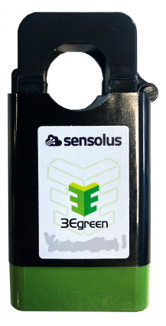
# SENSE CUR 4600

> SENSE CUR 4600 BLE current sensor

export const HeaderBadge = ({type, checkDms = false}) => {
  function addGroupBadge(h1Id) {
    const h1Element = document.getElementById(h1Id);
    if (!h1Element) {
      console.error(`Element with ID "${h1Id}" not found`);
      return;
    }
    if (h1Element.querySelector('.header-badge')) {
      console.warn('Header badge already exists on this element');
      return;
    }
    const badge = document.createElement('span');
    badge.className = 'header-badge';
    var badgeText;
    var badgeColor;
    switch (type) {
      case 'public':
        badgeText = 'Public';
        badgeColor = '#858585ff';
        break;
      case 'end-user':
        badgeText = 'End-User';
        badgeColor = '#0071a1';
        break;
      case 'multi-org':
        badgeText = 'Multi-Org';
        badgeColor = '#0071a1';
        break;
      case 'partner':
        badgeText = 'Partner';
        badgeColor = '#0071a1';
        break;
      case 'partner-pricing-eu':
        badgeText = 'Partner-EU';
        badgeColor = '#0071a1';
        break;
      case 'partner-pricing-us':
        badgeText = 'Partner-US';
        badgeColor = '#0071a1';
        break;
      case 'partner-pricing-world':
        badgeText = 'Partner-World';
        badgeColor = '#0071a1';
        break;
      case 'sensolus-internal':
        badgeText = 'Sensolus only';
        badgeColor = '#ffa858';
        break;
      default:
        badgeText = type;
        badgeColor = '#ffa858';
    }
    badge.textContent = badgeText;
    badge.style.cssText = `
        background-color: ${badgeColor};
        color: white;
        padding: 0.3em 0.8em 0.3em 0.8em;
        border-radius: 6px;
        font-size: 0.4em;
        margin-left: 20px;
        vertical-align: middle;
    `;
    h1Element.appendChild(badge);
  }
  function checkDocumentationServerAccess(type) {
    fetch('https://cloud.sensolus.com/documentation/user', {
      method: 'GET',
      headers: {
        'Accept': 'application/json'
      },
      credentials: 'include'
    }).then(response => {
      if (!response.ok) {
        console.error('Could not fetch documentation server user:', response);
      }
      return response.json();
    }).then(user => {
      const compatibleGroups = {
        "NORMAL": ["end-user", "public"],
        "PUBLIC": ["public"],
        "PARTNER": ["partner", "public", "end-user", "multi-org"],
        "MULTI_ORG": ["multi-org", "public", "end-user"],
        "SYSTEM": ["public", "end-user", "multi-org", "partner", "sensolus-internal"]
      };
      const allowedGroups = compatibleGroups[user.orgType] || [];
      const compatiblePriceListGroups = {
        "EU": ["partner-pricing-eu"],
        "US": ["partner-pricing-us"],
        "WORLD": ["partner-pricing-eu", "partner-pricing-us", "partner-pricing-world"]
      };
      allowedGroups.push(...compatiblePriceListGroups[user.orgType === "SYSTEM" ? "WORLD" : user.priceList] || []);
      if (!allowedGroups.includes(type)) {
        if (user.orgType === 'PUBLIC') {
          window.location.href = '/login?redirect=' + encodeURIComponent(window.location.pathname);
        } else {
          window.location.href = '/logout';
        }
      }
      addGroupBadge("page-title");
    }).catch(error => {
      console.error('Could not fetch documentation server user:', error);
      addGroupBadge("page-title");
    });
  }
  useEffect(() => {
    console.info("adding badge");
    addGroupBadge("page-title");
  });
  useEffect(() => {
    console.info("checking server access for type" + type);
    if (type && type !== 'public' && checkDms) {
      checkDocumentationServerAccess(type);
    }
  }, [type]);
  return <></>;
};

<HeaderBadge type={'public'} checkDms={false} />

<Frame>
  <img src="https://mintcdn.com/sensolus/WsfN3QaDXu9zn8t8/docs/spec_sheets/sensors/images/SENSE-CUR-4600.png?fit=max&auto=format&n=WsfN3QaDXu9zn8t8&q=85&s=8c1a9511ebaa22e1ca0e8355a85af1da" width="200" data-path="docs/spec_sheets/sensors/images/SENSE-CUR-4600.png" />
</Frame>

<AccordionGroup>
  <Accordion title="SENSE CUR 4600 (pdf)" icon="file">
    **Description**: <br />
    **Access level**: public<br />
    **Reference**: SDOC-498608282-1367<br />
    **Download**:  [PDF](https://cloud.sensolus.com/documentation/dms/SDOC-498608282-1367)

    <iframe src="https://cloud.sensolus.com/documentation/dms/SDOC-498608282-1367?viewer=true" style={{width: '100%', height: '881px', border: 'none', margin: 0, padding: 0}} />

    <div style={{display: "none"}} data-pdf-text="true">
      SENSE CUR 4600
      BLE DC Current Clamp Sensor
      [www.sensolus.com](http://www.sensolus.com) | [info@sensolus.com](mailto:info@sensolus.com)
      Clip-style DC current sensor with BLE connectivity for
      non-invasive current monitoring. Features
      configurable thresholds and user-replaceable battery.
      Ideal for battery-powered equipment and DC circuit
      monitoring.
      Bluetooth Low Energy
      Up to 5 years battery life
      Flame retardant
      71 × 36 × 36mm
      80g (2.8 oz)
      Current Measurement
      Measurement Range
      0.3A \~ 20A DC
      Resolution
      100mA DC
      Accuracy
      ±3% (5-20A DC)
      Maximum Voltage
      900V DC
      Current Type
      DC only (cannot measure AC)
      Sampling Interval
      Every 30 seconds
      Connectivity
      Technology
      Bluetooth Low Energy (BLE)
      Transmission Range
      Up to 35 meters (38 yards)
      Advertisement Period
      2 seconds at +0dBm
      Physical Characteristics
      Dimensions
      71 × 36 × 36mm
      Weight
      80 grams (2.8 oz)
      Material
      NYLON Flame Retardant (UL-94V0)
      Design
      Clip-style (no glue or screws required)

      SENSE CUR 4600
      BLE DC Current Clamp Sensor
      [www.sensolus.com](http://www.sensolus.com) | [info@sensolus.com](mailto:info@sensolus.com)
      Power
      Battery Type
      CR2477X 3V Lithium battery
      Battery Life
      Up to 5 years
      User Replaceable
      Yes
      Configuration
      Configurable Features
      •
      Forward current threshold
      •
      Backward current threshold
      •
      Configured via Sensolus mobile app
      Environment & Certifications
      Operating Temperature
      -20°C to +50°C
      IP Rating
      Not rated for outdoor use
      Certification
      CE (Europe)
    </div>
  </Accordion>

  <Accordion title="Installation manual for SENSE CUR 4600 (pdf)" icon="file">
    **Description**: <br />
    **Access level**: public<br />
    **Reference**: SDOC-498608282-1382<br />
    **Download**:  [PDF](https://cloud.sensolus.com/documentation/dms/SDOC-498608282-1382)

    <iframe src="https://cloud.sensolus.com/documentation/dms/SDOC-498608282-1382?viewer=true" style={{width: '100%', height: '881px', border: 'none', margin: 0, padding: 0}} />

    <div style={{display: "none"}} data-pdf-text="true">
      Installation manual for SENSE CUR 4600
      [www.sensolus.com](http://www.sensolus.com) | [info@sensolus.com](mailto:info@sensolus.com)
      February 2025
      Install the batteries
      Remove the green bottom lid of the clamp sensor.
      Place the battery with the - pole facing down.

      Installation manual for SENSE CUR 4600
      [www.sensolus.com](http://www.sensolus.com) | [info@sensolus.com](mailto:info@sensolus.com)
      February 2025
      Replace the green bottom lid.
      Install in the machine
      This sensor is for direct current (DC) measurements only.
      Open the machine, locate the battery and identify the plus and minus poles. Attach the sensor to one of the cables connected
      to the plus or the minus pole of the battery. Only one sensor is needed and it does not matter which cable you choose. Make
      sure the sensor is installed with the correct orientation:
      • Minus pole wire: The arrow on the sensor points towards the battery
      • Plus pole wire: The arrow on the sensor points away from the battery
      Link the sensor to the tracker
      Use the Sensolus mobile app to link the sensor to a tracker. Make sure you have the latest version of the app installed.
      Open the Sensolus smartphone app. Select the tracker from the asset list. Click Link sensor at the bottom of the page in the
      Advanced section.

      Installation manual for SENSE CUR 4600
      [www.sensolus.com](http://www.sensolus.com) | [info@sensolus.com](mailto:info@sensolus.com)
      February 2025
      Click the Pair sensor button.
      Scan the QR code on the sensor. The sensor slots will be automatically assigned.

      Installation manual for SENSE CUR 4600
      [www.sensolus.com](http://www.sensolus.com) | [info@sensolus.com](mailto:info@sensolus.com)
      February 2025
      Verify that the sensor is linked. Both charging and uncharging slots should be filled.

      Installation manual for SENSE CUR 4600
      [www.sensolus.com](http://www.sensolus.com) | [info@sensolus.com](mailto:info@sensolus.com)
      February 2025
      Adjust threshold values
      The threshold values can be adjusted for testing purposes using the Sensolus mobile app. Make sure you have the latest
      version of the app installed.
      Go to More → Sensor manager.
      Search for the device you want to edit and click on it to see the details.

      Installation manual for SENSE CUR 4600
      [www.sensolus.com](http://www.sensolus.com) | [info@sensolus.com](mailto:info@sensolus.com)
      February 2025
      Click the wheel icon to open the configuration settings. Enter the forward and backward current threshold values, then click
      the save icon to store the settings.
      To determine appropriate threshold values, consult the Sensolus documentation centre.

      Installation manual for SENSE CUR 4600
      [www.sensolus.com](http://www.sensolus.com) | [info@sensolus.com](mailto:info@sensolus.com)
      February 2025
      Important limitations
      Keep the following limitations in mind when using the SENSE CUR 4600:
      Limitation
      Details
      Measurement interval
      The measurement interval is 30 seconds, and time reporting
      resolution is in minutes. Short current flows cannot be accurately
      counted.
      No live measurements
      Live current measurements are not available in the platform.
      No graphing
      Current vs time graphs are not available in the platform.
      DC only
      The sensor cannot measure alternating current (AC) or voltages.
      Indoor use only
      The sensor is not IP rated and cannot be used outdoors.
      Fragile components
      The clamps contain fragile ferrite cores. Do not drop or hit the
      sensor.
      Single wire only
      Do not put both the + and - wire into the clamp at the same time.
      The positive and negative magnetic fields will cancel each other out,
      resulting in no measurement.
    </div>
  </Accordion>
</AccordionGroup>
