> ## Documentation Index
> Fetch the complete documentation index at: https://doc.sensolus.com/llms.txt
> Use this file to discover all available pages before exploring further.

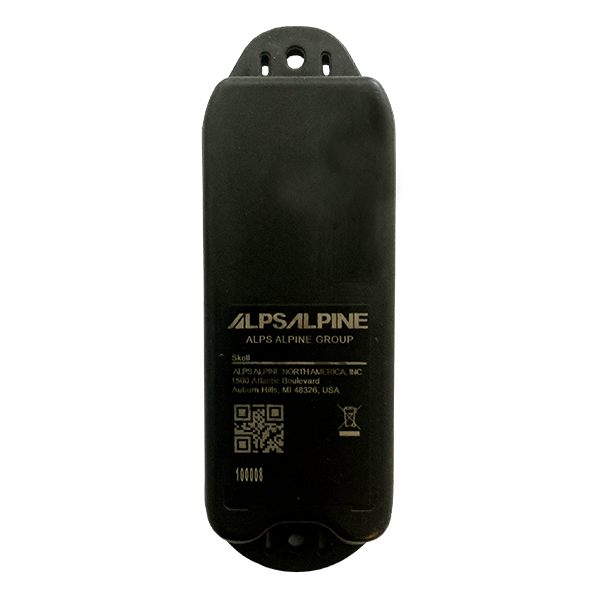
# SENSE FL 4300

> SENSE FL 4300 BLE fill-level radar sensor

export const HeaderBadge = ({type, checkDms = false}) => {
  function addGroupBadge(h1Id) {
    const h1Element = document.getElementById(h1Id);
    if (!h1Element) {
      console.error(`Element with ID "${h1Id}" not found`);
      return;
    }
    if (h1Element.querySelector('.header-badge')) {
      console.warn('Header badge already exists on this element');
      return;
    }
    const badge = document.createElement('span');
    badge.className = 'header-badge';
    var badgeText;
    var badgeColor;
    switch (type) {
      case 'public':
        badgeText = 'Public';
        badgeColor = '#858585ff';
        break;
      case 'end-user':
        badgeText = 'End-User';
        badgeColor = '#0071a1';
        break;
      case 'multi-org':
        badgeText = 'Multi-Org';
        badgeColor = '#0071a1';
        break;
      case 'partner':
        badgeText = 'Partner';
        badgeColor = '#0071a1';
        break;
      case 'partner-pricing-eu':
        badgeText = 'Partner-EU';
        badgeColor = '#0071a1';
        break;
      case 'partner-pricing-us':
        badgeText = 'Partner-US';
        badgeColor = '#0071a1';
        break;
      case 'partner-pricing-world':
        badgeText = 'Partner-World';
        badgeColor = '#0071a1';
        break;
      case 'sensolus-internal':
        badgeText = 'Sensolus only';
        badgeColor = '#ffa858';
        break;
      default:
        badgeText = type;
        badgeColor = '#ffa858';
    }
    badge.textContent = badgeText;
    badge.style.cssText = `
        background-color: ${badgeColor};
        color: white;
        padding: 0.3em 0.8em 0.3em 0.8em;
        border-radius: 6px;
        font-size: 0.4em;
        margin-left: 20px;
        vertical-align: middle;
    `;
    h1Element.appendChild(badge);
  }
  function checkDocumentationServerAccess(type) {
    fetch('https://cloud.sensolus.com/documentation/user', {
      method: 'GET',
      headers: {
        'Accept': 'application/json'
      },
      credentials: 'include'
    }).then(response => {
      if (!response.ok) {
        console.error('Could not fetch documentation server user:', response);
      }
      return response.json();
    }).then(user => {
      const compatibleGroups = {
        "NORMAL": ["end-user", "public"],
        "PUBLIC": ["public"],
        "PARTNER": ["partner", "public", "end-user", "multi-org"],
        "MULTI_ORG": ["multi-org", "public", "end-user"],
        "SYSTEM": ["public", "end-user", "multi-org", "partner", "sensolus-internal"]
      };
      const allowedGroups = compatibleGroups[user.orgType] || [];
      const compatiblePriceListGroups = {
        "EU": ["partner-pricing-eu"],
        "US": ["partner-pricing-us"],
        "WORLD": ["partner-pricing-eu", "partner-pricing-us", "partner-pricing-world"]
      };
      allowedGroups.push(...compatiblePriceListGroups[user.orgType === "SYSTEM" ? "WORLD" : user.priceList] || []);
      if (!allowedGroups.includes(type)) {
        if (user.orgType === 'PUBLIC') {
          window.location.href = '/login?redirect=' + encodeURIComponent(window.location.pathname);
        } else {
          window.location.href = '/logout';
        }
      }
      addGroupBadge("page-title");
    }).catch(error => {
      console.error('Could not fetch documentation server user:', error);
      addGroupBadge("page-title");
    });
  }
  useEffect(() => {
    console.info("adding badge");
    addGroupBadge("page-title");
  });
  useEffect(() => {
    console.info("checking server access for type" + type);
    if (type && type !== 'public' && checkDms) {
      checkDocumentationServerAccess(type);
    }
  }, [type]);
  return <></>;
};

<HeaderBadge type={'public'} checkDms={false} />

<Frame>
  <img src="https://mintcdn.com/sensolus/WsfN3QaDXu9zn8t8/docs/spec_sheets/sensors/images/SENSE-FL-4300.png?fit=max&auto=format&n=WsfN3QaDXu9zn8t8&q=85&s=bb472002952e598c25c984ddaed06f18" width="200" data-path="docs/spec_sheets/sensors/images/SENSE-FL-4300.png" />
</Frame>

<AccordionGroup>
  <Accordion title="SENSE FL 4300 (pdf)" icon="file">
    **Description**: <br />
    **Access level**: public<br />
    **Reference**: SDOC-498608282-1368<br />
    **Download**:  [PDF](https://cloud.sensolus.com/documentation/dms/SDOC-498608282-1368)

    <iframe src="https://cloud.sensolus.com/documentation/dms/SDOC-498608282-1368?viewer=true" style={{width: '100%', height: '881px', border: 'none', margin: 0, padding: 0}} />

    <div style={{display: "none"}} data-pdf-text="true">
      SENSE FL 4300
      BLE Fill-Level Radar Sensor
      [www.sensolus.com](http://www.sensolus.com) | [info@sensolus.com](mailto:info@sensolus.com)
      Radar-based distance sensor with BLE connectivity for
      fill-level measurement and loaded/unloaded state
      detection. Features configurable measurement
      intervals, integrated temperature sensor, and optional
      lid detection. Highly configurable for different material
      types.
      Bluetooth Low Energy 5
      5 year battery life
      IP67 rated
      Ø 133 × 45 × 21mm
      90g (3.2 oz)
      Sensing & Detection
      Technology
      Radar-based distance sensor
      Detection Range
      20cm to 7m
      Capabilities
      •
      Fill level measurement
      •
      Loaded/unloaded state detection
      •
      Optional lid open/close detection
      Measurement Interval
      Configurable (default 60 minutes)
      Material Detection
      Highly configurable for different material types
      Temperature Sensor
      Range
      -20°C to 65°C
      Accuracy
      ±1.5°C
      Connectivity
      Technology
      Bluetooth Low Energy 5 (BLE 5)
      Advertisement Frequency
      Every 3 seconds
      TX Power
      Configurable up to +8dBm

      SENSE FL 4300
      BLE Fill-Level Radar Sensor
      [www.sensolus.com](http://www.sensolus.com) | [info@sensolus.com](mailto:info@sensolus.com)
      Physical Characteristics
      Dimensions
      Ø 133 × 45 × 21mm
      Weight
      90 grams (3.2 oz)
      Casing Material
      PBT/PC UV Stable
      Mounting Holes Distance
      111.5mm
      Mounting Hole Diameter
      4mm
      IP Rating
      IP67
      Operating Temperature
      -20°C to +85°C
      Power
      Battery Type
      TITUS ER14335 Primary Lithium Thionyl chloride (SOCl₂)
      Battery Size
      ⅔ AA-size, 3.6V, 1.65Ah
      Battery Life
      5 years with default settings
      User Replaceable
      Non-replaceable
      Configuration
      Configurable Features
      •
      Measurement interval
      •
      TX power
      •
      Material type detection parameters
      •
      Lid open/close detection
      •
      Measurement pause on lid open
      Management Profiles
      Available upon request
    </div>
  </Accordion>

  <Accordion title="Installation manual for SENSE FL 4300 (pdf)" icon="file">
    **Description**: <br />
    **Access level**: public<br />
    **Reference**: SDOC-498608282-1383<br />
    **Download**:  [PDF](https://cloud.sensolus.com/documentation/dms/SDOC-498608282-1383)

    <iframe src="https://cloud.sensolus.com/documentation/dms/SDOC-498608282-1383?viewer=true" style={{width: '100%', height: '881px', border: 'none', margin: 0, padding: 0}} />

    <div style={{display: "none"}} data-pdf-text="true">
      Installation manual for SENSE FL 4300
      [www.sensolus.com](http://www.sensolus.com) | [info@sensolus.com](mailto:info@sensolus.com)
      February 2025
      The SENSE FL 4300 has two modes: fill level and load detection. This manual covers installation advice for both modes.
      Mounting the sensor
      All mounting options for your sensor can be found in the Sensolus product mounting instructions.
      Load detection
      Horizontal mounting
      When mounting the sensor horizontally for load detection:
      • Install the sensor in the middle of the load
      • Install in the middle of the cavity
      • Install the sensor so it has a 90° angle with the object it has to detect
      Do not install too close to the side and do not install at an angle. The radio signals can be obstructed and cause false sensor
      values.

      Installation manual for SENSE FL 4300
      [www.sensolus.com](http://www.sensolus.com) | [info@sensolus.com](mailto:info@sensolus.com)
      February 2025
      Make sure there is a minimum distance of 10 cm between the top of the sensor and the load.
      Vertical mounting
      When mounting the sensor vertically for load detection, install with the arrow on the back of the sensor facing up.

      Installation manual for SENSE FL 4300
      [www.sensolus.com](http://www.sensolus.com) | [info@sensolus.com](mailto:info@sensolus.com)
      February 2025
      Fill level
      Mounting inside an asset
      When mounting inside a container for fill level detection:

      Installation manual for SENSE FL 4300
      [www.sensolus.com](http://www.sensolus.com) | [info@sensolus.com](mailto:info@sensolus.com)
      February 2025
      • Install the sensor in the middle of the container
      • Install the sensor so it has a 90° angle with the surface it has to detect
      Do not install too close to the side and do not install at an angle. The radio signals can be obstructed and cause false sensor
      values.
      Make sure there is a minimum distance of 10 cm between the top of the sensor and the load.
      Mounting outside an asset
      When mounting outside a container for fill level detection:

      Installation manual for SENSE FL 4300
      [www.sensolus.com](http://www.sensolus.com) | [info@sensolus.com](mailto:info@sensolus.com)
      February 2025
      • Install the sensor in the middle of the container
      • Install the sensor so it has a 90° angle with the surface it has to detect
      Do not install too close to the side and do not install at an angle. The radio signals can be obstructed and cause false sensor
      values.
      Make sure there is a minimum distance of 10 cm between the top of the sensor and the load.

      Installation manual for SENSE FL 4300
      [www.sensolus.com](http://www.sensolus.com) | [info@sensolus.com](mailto:info@sensolus.com)
      February 2025
      Configuration
      To configure the sensor profile using the Sensolus app:
      Go to Admin → Sensors Select the device you want to configure Tap on the settings icon to go to the configuration page Tap
      the three dots in the top right to open the configuration actions menu In the configuration actions menu tap Profile Select the
      profile you want to apply to the sensor and tap the save icon on the top right
    </div>
  </Accordion>

  <Accordion title="3D-FILE SENSE FL 4300 (step)" icon="file">
    **Description**: 3D-file for SENSE FL 4300 in STEP format<br />
    **Access level**: end-user<br />
    **Reference**: SDOC-498608282-1221<br />
    **Download**:  [STEP](https://cloud.sensolus.com/documentation/dms/SDOC-498608282-1221)
  </Accordion>
</AccordionGroup>
