> ## Documentation Index
> Fetch the complete documentation index at: https://doc.sensolus.com/llms.txt
> Use this file to discover all available pages before exploring further.

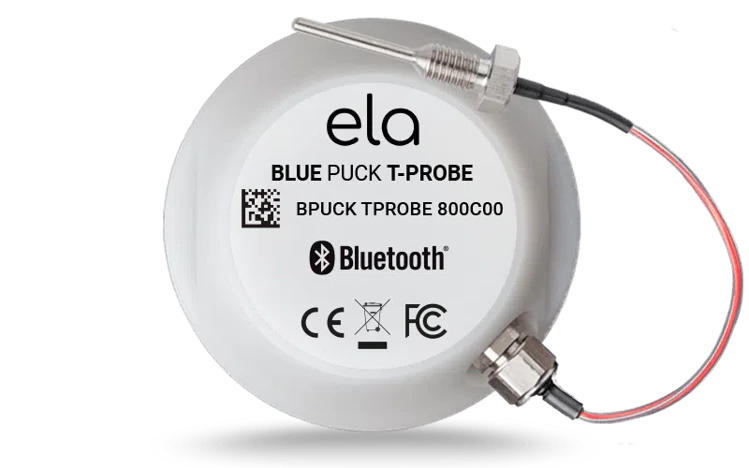
# SENSE T 4004

> SENSE T 4004 BLE temperature sensor

export const HeaderBadge = ({type, checkDms = false}) => {
  function addGroupBadge(h1Id) {
    const h1Element = document.getElementById(h1Id);
    if (!h1Element) {
      console.error(`Element with ID "${h1Id}" not found`);
      return;
    }
    if (h1Element.querySelector('.header-badge')) {
      console.warn('Header badge already exists on this element');
      return;
    }
    const badge = document.createElement('span');
    badge.className = 'header-badge';
    var badgeText;
    var badgeColor;
    switch (type) {
      case 'public':
        badgeText = 'Public';
        badgeColor = '#858585ff';
        break;
      case 'end-user':
        badgeText = 'End-User';
        badgeColor = '#0071a1';
        break;
      case 'multi-org':
        badgeText = 'Multi-Org';
        badgeColor = '#0071a1';
        break;
      case 'partner':
        badgeText = 'Partner';
        badgeColor = '#0071a1';
        break;
      case 'partner-pricing-eu':
        badgeText = 'Partner-EU';
        badgeColor = '#0071a1';
        break;
      case 'partner-pricing-us':
        badgeText = 'Partner-US';
        badgeColor = '#0071a1';
        break;
      case 'partner-pricing-world':
        badgeText = 'Partner-World';
        badgeColor = '#0071a1';
        break;
      case 'sensolus-internal':
        badgeText = 'Sensolus only';
        badgeColor = '#ffa858';
        break;
      default:
        badgeText = type;
        badgeColor = '#ffa858';
    }
    badge.textContent = badgeText;
    badge.style.cssText = `
        background-color: ${badgeColor};
        color: white;
        padding: 0.3em 0.8em 0.3em 0.8em;
        border-radius: 6px;
        font-size: 0.4em;
        margin-left: 20px;
        vertical-align: middle;
    `;
    h1Element.appendChild(badge);
  }
  function checkDocumentationServerAccess(type) {
    fetch('https://cloud.sensolus.com/documentation/user', {
      method: 'GET',
      headers: {
        'Accept': 'application/json'
      },
      credentials: 'include'
    }).then(response => {
      if (!response.ok) {
        console.error('Could not fetch documentation server user:', response);
      }
      return response.json();
    }).then(user => {
      const compatibleGroups = {
        "NORMAL": ["end-user", "public"],
        "PUBLIC": ["public"],
        "PARTNER": ["partner", "public", "end-user", "multi-org"],
        "MULTI_ORG": ["multi-org", "public", "end-user"],
        "SYSTEM": ["public", "end-user", "multi-org", "partner", "sensolus-internal"]
      };
      const allowedGroups = compatibleGroups[user.orgType] || [];
      const compatiblePriceListGroups = {
        "EU": ["partner-pricing-eu"],
        "US": ["partner-pricing-us"],
        "WORLD": ["partner-pricing-eu", "partner-pricing-us", "partner-pricing-world"]
      };
      allowedGroups.push(...compatiblePriceListGroups[user.orgType === "SYSTEM" ? "WORLD" : user.priceList] || []);
      if (!allowedGroups.includes(type)) {
        if (user.orgType === 'PUBLIC') {
          window.location.href = '/login?redirect=' + encodeURIComponent(window.location.pathname);
        } else {
          window.location.href = '/logout';
        }
      }
      addGroupBadge("page-title");
    }).catch(error => {
      console.error('Could not fetch documentation server user:', error);
      addGroupBadge("page-title");
    });
  }
  useEffect(() => {
    console.info("adding badge");
    addGroupBadge("page-title");
  });
  useEffect(() => {
    console.info("checking server access for type" + type);
    if (type && type !== 'public' && checkDms) {
      checkDocumentationServerAccess(type);
    }
  }, [type]);
  return <></>;
};

<HeaderBadge type={'public'} checkDms={false} />

<Frame>
  <img src="https://mintcdn.com/sensolus/WsfN3QaDXu9zn8t8/docs/spec_sheets/sensors/images/SENSE-T-4004.png?fit=max&auto=format&n=WsfN3QaDXu9zn8t8&q=85&s=6cd64054c2098c396f6652efb50ecd99" width="200" data-path="docs/spec_sheets/sensors/images/SENSE-T-4004.png" />
</Frame>

<AccordionGroup>
  <Accordion title="SENSE T 4004 (pdf)" icon="file">
    **Description**: <br />
    **Access level**: public<br />
    **Reference**: SDOC-498608282-1372<br />
    **Download**:  [PDF](https://cloud.sensolus.com/documentation/dms/SDOC-498608282-1372)

    <iframe src="https://cloud.sensolus.com/documentation/dms/SDOC-498608282-1372?viewer=true" style={{width: '100%', height: '881px', border: 'none', margin: 0, padding: 0}} />

    <div style={{display: "none"}} data-pdf-text="true">
      SENSE T 4004
      BLE Temperature Sensor with Probe
      [www.sensolus.com](http://www.sensolus.com) | [info@sensolus.com](mailto:info@sensolus.com)
      Compact BLE temperature sensor with external
      PT1000 probe for precise temperature monitoring
      across an extended range. Ideal for applications
      requiring remote temperature measurement with
      food-grade materials and extended battery life.
      Bluetooth Low Energy
      Up to 7 years battery life
      IP68 probe / IP65 housing
      Ø 57mm × 20mm (2¼ in × ²⁵⁄₃₂ in)
      63g (2.2 oz)
      Temperature Monitoring
      Probe Range
      -80°C to +200°C
      Accuracy
      •
      ±0.5°C typical (-30°C to +60°C)
      •
      ±2°C typical (-80°C to +200°C)
      Resolution
      0.1°C
      Housing Operating Temperature
      -40°C to +85°C
      Probe Specifications
      Sensor Type
      PT1000
      Connection
      M8 x 1.0
      Dimensions
      Ø 3mm × 28mm
      Cable Length
      1 meter
      Material
      •
      Stainless steel probe
      •
      Teflon cable insulation
      IP Rating
      IP68
      Connectivity
      Technology
      Bluetooth Low Energy (BLE)
      Transmission Range
      Up to 60 meters (65 yards)
      Advertisement Period
      2 seconds at +4dBm
      Physical Characteristics
      Housing Dimensions
      Ø 57mm × 20mm (2¼ in × ²⁵⁄₃₂ in)
      Weight
      63 grams (2.2 oz)
      Casing Material
      DELRIN (POM C) - Food Grade
      Housing IP Rating
      IP65

      SENSE T 4004
      BLE Temperature Sensor with Probe
      [www.sensolus.com](http://www.sensolus.com) | [info@sensolus.com](mailto:info@sensolus.com)
      Power
      Battery Type
      Non-replaceable internal lithium battery (3 VDC)
      Battery Life
      Up to 7 years (depending on transmission power)
      Certifications
      Europe
      •
      EN 300 328
      •
      EN 301 489
      •
      EN 55032
      •
      EN 62368-1
      •
      EN 12830
      •
      CE marked
      USA
      FCC certified
      Canada
      ISED certified
      UK
      UKCA certified
      Environmental
      RoHS compliant
    </div>
  </Accordion>

  <Accordion title="Installation manual for SENSE T 4004 (pdf)" icon="file">
    **Description**: <br />
    **Access level**: public<br />
    **Reference**: SDOC-498608282-1386<br />
    **Download**:  [PDF](https://cloud.sensolus.com/documentation/dms/SDOC-498608282-1386)

    <iframe src="https://cloud.sensolus.com/documentation/dms/SDOC-498608282-1386?viewer=true" style={{width: '100%', height: '881px', border: 'none', margin: 0, padding: 0}} />

    <div style={{display: "none"}} data-pdf-text="true">
      Installation manual for SENSE T 4004
      [www.sensolus.com](http://www.sensolus.com) | [info@sensolus.com](mailto:info@sensolus.com)
      February 2025
      Mounting the sensor
      All mounting options for your sensor can be found in the Sensolus product mounting instructions.
      Mounting the probe
      This is a lab product. The optimal mounting instruction for the probe is still being investigated. At this moment there are no
      standardized instructions to mount the probe since this is use case specific.
      Testing the sensor before actual usage is required.
      Mounting advice for liquid containers
      You will need quality thermal paste to mount the probe onto the liquid container.

      Installation manual for SENSE T 4004
      [www.sensolus.com](http://www.sensolus.com) | [info@sensolus.com](mailto:info@sensolus.com)
      February 2025
      Step
      Action
      Details
      Locate the thermal stud
      Find the stud on the liquids container
      There is a stud with external thread on the
      liquids container. Loosen the nut. The
      thermal probe of the SENSE T 4004 should
      be attached onto the stud.
      Mount the probe
      Apply thermal paste and attach
      Apply enough thermal paste onto the sensor
      probe and attach to the stud. Screw the nut
      back onto the stud. Make sure everything is
      fastened tightly together.
      Mount the sensor
      Position the sensor correctly
      Mount the sensor in the tank shell, with the
      probe behind the insulation and the sensor
      as close as possible to the external cover to
      ensure BLE connection to a tracker. Fit outer
      insulation, making sure the pocket is well
      insulated. Do not use too much insulation.
      Close up everything.
      Locate the thermal stud

      Installation manual for SENSE T 4004
      [www.sensolus.com](http://www.sensolus.com) | [info@sensolus.com](mailto:info@sensolus.com)
      February 2025
      Mount the probe with thermal paste
      Mount the sensor
    </div>
  </Accordion>
</AccordionGroup>
