> ## Documentation Index
> Fetch the complete documentation index at: https://doc.sensolus.com/llms.txt
> Use this file to discover all available pages before exploring further.

# TAG 2002

> TAG 2002

export const HeaderBadge = ({type, checkDms = false}) => {
  function addGroupBadge(h1Id) {
    const h1Element = document.getElementById(h1Id);
    if (!h1Element) {
      console.error(`Element with ID "${h1Id}" not found`);
      return;
    }
    if (h1Element.querySelector('.header-badge')) {
      console.warn('Header badge already exists on this element');
      return;
    }
    const badge = document.createElement('span');
    badge.className = 'header-badge';
    var badgeText;
    var badgeColor;
    switch (type) {
      case 'public':
        badgeText = 'Public';
        badgeColor = '#858585ff';
        break;
      case 'end-user':
        badgeText = 'End-User';
        badgeColor = '#0071a1';
        break;
      case 'multi-org':
        badgeText = 'Multi-Org';
        badgeColor = '#0071a1';
        break;
      case 'partner':
        badgeText = 'Partner';
        badgeColor = '#0071a1';
        break;
      case 'partner-pricing-eu':
        badgeText = 'Partner-EU';
        badgeColor = '#0071a1';
        break;
      case 'partner-pricing-us':
        badgeText = 'Partner-US';
        badgeColor = '#0071a1';
        break;
      case 'partner-pricing-world':
        badgeText = 'Partner-World';
        badgeColor = '#0071a1';
        break;
      case 'sensolus-internal':
        badgeText = 'Sensolus only';
        badgeColor = '#ffa858';
        break;
      default:
        badgeText = type;
        badgeColor = '#ffa858';
    }
    badge.textContent = badgeText;
    badge.style.cssText = `
        background-color: ${badgeColor};
        color: white;
        padding: 0.3em 0.8em 0.3em 0.8em;
        border-radius: 6px;
        font-size: 0.4em;
        margin-left: 20px;
        vertical-align: middle;
    `;
    h1Element.appendChild(badge);
  }
  function checkDocumentationServerAccess(type) {
    fetch('https://cloud.sensolus.com/documentation/user', {
      method: 'GET',
      headers: {
        'Accept': 'application/json'
      },
      credentials: 'include'
    }).then(response => {
      if (!response.ok) {
        console.error('Could not fetch documentation server user:', response);
      }
      return response.json();
    }).then(user => {
      const compatibleGroups = {
        "NORMAL": ["end-user", "public"],
        "PUBLIC": ["public"],
        "PARTNER": ["partner", "public", "end-user", "multi-org"],
        "MULTI_ORG": ["multi-org", "public", "end-user"],
        "SYSTEM": ["public", "end-user", "multi-org", "partner", "sensolus-internal"]
      };
      const allowedGroups = compatibleGroups[user.orgType] || [];
      const compatiblePriceListGroups = {
        "EU": ["partner-pricing-eu"],
        "US": ["partner-pricing-us"],
        "WORLD": ["partner-pricing-eu", "partner-pricing-us", "partner-pricing-world"]
      };
      allowedGroups.push(...compatiblePriceListGroups[user.orgType === "SYSTEM" ? "WORLD" : user.priceList] || []);
      if (!allowedGroups.includes(type)) {
        if (user.orgType === 'PUBLIC') {
          window.location.href = '/login?redirect=' + encodeURIComponent(window.location.pathname);
        } else {
          window.location.href = '/logout';
        }
      }
      addGroupBadge("page-title");
    }).catch(error => {
      console.error('Could not fetch documentation server user:', error);
      addGroupBadge("page-title");
    });
  }
  useEffect(() => {
    console.info("adding badge");
    addGroupBadge("page-title");
  });
  useEffect(() => {
    console.info("checking server access for type" + type);
    if (type && type !== 'public' && checkDms) {
      checkDocumentationServerAccess(type);
    }
  }, [type]);
  return <></>;
};

<HeaderBadge type={'public'} checkDms={false} />

<Frame>
  <img src="https://mintcdn.com/sensolus/g6Vof8Tz-uQUuC4v/docs/spec_sheets/trackers/images/TAG-2002.png?fit=max&auto=format&n=g6Vof8Tz-uQUuC4v&q=85&s=5a627657f6ead704cd93ccd400b56bc7" width="200" data-path="docs/spec_sheets/trackers/images/TAG-2002.png" />
</Frame>

<AccordionGroup>
  <Accordion title="TAG 2002 installation and activation manual EN (pdf)" icon="file">
    **Description**: <br />
    **Access level**: public<br />
    **Reference**: SDOC-498608282-90<br />
    **Download**:  [PDF](https://cloud.sensolus.com/documentation/dms/SDOC-498608282-90)

    <iframe src="https://cloud.sensolus.com/documentation/dms/SDOC-498608282-90?viewer=true" style={{width: '100%', height: '881px', border: 'none', margin: 0, padding: 0}} />

    <div style={{display: "none"}} data-pdf-text="true">
      [www.sensolus.com](http://www.sensolus.com) | [info@sensolus.com](mailto:info@sensolus.com)
      Tap on the edit icon
      (    ).
      You can now edit the
      name, tags and picture
      of the tag.
      Save the setting by
      tapping the save icon
      (    ).
      Activation and installation manual for TAG 2002
      Activation of the TAG 2002
      Download and install the Sensolus app from the Apple or Android store. Log
      in to the app with your Sensolus credentials.
      Adjust the settings of the Bluetooth tag tracker
      Click on the search bar.
      Click on the barcode
      icon next to the search
      bar. The camera of your
      phone will open.
      Scan the Barcode
      printed on the front of
      the BLE tracker.
      Click on your tracker
      that will appear in
      your screen to go to
      settings.

      [www.sensolus.com](http://www.sensolus.com) | [info@sensolus.com](mailto:info@sensolus.com)
      Installing with double sided tape
      Cleaning the surfaces
      Clean the area on the asset where you
      want to add the tag and also the back
      side of the tag to get rid of any grease/
      oil.
      Sand both surfaces lightly for a few
      seconds to increase surface area.
      Clean it again to remove the dust.
      Installing the Tag 2002
      Add the double sided adhesive tape to
      the tag.
      Push the tracker into place and push on
      the tracker\&#39;s top to ensure it is mounted
      properly.
    </div>
  </Accordion>

  <Accordion title="TAG 2002 (pdf)" icon="file">
    **Description**: <br />
    **Access level**: public<br />
    **Reference**: SDOC-498608282-1408<br />
    **Download**:  [PDF](https://cloud.sensolus.com/documentation/dms/SDOC-498608282-1408)

    <iframe src="https://cloud.sensolus.com/documentation/dms/SDOC-498608282-1408?viewer=true" style={{width: '100%', height: '881px', border: 'none', margin: 0, padding: 0}} />

    <div style={{display: "none"}} data-pdf-text="true">
      TAG 2002
      BLE Location Tag Tracker
      [www.sensolus.com](http://www.sensolus.com) | [info@sensolus.com](mailto:info@sensolus.com)
      Rugged location tag tracker built for reliable, long-term
      asset tracking in harsh environments. Using Bluetooth
      Low Energy (BLE) technology, it enables the
      localization of assets when in range of Sensolus
      devices with smart BLE gateway capabilities.
      BLE iBeacon advertising
      Up to 10 years battery life
      IP69K rated
      Ø 57mm × 20mm
      41g
      Connectivity
      Technology
      Bluetooth Low Energy (BLE) iBeacon
      Transmission Range
      50 meters or more at +4dBm emission power. Actual
      detection range is strongly influenced by physical
      environment.
      Mechanics & Design
      Dimensions
      Ø 57mm base, 20mm thickness
      Weight
      41 grams
      Color
      White
      Casing Material
      DELRIN (POM C) - Compatible with food products
      (90/128/EEC)
      Water & Dust Resistance
      IP69K
      Operating Temperature
      -40°C to +85°C
      Power
      Battery Type
      Non-replaceable internal lithium battery (3 VDC)
      Battery Life
      Up to 10 years. Actual battery life may be reduced by extreme
      temperatures.
      Certifications
      Europe
      CE: EN 300 328 / EN 301 489 & EN 55032 / EN 62368-1
      USA
      FCC: 15.247 / FCC PT 15B
      Canada
      ISED: RSS-247 / ICES-003
      Environmental
      RoHS compliant
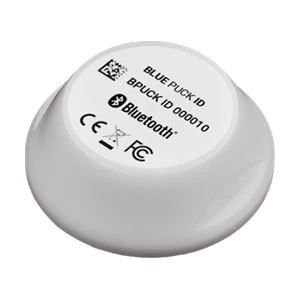
    </div>
  </Accordion>
</AccordionGroup>

For installation instructions, see [Installation instructions](/docs/spec_sheets/installation_instructions).
