> ## Documentation Index
> Fetch the complete documentation index at: https://doc.sensolus.com/llms.txt
> Use this file to discover all available pages before exploring further.

# TAG 2006

> TAG 2006

export const HeaderBadge = ({type, checkDms = false}) => {
  function addGroupBadge(h1Id) {
    const h1Element = document.getElementById(h1Id);
    if (!h1Element) {
      console.error(`Element with ID "${h1Id}" not found`);
      return;
    }
    if (h1Element.querySelector('.header-badge')) {
      console.warn('Header badge already exists on this element');
      return;
    }
    const badge = document.createElement('span');
    badge.className = 'header-badge';
    var badgeText;
    var badgeColor;
    switch (type) {
      case 'public':
        badgeText = 'Public';
        badgeColor = '#858585ff';
        break;
      case 'end-user':
        badgeText = 'End-User';
        badgeColor = '#0071a1';
        break;
      case 'multi-org':
        badgeText = 'Multi-Org';
        badgeColor = '#0071a1';
        break;
      case 'partner':
        badgeText = 'Partner';
        badgeColor = '#0071a1';
        break;
      case 'partner-pricing-eu':
        badgeText = 'Partner-EU';
        badgeColor = '#0071a1';
        break;
      case 'partner-pricing-us':
        badgeText = 'Partner-US';
        badgeColor = '#0071a1';
        break;
      case 'partner-pricing-world':
        badgeText = 'Partner-World';
        badgeColor = '#0071a1';
        break;
      case 'sensolus-internal':
        badgeText = 'Sensolus only';
        badgeColor = '#ffa858';
        break;
      default:
        badgeText = type;
        badgeColor = '#ffa858';
    }
    badge.textContent = badgeText;
    badge.style.cssText = `
        background-color: ${badgeColor};
        color: white;
        padding: 0.3em 0.8em 0.3em 0.8em;
        border-radius: 6px;
        font-size: 0.4em;
        margin-left: 20px;
        vertical-align: middle;
    `;
    h1Element.appendChild(badge);
  }
  function checkDocumentationServerAccess(type) {
    fetch('https://cloud.sensolus.com/documentation/user', {
      method: 'GET',
      headers: {
        'Accept': 'application/json'
      },
      credentials: 'include'
    }).then(response => {
      if (!response.ok) {
        console.error('Could not fetch documentation server user:', response);
      }
      return response.json();
    }).then(user => {
      const compatibleGroups = {
        "NORMAL": ["end-user", "public"],
        "PUBLIC": ["public"],
        "PARTNER": ["partner", "public", "end-user", "multi-org"],
        "MULTI_ORG": ["multi-org", "public", "end-user"],
        "SYSTEM": ["public", "end-user", "multi-org", "partner", "sensolus-internal"]
      };
      const allowedGroups = compatibleGroups[user.orgType] || [];
      const compatiblePriceListGroups = {
        "EU": ["partner-pricing-eu"],
        "US": ["partner-pricing-us"],
        "WORLD": ["partner-pricing-eu", "partner-pricing-us", "partner-pricing-world"]
      };
      allowedGroups.push(...compatiblePriceListGroups[user.orgType === "SYSTEM" ? "WORLD" : user.priceList] || []);
      if (!allowedGroups.includes(type)) {
        if (user.orgType === 'PUBLIC') {
          window.location.href = '/login?redirect=' + encodeURIComponent(window.location.pathname);
        } else {
          window.location.href = '/logout';
        }
      }
      addGroupBadge("page-title");
    }).catch(error => {
      console.error('Could not fetch documentation server user:', error);
      addGroupBadge("page-title");
    });
  }
  useEffect(() => {
    console.info("adding badge");
    addGroupBadge("page-title");
  });
  useEffect(() => {
    console.info("checking server access for type" + type);
    if (type && type !== 'public' && checkDms) {
      checkDocumentationServerAccess(type);
    }
  }, [type]);
  return <></>;
};

<HeaderBadge type={'public'} checkDms={false} />

<Frame>
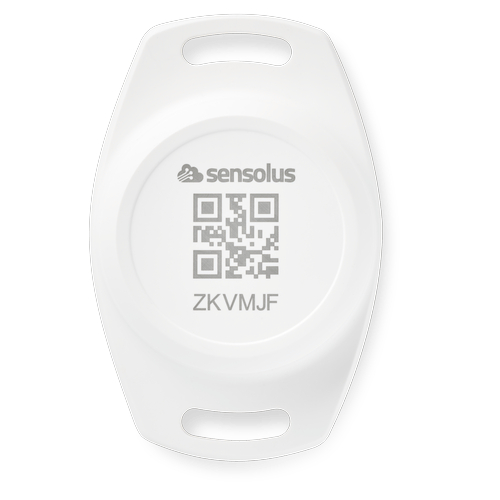
  <img src="https://mintcdn.com/sensolus/W-UskwQvZFv0YXIw/docs/spec_sheets/trackers/images/TAG-2006.png?fit=max&auto=format&n=W-UskwQvZFv0YXIw&q=85&s=99162f2eafa79a5cb005347a8189cf22" width="200" data-path="docs/spec_sheets/trackers/images/TAG-2006.png" />
</Frame>

<AccordionGroup>
  <Accordion title="TAG 2006 (pdf)" icon="file">
    **Description**: <br />
    **Access level**: public<br />
    **Reference**: SDOC-498608282-1409<br />
    **Download**:  [PDF](https://cloud.sensolus.com/documentation/dms/SDOC-498608282-1409)

    <iframe src="https://cloud.sensolus.com/documentation/dms/SDOC-498608282-1409?viewer=true" style={{width: '100%', height: '881px', border: 'none', margin: 0, padding: 0}} />

    <div style={{display: "none"}} data-pdf-text="true">
      TAG 2006
      BLE Location Tag Tracker
      [www.sensolus.com](http://www.sensolus.com) | [info@sensolus.com](mailto:info@sensolus.com)
      Rugged location tag tracker built for reliable, long-term
      asset tracking in harsh environments. Using Bluetooth
      Low Energy (BLE) technology, it enables the
      localization of assets when in range of Sensolus
      devices with smart BLE gateway capabilities.
      BLE iBeacon advertising
      Up to 10 years battery life
      IP67 rated
      70 × 46 × 21mm
      33.5g
      Connectivity
      Technology
      Bluetooth Low Energy (BLE) iBeacon
      Transmission Range
      50 meters or more at +4dBm emission power. Actual
      detection range is strongly influenced by physical
      environment.
      Mechanics & Design
      Dimensions
      70 × 46 × 21mm
      Weight
      33.5 grams
      Casing Material
      PC + ABS
      Water & Dust Resistance
      IP67
      Operating Temperature
      -20°C to +60°C
      Power
      Battery Type
      User replaceable lithium coin CR2477 battery
      Battery Life
      Up to 10 years. Actual battery life may be reduced by extreme
      temperatures.
      Mounting
      Tamper Protection
      The battery and internal board can only be reached when the
      device is unmounted, providing extra tamper protection.

      TAG 2006
      BLE Location Tag Tracker
      [www.sensolus.com](http://www.sensolus.com) | [info@sensolus.com](mailto:info@sensolus.com)
      Certifications
      Europe
      CE-RED, CE-LVD, CE-EMC, REACH
      USA
      FCC
      Environmental
      RoHS compliant
    </div>
  </Accordion>

  <Accordion title="Installation and activation manual TAG 2006 (pdf)" icon="file">
    **Description**: <br />
    **Access level**: public<br />
    **Reference**: SDOC-498608282-1389<br />
    **Download**:  [PDF](https://cloud.sensolus.com/documentation/dms/SDOC-498608282-1389)

    <iframe src="https://cloud.sensolus.com/documentation/dms/SDOC-498608282-1389?viewer=true" style={{width: '100%', height: '881px', border: 'none', margin: 0, padding: 0}} />

    <div style={{display: "none"}} data-pdf-text="true">
      Installation and activation manual TAG 2006
      [www.sensolus.com](http://www.sensolus.com) | [info@sensolus.com](mailto:info@sensolus.com)
      May 14, 2025
      Activation
      The TAG 2006 is already activated when you receive it. No activation steps are required.
      Mounting the TAG 2006
      Guidelines for mounting the tracker can be found in the Sensolus Documentation center.
      Mounting with screws, rivets, or bolts
      The TAG 2006 has mounting holes for affixing with rivets, screws, or bolts. The spacing between the mounting holes is 60mm.
      Important mounting warning
      Do not install the TAG 2006 close to magnets. Magnets can interfere with the tag\&#39;s operation.
      Battery replacement
      The battery is replaceable in case of defect. The TAG 2006 uses a CR 2477 battery.

      Installation and activation manual TAG 2006
      [www.sensolus.com](http://www.sensolus.com) | [info@sensolus.com](mailto:info@sensolus.com)
      May 14, 2025
      1
      Unmount the tag and
      put it face down.
      →
      2
      Unscrew the
      backplate by turning it
      counterclockwise.
      →
      3
      Replace the empty CR
      2477 battery with a
      new one.
      4
      Screw the backplate
      on again by turning it
      clockwise.
      Edit tag information with the mobile app
      The Sensolus mobile app allows you to edit the name, tags, and picture of a TAG 2006.
      Download the Sensolus mobile app from the App Store or Google Play.
      Open the Sensolus smartphone app and login with your credentials. Go to the tag you want to edit via the asset list, map, or
      search function. In the search function, use the QR code scanner to open the tag details page. Tap on the edit button. You can
      now edit the name, tags, and picture of the tag. Save the settings by tapping the save icon.
      Safety advice – device subjected to strong mechanical impact
      Risk of delayed battery failure and chemical hazard
      If a device has been hit, crushed, or struck by a heavy object (for example a forklift, container, pallet, or falling load), the
      internal components and battery may be damaged even if no external damage is visible. Such damage can result in delayed
      overheating, leakage, or failure.
      If a device has been subjected to a strong mechanical impact, the following mandatory safety actions must be taken:

      Installation and activation manual TAG 2006
      [www.sensolus.com](http://www.sensolus.com) | [info@sensolus.com](mailto:info@sensolus.com)
      May 14, 2025
      \#
      Action
      Details
      1
      Do not touch the device
      Do not move, lift, open, shake, or inspect the
      device immediately after the impact. Internal
      damage may cause delayed reactions.
      2
      Keep a minimum safety distance
      Maintain a clear distance of at least 5 meters
      from the device. Keep all personnel away
      during this period.
      3
      Wait at least 10 minutes
      The device must remain untouched and
      undisturbed for a minimum of 10 minutes
      following the impact. This waiting time
      allows potential delayed thermal or chemical
      reactions to become evident.
      4
      Observe from a safe distance
      Watch for warning signs: smoke, vapor, or
      unusual odor; heat generation; fluid leakage;
      hissing, cracking, or popping noises.
      5
      After the waiting period
      If any abnormal condition is observed,
      isolate the area immediately and notify
      responsible safety or supervisory personnel.
      The device must be quarantined and
      handled according to battery safety and
      disposal procedures. The device must not be
      used.
      A device may appear undamaged and still be unsafe. Normal operation after impact does NOT mean the device is safe.
      Failure to follow this safety advice may result in serious injury, fire, or chemical exposure.
    </div>
  </Accordion>

  <Accordion title="3D-file TAG 2006 (step)" icon="file">
    **Description**: 3D-file for TAG 2006 STEP format<br />
    **Access level**: end-user<br />
    **Reference**: SDOC-498608282-1224<br />
    **Download**:  [STEP](https://cloud.sensolus.com/documentation/dms/SDOC-498608282-1224)
  </Accordion>
</AccordionGroup>
