

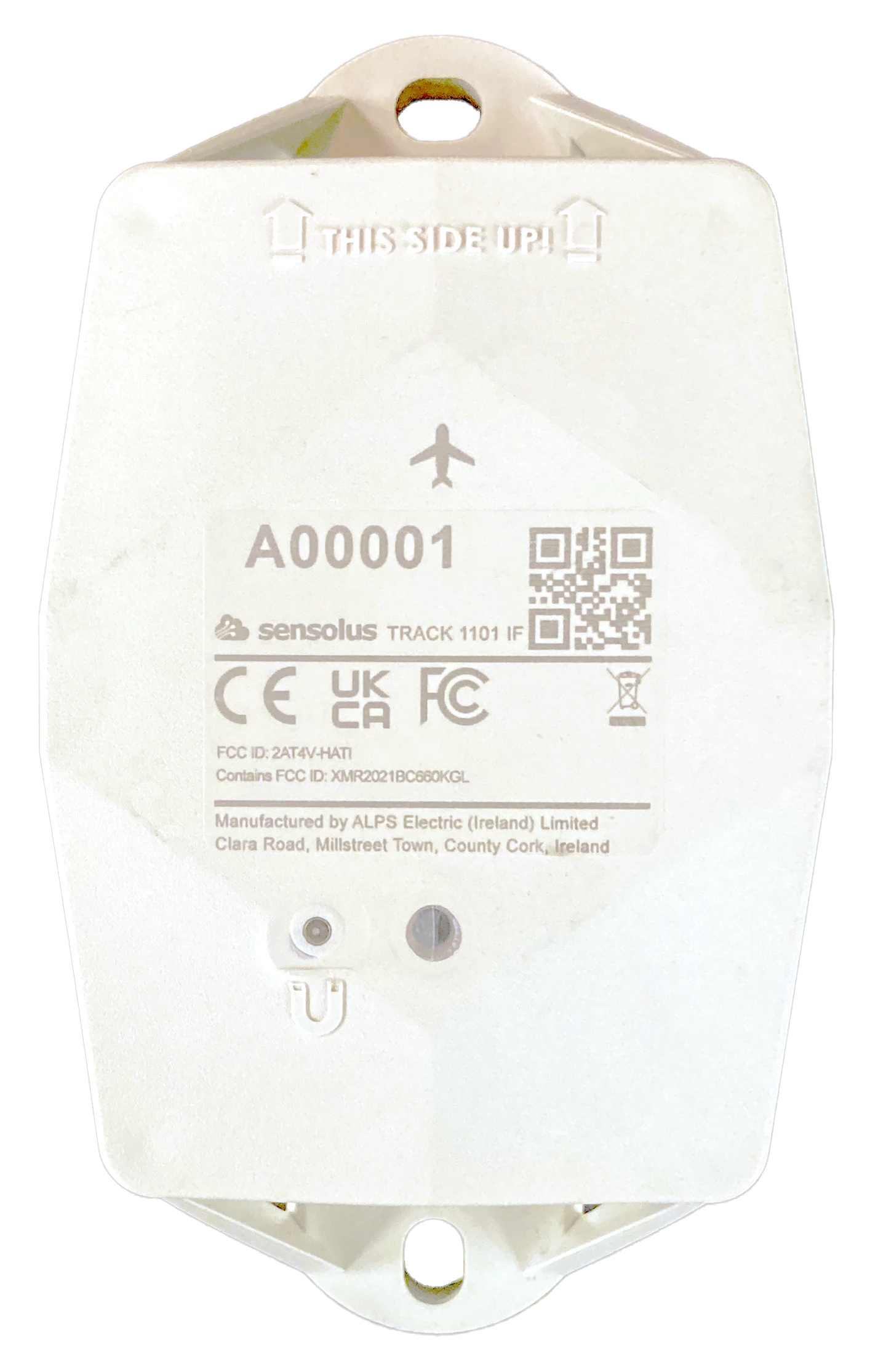
TRACK 1101 IF White (pdf)
TRACK 1101 IF White (pdf)
Description:
Access level: public
Reference: SDOC-498608282-1360
Download: PDF
Access level: public
Reference: SDOC-498608282-1360
Download: PDF
TRACK 1101 IF White
GNSS/Wi-Fi/BLE - NB-IoT
www.sensolus.com | info@sensolus.com
The rugged low-power tracker with long battery life
with NB-IoT connectivity and guaranteed data
recovery. The tracker provides general localization,
zone and high precision. The tracker comes with an
onboard temperature sensor and shock detection.
Compatible with multiple external environmental
sensors. The tracker firmware can be upgraded over
the air. This tracker is DO-160 certified.
GNSS
Wi-Fi scanning
Bluetooth geobeacon for zone precision
NB-IoT
In flight certified
Europe and North America
Data recovery
IP69K & IP68
IK 09
Flame retardant
130×72×36 mm
212g (7.6 oz)
Connectivity
NB-IoT
•
Energy efficient transceiver
•
Internal omnidirectional antenna
•
Bi-directional communication
•
NB-IoT bands: 8,12,20
•
Data recovery
•
OTA firmware upgrade (NB-IoT)
Bluetooth Low Energy (BLE)
Bluetooth Low Energy 5.0
Geolocalization
GNSS
Multi GNSS constellation chipset (GPS+GALILEO)
BLE
•
Sensolus proximity beacon detection
•
Detectable by zone anchors
Wi-Fi scanning
•
Wi-Fi based geolocalization
•
Wi-Fi 2.4 GHzTRACK 1101 IF White
GNSS/Wi-Fi/BLE - NB-IoT
www.sensolus.com | info@sensolus.com
Sensing
Internal
•
Activity monitoring
•
Orientation monitoring
•
Virtual tamper detection
•
Temperature monitoring
•
range: -20°C till 60°C (-4°F to 140°F)
•
typical accuracy: +/- 0.25°C (+/- 0.45°F)
•
worst case accuracy: +/- 1°C (+/- 1.8°F)
•
Configurable shock detection
Activation and mounting
•
Activation and mounting (https://doc.sensolus.com/docs/s
ensolus_internal/installation-manuals/track1101_if)
•
Instructions for mounting the device on an ULD are
available in the Sensolus documentation center (https://do
c.sensolus.com/docs/sensolus_internal/installation-manual
s/track1101_if_ULD).
Mechanics & Design
Antennas
All antennas are internal
Water & dust resistance
IP68 & IP69K
Size
130x72x36 mm
(5⅛ x 2⁵³⁄₆₄ x 1²⁷⁄₆₄ in)
Impact resistance
IK09
Weight
200 gram (7 oz)
Drop shock and vibration
EN 60068
Color
White
Operating temperature
-20°C to 60°C
(-4°F to 140°F)*
The specifics regarding operational temperature are contingent upon the
application, installation circumstances, and environmental factors such as
sunlight exposure. For further information, please reach out to Sensolus.
Battery life can be affected when devices function for extended periods at the
extremes of this range.
Casing
•
Shell: PBT/PC 29 TM-Z2 FR UV LS
•
Flame retardant
•
UV-stabilizedTRACK 1101 IF White
GNSS/Wi-Fi/BLE - NB-IoT
www.sensolus.com | info@sensolus.com
Battery
Standard 3 cell
•
User replaceable battery pack (Li-SoCl2) 5200mAh +
hybrid capacitor
•
1.44 gram (0.0507 oz) lithium, 2 cells of 0.72 gram (0.0253
oz)
•
Compliant with 49 CFR 172.102 Special Provision 388
Certifications
Regulatory
•
CE
•
FCC
•
IC
Bluetooth 5.0
Declaration ID D068598
DO-160
AMC1 CAT.GEN.MPA.140 (d)(3)(iii) Emissions <100mW
Electrical safety
EN 62368-1
Battery certifications
•
UN 38.3
•
UL 1642
User Interaction
Device activation
Magnetic activation
LED feedback
Green & red LED feedback on the device
Synchronize remote settings
•
Instant: Magnet activation
•
Periodic: No user interaction needed
Management Services
Diagnostics
•
Battery lifetime prediction
•
Detailed energy consumption
•
Geolocation diagnostics
•
Installation
•
Communication quality
Management
•
OTA firmware updates over NB-IoT and BLE
•
Remote configuration
•
Tracker usage profiles
•
External environmental sensors
Application services
•
Localization
•
Journeys
•
Activity
•
Utilization
•
Temperature detection
•
Tilt detection
•
Shock detectionTRACK 1101 IF White
GNSS/Wi-Fi/BLE - NB-IoT
www.sensolus.com | info@sensolus.com
Firmware configuration
Communication service
•
Data recovery strategy
•
Communication conditions
Location service
•
Motion based,context based, periodic or scheduled
•
Configurable update rate and journey detection
•
Priority sequence (GNSS, Wi-Fi scanning , Bluetooth
geobeacon)
•
GNSS fix parameters
•
Indoor detection algo
•
Wi-Fi scan strategy
•
BLE scan strategy
General configuration
•
Rule engine configuration
•
Diagnostic levels
•
Boot methods
•
Accurate time synchronization
Orientation service
Orientation detection parameters
Environmental sensing
•
Polling and aggregation strategy
•
Alerts
•
Edge processing parameters
Activity service
Activity detection parameters
Tamper service
Virtual tamper algo configuration
Shock detection
Shock algo detection parameters
Security
•
Device unique encryption keys
•
End to end payload encryption Chacha 20
•
AES encrypted firmware
•
Firmware upgrade allows only signed firmware images
Mounting manual TRACK 1101 IF on ULD (pdf)
Mounting manual TRACK 1101 IF on ULD (pdf)
Description:
Access level: public
Reference: SDOC-498608282-1393
Download: PDF
Access level: public
Reference: SDOC-498608282-1393
Download: PDF
Mounting manual TRACK 1101 IF on ULD
www.sensolus.com | info@sensolus.com
December 16, 2025 11:23 AM
Mounting the tracker on an ULD.
Install the tracker on the inside of the ULD. Use rivets and washers to mount the tracker on the ULD. Recommended rivet
dimensions D2: 12-14 mm is a good head diameter for 1101 IF (dome or flat head) D1: 5-6 mm is a good diameter for
1101 IF
Step 1
Install on the inside of the ULD. The area
where to install is indicated with a green
circle on the picture.
Step 2
Install the tracker in this area of the ULD.
Step 3
Indicate the mounting holes on the canvas
with a pen or pencil.
Step 4
Drill both mounting holes through the
canvas.
Step 5
Rivet the tracker with washers to secure
good fastening. Top mounting hole first.
Step 6
Secure the complete mounting of the tracker
by fastening the bottom with a second rivet
and washer.
Step 7
The inside of the ULD with a mounted
tracker looks like this.
Note: Use of our tracking solution with third-party shipping, courier, and logistics services might be subject to those
providers' applicable terms and conditions. Users are responsible for reviewing and complying with all relevant third-party
terms. Sensolus makes no representations regarding and assumes no liability for third-party terms or services, nor for any
user non-compliance with third-party terms.
Safety advice – device subjected to strong mechanical impact
Risk of delayed battery failure and chemical hazard
If a device has been hit, crushed, or struck by a heavy object (for example a forklift, container, pallet, or falling load), the
internal components and battery may be damaged even if no external damage is visible. Such damage can result in delayed
overheating, leakage, or failure.
If a device has been subjected to a strong mechanical impact, the following mandatory safety actions must be taken:Mounting manual TRACK 1101 IF on ULD
www.sensolus.com | info@sensolus.com
December 16, 2025 11:23 AM
#
Action
Details
1
Do not touch the device
Do not move, lift, open, shake, or inspect the
device immediately after the impact. Internal
damage may cause delayed reactions.
2
Keep a minimum safety distance
Maintain a clear distance of at least 5 meters
from the device. Keep all personnel away
during this period.
3
Wait at least 10 minutes
The device must remain untouched and
undisturbed for a minimum of 10 minutes
following the impact. This waiting time
allows potential delayed thermal or chemical
reactions to become evident.
4
Observe from a safe distance
Watch for warning signs: smoke, vapor, or
unusual odor; heat generation; fluid leakage;
hissing, cracking, or popping noises.
5
After the waiting period
If any abnormal condition is observed,
isolate the area immediately and notify
responsible safety or supervisory personnel.
The device must be quarantined and
handled according to battery safety and
disposal procedures. The device must not be
used.
A device may appear undamaged and still be unsafe. Normal operation after impact does NOT mean the device is safe.
Failure to follow this safety advice may result in serious injury, fire, or chemical exposure.
Installation and activation manual TRACK 1101 IF (pdf)
Installation and activation manual TRACK 1101 IF (pdf)
Description:
Access level: public
Reference: SDOC-498608282-1394
Download: PDF
Access level: public
Reference: SDOC-498608282-1394
Download: PDF
Installation and activation manual TRACK 1101 IF
www.sensolus.com | info@sensolus.com
December 16, 2025 9:53 AM
Mounting the tracker
Guidelines how to mount the tracker can be found here.
Tracker activation
Activation of the trackers is preferably done with clear skies, and not inside (e.g. factory or warehouse).
Trackers are not activated when delivered to your premises.
Their subscription in the platform will start within six months of purchase.
1
Hold a magnet for
about 5 seconds on
top of the logo on the
asset tracker.
→
2
You will first see a red
LED. Do not remove
the magnet yet.
→
3
When the green LED
is blinking you can
remove the magnet.
Your tracker is ready
for use.
Activation troubleshooting
Activating a tracker that communicates over the NB-IoT or LTE-M network can sometimes come with a delay. With a delay we
mean that the online status doesn't appear within 5 minutes after holding the magnet to the tracker. This is mostly due to
conditions on the network operator site.
If the activation wasn't successful after 5 minutes the tracker will try again to activate again after waiting 24 hours.
This long period of time is often an obstacle to start installing trackers to assets and makes the timing of the installation of the
trackers cumbersome as it is important to only install trackers when they appeared as online on the platform.
To overcome to 24 hours waiting time, you can do the following:
If after 5 minutes of waiting and the status didn't change yet to “online” hold the magnet again for 5 seconds on top of the
tracker to enforce a new attempt for activation. Keep trying every 5 minutes until the Online status appears.
Installation advice
Avoid blocking the tracker's view
with metal or carbonfibre walls.
They weaken or block the
radiofrequency signals.
Place the tracker as high as
possible on the asset to ensure
good network coverage.
Make sure the mounting surface
is flat and clean, for a strong and
durable bond.
Do not install the tracker on
parts that receive frequent
shocks or vibrations.Installation and activation manual TRACK 1101 IF
www.sensolus.com | info@sensolus.com
December 16, 2025 9:53 AM
Install the tracker vertically, with
the logo facing up.
If your asset is handled in a rough
environment, you can place the
tracker in a protected location,
but never with metal or
carbonfibre above the tracker.
Make sure the tracker has a clear
view on the sky.
Avoid placing the tracker in a
place that can collect water.
If you can't install vertically, do
not mount the tracker upside
down.
Place thermal insulation material,
such as wood or plastic, between
the tracker and the metal asset if
the asset produces heat — for
example, engines.
Troubleshooting
- Put the magnet on the tracker for less than 5 seconds
- The possible LED feedback options are: Red LED: Tracker is not activated Green LED: Tracker is activated and working properly No LED: tracker is not functioning (probably dead battery -> contact support) Red LED is blinking: Tracker is busy
- This device may not cause harmful interference, and
- This device must accept any interference received, including interference that may cause undesired operation. This equipment has been tested and found to comply with the limits for a Class B digital device, pursuant to Part 15 of the FCC Rules. These limits are designed to provide reasonable protection against harmful interference in a residential installation. This equipment generates, uses and can radiate radio frequency energy and, if not installed and used in accordance with the instructions, may cause harmful interference to radio communications. However, there is no guarantee that interference will not occur in a particular installation. If this equipment does cause harmful interference to radio or television reception, which can be determined by turning the equipment off and on, the user is encouraged to try to correct the interference by one of the following measures: • Reorient or relocate the receiving antenna. • Increase the separation between the equipment and receiver. • Connect the equipment into an outlet on a circuit different from that to which the receiver is connected. • Consult the dealer or an experienced radio/TV technician for help. FCC Caution: Any changes or modifications not expressly approved by the party responsible for compliance could void the user's authority to operate this equipment. This transmitter must not be co-located or operating in conjunction with any other antenna or transmitter. Radiation Exposure Statement: This equipment complies with FCC radiation exposure limits set forth for an uncontrolled environment. This equipment should be installed and operated with minimum distance 20cm between the radiator & your body. This equipment is not suitable for use in locations where children are likely to be present. Industry Canada Statement This device complies with ISED's licence-exempt RSSs. Operation is subject to the following two conditions: This device may not cause harmful interference, and This device must accept any interference received, including interference that may cause undesired operation. Under Industry Canada regulations, this radio transmitter may only operate using an antenna of a type and maximum (or lesser) gain approved for the transmitter by Industry Canada. To reduce potential radio interference to other users, the antenna type and its gain should be chosen so that the equivalent isotropically radiated power (e.i.r.p.) is not more than that necessary for successful communication. RF Exposure Requirements: This equipment complies with Canada radiation exposure limits set forth for an uncontrolled environment. This equipment should be installed and operated with minimum distance 20cm between the radiator and your body. Le présent appareil est conforme aux CNR d' ISED applicables aux appareils radio exempts de licence. L'exploitation est autorisée aux deux conditions suivantes:
- le dispositif ne doit pas produire de brouillage préjudiciable, et
- ce dispositif doit accepter tout brouillage reçu, y compris un brouillage susceptible de provoquer un fonctionnement indésirable. Conformément à la réglementation d'Industrie Canada, le présent émetteur radio peut fonctionner avec une antenne d'un type et d'un gain maximal (ou inférieur) approuvé pour l'émetteur par Industrie Canada. Dans le but de réduire les risques de brouillage radio électrique à l'intention des autres utilisateurs, il faut choisir le type d'antenne et son gain de sorte que la puissance isotrope rayonnée équivalente (p.i.r.e.) ne dépasse pas l'intensité nécessaire à l'établissement d'une communication satisfaisante. Déclaration d'exposition aux radiations: Cet équipement est conforme aux limites d'exposition aux rayonnements du Canada établies pour un environnement non contrôlé. Cet équipement doit être installé et utilisé avec un minimum de 20 cm de distance entre la source de rayonnement et votre corps. Note: Use of our tracking solution with third-party shipping, courier, and logistics services might be subject to those providers' applicable terms and conditions. Users are responsible for reviewing and complying with all relevant third-party terms. Sensolus makes no representations regarding and assumes no liability for third-party terms or services, nor for any user non-compliance with third-party terms.