> ## Documentation Index
> Fetch the complete documentation index at: https://doc.sensolus.com/llms.txt
> Use this file to discover all available pages before exploring further.

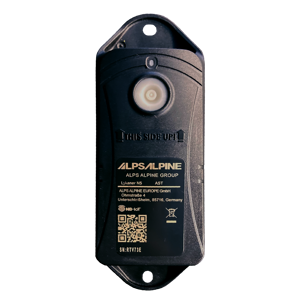
# TRACK 1130

> TRACK 1130 Battery powered tracker that uses Wi-Fi sniffing for localization

export const HeaderBadge = ({type, checkDms = false}) => {
  function addGroupBadge(h1Id) {
    const h1Element = document.getElementById(h1Id);
    if (!h1Element) {
      console.error(`Element with ID "${h1Id}" not found`);
      return;
    }
    if (h1Element.querySelector('.header-badge')) {
      console.warn('Header badge already exists on this element');
      return;
    }
    const badge = document.createElement('span');
    badge.className = 'header-badge';
    var badgeText;
    var badgeColor;
    switch (type) {
      case 'public':
        badgeText = 'Public';
        badgeColor = '#858585ff';
        break;
      case 'end-user':
        badgeText = 'End-User';
        badgeColor = '#0071a1';
        break;
      case 'multi-org':
        badgeText = 'Multi-Org';
        badgeColor = '#0071a1';
        break;
      case 'partner':
        badgeText = 'Partner';
        badgeColor = '#0071a1';
        break;
      case 'partner-pricing-eu':
        badgeText = 'Partner-EU';
        badgeColor = '#0071a1';
        break;
      case 'partner-pricing-us':
        badgeText = 'Partner-US';
        badgeColor = '#0071a1';
        break;
      case 'partner-pricing-world':
        badgeText = 'Partner-World';
        badgeColor = '#0071a1';
        break;
      case 'sensolus-internal':
        badgeText = 'Sensolus only';
        badgeColor = '#ffa858';
        break;
      default:
        badgeText = type;
        badgeColor = '#ffa858';
    }
    badge.textContent = badgeText;
    badge.style.cssText = `
        background-color: ${badgeColor};
        color: white;
        padding: 0.3em 0.8em 0.3em 0.8em;
        border-radius: 6px;
        font-size: 0.4em;
        margin-left: 20px;
        vertical-align: middle;
    `;
    h1Element.appendChild(badge);
  }
  function checkDocumentationServerAccess(type) {
    fetch('https://cloud.sensolus.com/documentation/user', {
      method: 'GET',
      headers: {
        'Accept': 'application/json'
      },
      credentials: 'include'
    }).then(response => {
      if (!response.ok) {
        console.error('Could not fetch documentation server user:', response);
      }
      return response.json();
    }).then(user => {
      const compatibleGroups = {
        "NORMAL": ["end-user", "public"],
        "PUBLIC": ["public"],
        "PARTNER": ["partner", "public", "end-user", "multi-org"],
        "MULTI_ORG": ["multi-org", "public", "end-user"],
        "SYSTEM": ["public", "end-user", "multi-org", "partner", "sensolus-internal"]
      };
      const allowedGroups = compatibleGroups[user.orgType] || [];
      const compatiblePriceListGroups = {
        "EU": ["partner-pricing-eu"],
        "US": ["partner-pricing-us"],
        "WORLD": ["partner-pricing-eu", "partner-pricing-us", "partner-pricing-world"]
      };
      allowedGroups.push(...compatiblePriceListGroups[user.orgType === "SYSTEM" ? "WORLD" : user.priceList] || []);
      if (!allowedGroups.includes(type)) {
        if (user.orgType === 'PUBLIC') {
          window.location.href = '/login?redirect=' + encodeURIComponent(window.location.pathname);
        } else {
          window.location.href = '/logout';
        }
      }
      addGroupBadge("page-title");
    }).catch(error => {
      console.error('Could not fetch documentation server user:', error);
      addGroupBadge("page-title");
    });
  }
  useEffect(() => {
    console.info("adding badge");
    addGroupBadge("page-title");
  });
  useEffect(() => {
    console.info("checking server access for type" + type);
    if (type && type !== 'public' && checkDms) {
      checkDocumentationServerAccess(type);
    }
  }, [type]);
  return <></>;
};

<HeaderBadge type={'public'} checkDms={false} />

<Frame>
  <img src="https://mintcdn.com/sensolus/g6Vof8Tz-uQUuC4v/docs/spec_sheets/trackers/images/TRACK-1130.png?fit=max&auto=format&n=g6Vof8Tz-uQUuC4v&q=85&s=645ce88c89940d45dfb97908ae46885e" width="200" data-path="docs/spec_sheets/trackers/images/TRACK-1130.png" />
</Frame>

<AccordionGroup>
  <Accordion title="TRACK 1130 spec sheet (pdf)" icon="file">
    **Description**: TRACK 1130 spec sheet<br />
    **Access level**: public<br />
    **Reference**: SDOC-498608282-258<br />
    **Download**:  [PDF](https://cloud.sensolus.com/documentation/dms/SDOC-498608282-258)

    <iframe src="https://cloud.sensolus.com/documentation/dms/SDOC-498608282-258?viewer=true" style={{width: '100%', height: '881px', border: 'none', margin: 0, padding: 0}} />

    <div style={{display: "none"}} data-pdf-text="true">
      November 12, 2025 11:03 AM
      [www.sensolus.com](http://www.sensolus.com) |  [info@sensolus.com](mailto:info@sensolus.com)
      LYKANER N5 - WIFI - NB-IoT
      TRACK 1130
      Connectivity
      Geolocalization
      50mm (1 ³¹/₃₂ in)
      31,5 mm (1 ¹⁵/₆₄ in)
      140 mm (5 ³³/₆₄ in)
      The  long-life battery powered WIFI tracker communicating
      over the NB-IoT network.
      Wi-Fi
      Wi-Fi based geolocalization
      Sensing
      Internal
      · Relocation based on acceleration
      · Orientation state
      ∅5,2mm
      ∅5,2mm (¹³/₆₄ in)
      125,35 mm (4 ¹⁵/₁₆ in)
      · Energy efficient transceiver
      · Internal omnidirectional antenna
      · Bi-directional communication
      NB-IoT
      IP69
      Mechanics & design
      Water & dust resistance
      Size
      140 x50x31,5 mm (5 ³³/₆₄  x 1 ³¹/₃₂ x 1 ¹⁵/₆₄ in)  (L W H)
      Weight
      146 gram (5.15 oz)
      Color
      Black
      Casing
      PC/PBT
      -20°C to 60°C (-4°F to 140°F)
      Operating temperature
      Antennas
      All antennas are internal
      IK8
      Impact resistance
      · NB-IoT bands: Europe and North America
      · Data recovery
      · OTA firmware upgrade (NB-IoT)
      Wi-Fi
      IP69
      IK8
      NB-IoT
      Europe and North America
      Data recovery
      Up to 7 years of battery life (read the details)
      · TRACK 1130 comes with the Standard connectivity plan.
      Connectivity plan

      November 12, 2025 11:03 AM
      [www.sensolus.com](http://www.sensolus.com) |  [info@sensolus.com](mailto:info@sensolus.com)
      Certifications
      Regulatory
      CE, UK-CA, FCC, IC, CGF, PTCRB
      User interaction
      Device activation
      Activation with button (push hard for at least 5 sec.)
      LED feedback
      LED will blink for 10 sec to confirm the activation.
      Battery
      · Not replaceable battery pack: Li-SoCl2,2xER17505M-L  3,6V 5600mAh
      Management services
      · Remote configuration
      · Tracker usage profiles
      · Low battery alert
      · 4 battery levels
      · Communication quality
      Diagnostics
      Management
      Application services
      ·
      Localization
      ·
      Geozones
      Firmware configuration
      Location service
      Periodic and relocation parameters
      Communication service
      Data recovery configuration (optional)
      General configuration
      · Boot methods
      · Time synchronization
      Tamper service
      Virtual tamper algo configuration
      Security
      · Device unique encryption keys
      · End to end payload encryption Chacha 20
      · AES encrypted firmware
      · Firmware upgrade allows only signed firmware images
      Mounting
      · Activation manual
      · Instructions for mounting the device are available in the Sensolus documentation center.
    </div>
  </Accordion>

  <Accordion title="TRACK 1130 drill hole template (pdf)" icon="file">
    **Description**: TRACK 1130 drill hole template. Use this to drill holes at the correct distances when installing a tracker on an asset.<br />
    **Access level**: public<br />
    **Reference**: SDOC-498608282-264<br />
    **Download**:  [PDF](https://cloud.sensolus.com/documentation/dms/SDOC-498608282-264)

    <iframe src="https://cloud.sensolus.com/documentation/dms/SDOC-498608282-264?viewer=true" style={{width: '100%', height: '881px', border: 'none', margin: 0, padding: 0}} />

    <div style={{display: "none"}} data-pdf-text="true">
      125,35 mm
      Drilling hole pattern for
      TRACK 1130
      Do not scale this drawing!
      Print on A4 paper
    </div>
  </Accordion>

  <Accordion title="3D-file TRACK 1130 (stl)" icon="file">
    **Description**: 3D-file TRACK 1130 in STL format<br />
    **Access level**: end-user<br />
    **Reference**: SDOC-498608282-694<br />
    **Download**:  [STL](https://cloud.sensolus.com/documentation/dms/SDOC-498608282-694)
  </Accordion>

  <Accordion title="Installation and activation manual TRACK 1130 (pdf)" icon="file">
    **Description**: <br />
    **Access level**: public<br />
    **Reference**: SDOC-498608282-1400<br />
    **Download**:  [PDF](https://cloud.sensolus.com/documentation/dms/SDOC-498608282-1400)

    <iframe src="https://cloud.sensolus.com/documentation/dms/SDOC-498608282-1400?viewer=true" style={{width: '100%', height: '881px', border: 'none', margin: 0, padding: 0}} />

    <div style={{display: "none"}} data-pdf-text="true">
      Installation and activation manual TRACK 1130
      [www.sensolus.com](http://www.sensolus.com) | [info@sensolus.com](mailto:info@sensolus.com)
      July 31, 2024 3:31 PM
      Tracker activation
      Trackers are not activated when delivered to your premises, to avoid battery consumption before actual deployment. The
      tracker is a one-time activation device: once it is activated, it cannot be deactivated afterward.
      The activation status can be verified by looking up the device in the Sensolus portal using the device serial number. To
      effectively start using the tracker, it must be activated using the following method:
      1
      Press the activation
      button and keep it
      pressed for at least 5
      seconds. You can hear
      or feel a click when
      the button is
      effectively pressed.
      You can also use the
      blunt back of a pen or
      pencil for this.
      →
      2
      The red LED will blink
      for 10 seconds to
      confirm that it is
      starting the activation
      sequence.
      →
      3
      Once activation
      sequence is
      completed, the device
      will for a second time
      emit LED blinking for
      5 seconds to indicate
      the completion of the
      activation sequence.
      →
      4
      After activation and
      during normal
      operation, the LED
      does not light up.
      Activation of the tracker is preferably done in a place where there are Wi-Fi networks, which makes it easier to confirm
      that a first Wi-Fi location resolution has succeeded after activation.
      The platform subscription costs for the tracker start when it is first activated, or latest after six months after the shipment
      date.
      In the (exceptional) case that activation sequence cannot be completed within 3 minutes (for example in areas lacking coverage
      by the communication provider), the device will employ a temporary back-off strategy to avoid draining the battery (2 x 30
      minutes, 12 hours and then 24 hours). This means that feedback responsiveness may be reduced when encountering this
      problem.
      Mounting the tracker on the asset
      Guidelines how to mount the tracker can be found here.
      Recommended device orientation
      For optimal battery usage please follow the below device mounting orientation recommendations:
      Recommended

      Installation and activation manual TRACK 1130
      [www.sensolus.com](http://www.sensolus.com) | [info@sensolus.com](mailto:info@sensolus.com)
      July 31, 2024 3:31 PM
      Acceptable
      Not recommended

      Installation and activation manual TRACK 1130
      [www.sensolus.com](http://www.sensolus.com) | [info@sensolus.com](mailto:info@sensolus.com)
      July 31, 2024 3:31 PM
      Installation advice
      Avoid blocking the tracker\&#39;s view with metal
      or carbonfibre walls. They weaken or block
      the radiofrequency signals.
      Place the tracker as high as possible on the
      asset to ensure good network coverage.
      Make sure the mounting surface is flat and
      clean, for a strong and durable bond.
      Do not install the tracker on parts that
      receive frequent shocks or vibrations.
      Avoid placing the tracker in a place that can
      collect water.
      If your asset is handled in a rough
      environment, you can place the tracker in a
      protected location, but never with metal or
      carbonfibre above the tracker.
      Safety advice – device subjected to strong mechanical impact
      Risk of delayed battery failure and chemical hazard
      If a device has been hit, crushed, or struck by a heavy object (for example a forklift, container, pallet, or falling load), the
      internal components and battery may be damaged even if no external damage is visible. Such damage can result in delayed
      overheating, leakage, or failure.
      If a device has been subjected to a strong mechanical impact, the following mandatory safety actions must be taken:
      \#
      Action
      Details
      1
      Do not touch the device
      Do not move, lift, open, shake, or inspect the
      device immediately after the impact. Internal
      damage may cause delayed reactions.
      2
      Keep a minimum safety distance
      Maintain a clear distance of at least 5 meters
      from the device. Keep all personnel away
      during this period.
      3
      Wait at least 10 minutes
      The device must remain untouched and
      undisturbed for a minimum of 10 minutes
      following the impact. This waiting time
      allows potential delayed thermal or chemical
      reactions to become evident.
      4
      Observe from a safe distance
      Watch for warning signs: smoke, vapor, or
      unusual odor; heat generation; fluid leakage;
      hissing, cracking, or popping noises.
      5
      After the waiting period
      If any abnormal condition is observed,
      isolate the area immediately and notify
      responsible safety or supervisory personnel.
      The device must be quarantined and
      handled according to battery safety and
      disposal procedures. The device must not be
      used.

      Installation and activation manual TRACK 1130
      [www.sensolus.com](http://www.sensolus.com) | [info@sensolus.com](mailto:info@sensolus.com)
      July 31, 2024 3:31 PM
      A device may appear undamaged and still be unsafe. Normal operation after impact does NOT mean the device is safe.
      Failure to follow this safety advice may result in serious injury, fire, or chemical exposure.
    </div>
  </Accordion>
</AccordionGroup>

For installation instructions, see [Installation instructions](/docs/spec_sheets/installation_instructions).
