> ## Documentation Index
> Fetch the complete documentation index at: https://doc.sensolus.com/llms.txt
> Use this file to discover all available pages before exploring further.

# TRACK 1203

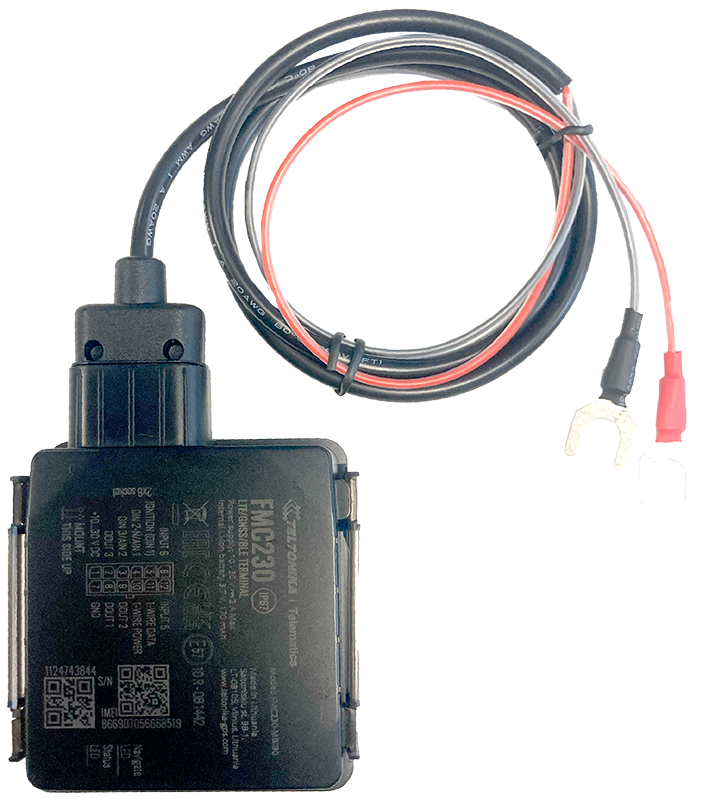
> TRACK 1203 Externally powered vehicle tracker

export const HeaderBadge = ({type, checkDms = false}) => {
  function addGroupBadge(h1Id) {
    const h1Element = document.getElementById(h1Id);
    if (!h1Element) {
      console.error(`Element with ID "${h1Id}" not found`);
      return;
    }
    if (h1Element.querySelector('.header-badge')) {
      console.warn('Header badge already exists on this element');
      return;
    }
    const badge = document.createElement('span');
    badge.className = 'header-badge';
    var badgeText;
    var badgeColor;
    switch (type) {
      case 'public':
        badgeText = 'Public';
        badgeColor = '#858585ff';
        break;
      case 'end-user':
        badgeText = 'End-User';
        badgeColor = '#0071a1';
        break;
      case 'multi-org':
        badgeText = 'Multi-Org';
        badgeColor = '#0071a1';
        break;
      case 'partner':
        badgeText = 'Partner';
        badgeColor = '#0071a1';
        break;
      case 'partner-pricing-eu':
        badgeText = 'Partner-EU';
        badgeColor = '#0071a1';
        break;
      case 'partner-pricing-us':
        badgeText = 'Partner-US';
        badgeColor = '#0071a1';
        break;
      case 'partner-pricing-world':
        badgeText = 'Partner-World';
        badgeColor = '#0071a1';
        break;
      case 'sensolus-internal':
        badgeText = 'Sensolus only';
        badgeColor = '#ffa858';
        break;
      default:
        badgeText = type;
        badgeColor = '#ffa858';
    }
    badge.textContent = badgeText;
    badge.style.cssText = `
        background-color: ${badgeColor};
        color: white;
        padding: 0.3em 0.8em 0.3em 0.8em;
        border-radius: 6px;
        font-size: 0.4em;
        margin-left: 20px;
        vertical-align: middle;
    `;
    h1Element.appendChild(badge);
  }
  function checkDocumentationServerAccess(type) {
    fetch('https://cloud.sensolus.com/documentation/user', {
      method: 'GET',
      headers: {
        'Accept': 'application/json'
      },
      credentials: 'include'
    }).then(response => {
      if (!response.ok) {
        console.error('Could not fetch documentation server user:', response);
      }
      return response.json();
    }).then(user => {
      const compatibleGroups = {
        "NORMAL": ["end-user", "public"],
        "PUBLIC": ["public"],
        "PARTNER": ["partner", "public", "end-user", "multi-org"],
        "MULTI_ORG": ["multi-org", "public", "end-user"],
        "SYSTEM": ["public", "end-user", "multi-org", "partner", "sensolus-internal"]
      };
      const allowedGroups = compatibleGroups[user.orgType] || [];
      const compatiblePriceListGroups = {
        "EU": ["partner-pricing-eu"],
        "US": ["partner-pricing-us"],
        "WORLD": ["partner-pricing-eu", "partner-pricing-us", "partner-pricing-world"]
      };
      allowedGroups.push(...compatiblePriceListGroups[user.orgType === "SYSTEM" ? "WORLD" : user.priceList] || []);
      if (!allowedGroups.includes(type)) {
        if (user.orgType === 'PUBLIC') {
          window.location.href = '/login?redirect=' + encodeURIComponent(window.location.pathname);
        } else {
          window.location.href = '/logout';
        }
      }
      addGroupBadge("page-title");
    }).catch(error => {
      console.error('Could not fetch documentation server user:', error);
      addGroupBadge("page-title");
    });
  }
  useEffect(() => {
    console.info("adding badge");
    addGroupBadge("page-title");
  });
  useEffect(() => {
    console.info("checking server access for type" + type);
    if (type && type !== 'public' && checkDms) {
      checkDocumentationServerAccess(type);
    }
  }, [type]);
  return <></>;
};

<HeaderBadge type={'public'} checkDms={false} />

<Frame>
  <img src="https://mintcdn.com/sensolus/g6Vof8Tz-uQUuC4v/docs/spec_sheets/trackers/images/TRACK-1203.png?fit=max&auto=format&n=g6Vof8Tz-uQUuC4v&q=85&s=2ebd3c4dd3b23cc1ce95976ae90232a6" width="200" height="200" data-path="docs/spec_sheets/trackers/images/TRACK-1203.png" />
</Frame>

<AccordionGroup>
  <Accordion title="TRACK 1203 spec sheet EN (pdf)" icon="file">
    **Description**: <br />
    **Access level**: public<br />
    **Reference**: SDOC-498608282-599<br />
    **Download**:  [PDF](https://cloud.sensolus.com/documentation/dms/SDOC-498608282-599)

    <iframe src="https://cloud.sensolus.com/documentation/dms/SDOC-498608282-599?viewer=true" style={{width: '100%', height: '881px', border: 'none', margin: 0, padding: 0}} />

    <div style={{display: "none"}} data-pdf-text="true">
      December 12, 2024 10:20 AM
      [www.sensolus.com](http://www.sensolus.com) |  [info@sensolus.com](mailto:info@sensolus.com)
      Waterproof 4G LTE Cat 1 tracker with flexible inputs
      TRACK 1203
      GNSS
      67 mm
      IP67
      External power source
      Internal back up battery
      Track 1203 wired is a smart and waterproof GNSS tracker
      with internal backup battery.
      Mounting
      ·
      Tie wraps
      ·
      Double sided tape
      Geolocalization
      GNSS
      GPS, GLONASS, GALILEO, BEIDOU, QZSS, AGPS
      Connectivity
      Mobile network
      4G (SIM-card is required) with fallback to 3G (UMTS), 2G
      (GSM) networks
      25.6 mm
      110 mm

      December 12, 2024 10:20 AM
      [www.sensolus.com](http://www.sensolus.com) |  [info@sensolus.com](mailto:info@sensolus.com)
      Power
      · Input voltage: 10 - 30 V DC with overvoltage protection
      · Back up battery : 170 mAh Li-Ion, 3.7 V battery (0.63 Wh)
      Certifications
      Regulatory
      CE-RED, E-Mark,RCM,Anatel, REACH, RoHS, TRA, CITC
      Configuration
      Configuration and firmware update
      · FOTA
      · Remote device configuration
      Time synchronisation
      · GNSS
      · NITZ
      · NTP
      Application services
      · Localization
      · Journeys
      · Activity
      · Utilization
      · Speed
      · Travelled distance
      Mechanics & design
      Size
      Weight
      110 mm x 67 mm x 25,6 mm
      80 gram (without power cable)
      Color
      ·
      Internal High Gain GNSS antenna
      ·
      Internal GSM High Gain Celullar antenna
      Antenna
      IP67
      Water & dust resistance casing
      -20 to 85°C
      Operating temperature
      -20 to 85°C (without battery)
      Storage temperature
      Light Gray
      Sensors
      Accelerometer
      Memory
      128MB internal flash memory
      5% to 95% non-condensing
      Operating humidity
      Power cable
      ·
      2 fork connectors for battery connection
      ·
      90 cm
    </div>
  </Accordion>

  <Accordion title="TRACK 1203 installation manual (pdf)" icon="file">
    **Description**: <br />
    **Access level**: public<br />
    **Reference**: SDOC-498608282-1401<br />
    **Download**:  [PDF](https://cloud.sensolus.com/documentation/dms/SDOC-498608282-1401)

    <iframe src="https://cloud.sensolus.com/documentation/dms/SDOC-498608282-1401?viewer=true" style={{width: '100%', height: '881px', border: 'none', margin: 0, padding: 0}} />

    <div style={{display: "none"}} data-pdf-text="true">
      TRACK 1203 installation manual
      [www.sensolus.com](http://www.sensolus.com) | [info@sensolus.com](mailto:info@sensolus.com)
      January 22, 2025 1:43 PM
      Advice before installation

      1. Orientation of the tracker
         Install with connection plug in line of the driving direction.
         Do not install perpendicular to the driving direction.
         Install with connection plug in line of the driving direction. Do not install perpendicular to the driving direction.
      2. Do not install upside down
      3. Avoid placement of TRACK 1203 under metal surfaces

      TRACK 1203 installation manual
      [www.sensolus.com](http://www.sensolus.com) | [info@sensolus.com](mailto:info@sensolus.com)
      January 22, 2025 1:43 PM
      4\. Mount horizontal
      TRACK 1203 must be placed so its state is as horizontal as possible. If TRACK 1203 is leant more than 30 degrees, it is
      considered incorrect mounting.
      Mounting the device

      1. Connect the plug

      TRACK 1203 installation manual
      [www.sensolus.com](http://www.sensolus.com) | [info@sensolus.com](mailto:info@sensolus.com)
      January 22, 2025 1:43 PM
      2\. Attach to plus and minus pole of the vehicle battery
      Connect the wires to the vehicle battery:
      • Red = plus pole (positive terminal)
      • Black = minus pole (negative terminal)
      3\. Attach to a surface with printed side facing up
      Install the tracker with the TOP side facing up. You can use double-sided tape or tie wraps to secure the device.
      Install with double-sided tape or tie wraps

      TRACK 1203 installation manual
      [www.sensolus.com](http://www.sensolus.com) | [info@sensolus.com](mailto:info@sensolus.com)
      January 22, 2025 1:43 PM
      Install with TOP side facing up
      Safety advice – device subjected to strong mechanical impact
      Risk of delayed battery failure and chemical hazard
      If a device has been hit, crushed, or struck by a heavy object (for example a forklift, container, pallet, or falling load), the
      internal components and battery may be damaged even if no external damage is visible. Such damage can result in delayed
      overheating, leakage, or failure.
      If a device has been subjected to a strong mechanical impact, the following mandatory safety actions must be taken:

      TRACK 1203 installation manual
      [www.sensolus.com](http://www.sensolus.com) | [info@sensolus.com](mailto:info@sensolus.com)
      January 22, 2025 1:43 PM
      \#
      Action
      Details
      1
      Do not touch the device
      Do not move, lift, open, shake, or inspect the
      device immediately after the impact. Internal
      damage may cause delayed reactions.
      2
      Keep a minimum safety distance
      Maintain a clear distance of at least 5 meters
      from the device. Keep all personnel away
      during this period.
      3
      Wait at least 10 minutes
      The device must remain untouched and
      undisturbed for a minimum of 10 minutes
      following the impact. This waiting time
      allows potential delayed thermal or chemical
      reactions to become evident.
      4
      Observe from a safe distance
      Watch for warning signs: smoke, vapor, or
      unusual odor; heat generation; fluid leakage;
      hissing, cracking, or popping noises.
      5
      After the waiting period
      If any abnormal condition is observed,
      isolate the area immediately and notify
      responsible safety or supervisory personnel.
      The device must be quarantined and
      handled according to battery safety and
      disposal procedures. The device must not be
      used.
      A device may appear undamaged and still be unsafe. Normal operation after impact does NOT mean the device is safe.
      Failure to follow this safety advice may result in serious injury, fire, or chemical exposure.
    </div>
  </Accordion>
</AccordionGroup>

For installation instructions, see [Installation instructions](/docs/spec_sheets/installation_instructions).
