Description: TRACK 1210 spec sheet EN
Access level: public
Reference: SDOC-498608282-1055
Download: PDF
November 10, 2025 5:11 PM www.sensolus.com | info@sensolus.com GNSS/WIFI/BLE - NB-IoT TRACK 1210 · Energy efficient transceiver · Internal omnidirectional antenna · Bi-directional communication · NB-IoT bands: Europe and North America · Data recovery · OTA firmware upgrade (NB-IoT) · Bluetooth Low Energy 5.0 Connectivity Geolocalization Up to 12 years of back up battery IP rating in progress IK09 Flame retardant The rugged low-power tracker can be wired to an external power source. It has NB-IoT connectivity and guaranteed data recovery. The tracker provides general localization, zone and high precision. The tracker comes with an on­ board temperature sensor and shock detection. Compatible with multiple external environmental sensors. The tracker firmware can be upgraded over the air. NB-IoT Bluetooth Low Energy (BLE) GNSS Multi GNSS constellation chipset (GPS+GALILEO) BLE · Sensolus proximity beacon detection · Detectable by zone and high precision anchors Wi-Fi scanning · Wi-Fi based geolocalization · Wi-Fi 2.4 GHz NB-IoT Europe and North America Data recovery GNSS Wi-Fi scanning Bluetooth geobeacon for zone precision · TRACK 1210 comes with the Standard connectivity plan. Connectivity planNovember 10, 2025 5:11 PM www.sensolus.com | info@sensolus.com IP 67 Mechanics & design Water & dust resistance Size 130x72x36 mm (5¹/₈ x 2⁵³/₆₄ x 1²⁷/₆₄ in )(L W H) Weight 218,3 gram (7.68 oz) without cable Color White and black Casing · PBT/PC 29 TM-Z2 FR UV LS · Flame retardant · UV-stabilized IK09 Impact resistance Operating temperature Antennas All antennas are internal Activation and mounting EN 60068 Drop shock and vibration Sensing Internal · Activity monitoring · Orientation monitoring · Virtual tamper detection · Temperature monitoring (range: -20°C till 60°C, typical accuracy: +/- 0,25°C, worst case accuracy: +/- 1°C) · Configurable shock detection Connectable environmental BLE sensors · Temperature, humidity · Fill level, contact, magnet · Other BLE sensors can be added Power supply Input voltage: 10 - 30 V DC with overvoltage protection Voltage Connectors to the power source can be soldered to the cable ends Cable terminations -20°C to 60°C (-4°F to 140°F) &#42; The specifics regarding operational temperature are contingent upon the application, installation circumstances, and environmental factors such as sunlight exposure. For further information, please reach out to Sensolus. Battery life can be affected when devices function for extended periods at the extremes of this range. · Activation manual · Holes 7x9mm (⁹/₃₂ &#42; ²³/₆₄ in) for screws or rivets. 115 mm (4¹⁷/₃₂ in) distance between the centers of the mounting holes. · Instructions for mounting the device are available in the Sensolus documentation center. ~3mA (idle) Typical power consumption · 300mA (@10V) · 70mA (@30V) Max typical power consumption · > 500mA and < 1A fuse · The TRACK1210 has an internal fuse at the external power input · The fuse is rated at 1A (slow blow type) · This fuse is NOT resettable · Fuse used in the device: Bel fuse 0685T1000 Fuse recommendationsNovember 10, 2025 5:11 PM www.sensolus.com | info@sensolus.com Application services · Connectable with
environmental sensors · Temparture detection · Localization · Journeys · Activity · Utilization · Tilt detection · Shock detection Management services · OTA firmware updates over NB-IoT and BLE · Remote configuration · Tracker usage profiles · External environmental sensors · Back up battery lifetime prediction · Detailed energy consumption · Geolocation diagnostics · Installation · Communication quality Diagnostics Management User interaction Device activation Magnetic activation LED feedback Green & red LED feedback on the device Synchronize remote settings · Instant: Magnet activation · Periodic: No user interaction needed Certifications Electrical safety EN 62368-1 Regulatory · CE · FCC · IC D068598 Bluetooth 5.0 Environmental Drop shock Back up battery Standard 3 cell · Battery life depending on operating mode. · User replaceable battery pack (Li-SoCl2) 12000 mAh · 2.94 gram (0.1037oz) lithium
November 10, 2025 5:11 PM www.sensolus.com | info@sensolus.com Security · Device unique encryption keys · End to end payload encryption Chacha 20 · AES encrypted firmware · Firmware upgrade allows only signed firmware images 72mm (2⁵³/₆₄ in) 36 mm (1²⁷/₆₄ in) 130 mm (5 ¹/₈ in) 115 mm (4 ¹⁷/₃₂ in) Tracker measurements Accessories CAB 8600: 6 m power cable for TRACK 1210 Firmware configuration Location service · Motion based,context based, periodic or scheduled · Configurable update rate and journey detection · Priority sequence (GNSS, Wi-Fi scanning , Bluetooth geo­ beacon) · GNSS fix parameters · Indoor detection algo · Wi-Fi scan strategy · BLE scan strategy Communication service · Data recovery strategy · Communication conditions Activity service · Activity detection parameters Orientation service · Orientation detection parameters Environmental sensing · Polling and aggregation strategy · Alerts · Edge processing parameters General configuration · Rule engine configuration · Diagnostic levels · Boot methods · Accurate time synchronization Tamper service · Virtual tamper algo configuration Shock detection · Shock algo detection parameters
Description: Installation manual of TRACK 1210.
Access level: end-user
Reference: SDOC-498608282-1041
Download: PDF
www.sensolus.com | info@sensolus.com August 18, 2025 3:52 PM Installation and activation manual TRACK 1210
  1. Activation of the tracker Hold a magnet for about 5 seconds on top of the logo on the tracker. You will first see a red LED. Do not remove the magnet yet. When the green LED is blinking you can remove the magnet. The tracker is ready for use. Activation of the tracker is preferably done with clear skies, and not inside (e.g. factory or warehouse). Trackers are not activated when delivered to your premises. Their subscription in the platform will start within six month of purchase. Activation troubleshooting Activating a tracker that communicates over the NB-IoT network can sometimes come with a delay. With a delay we mean that the online status doesn&#39;t appear within 5 minutes after holding the magnet to the tracker. This is mostly due to conditions on the network operator site. If the activation wasn&#39;t successful after 5 minutes the tracker will try again to activate again after waiting 24 hours. This long period of time is often an obstacle to start installing trackers to assets and makes the timing of the installation of the trackers cumbersome as it is important to only install trackers when they appeared as online on the platform. To overcome to 24 hours waiting time, you can do the following: if after 5 minutes of waiting and the status didn&#39;t change yet to “online&#39;&#39; hold the magnet again for 5 seconds on top of the tracker to enforce a new attempt for activation. Keep trying every 5 minutes until the Online status appears.
www.sensolus.com | info@sensolus.com www.sensolus.com | info@sensolus.com August 18, 2025 3:52 PM August 18, 2025 3:52 PM 6. Force new configuration download on the tracker Hold a magnet for about 5 seconds on top of the logo on the asset tracker. You will see a green LED. You will see a red and green LED. Now remove the Magnet Green LED is blinking for minimum 30 seconds. Your tracker is checking for new configurations You see a green LED: New configuration setting received You see a red LED: No new  configuration received. A firmware can be uploaded on the zone anchor. Queue the firmware in the Sensolus platform first. 4. Fuse installation An additional fuse (> 500mA and < 1A) can be installed. Install the fuse on the voltage in red cable in series. The tracker has an internal fuse, see specsheet for details. The external cable is composed of 4 internal wires: • Black: GND / Ground. Connect to black battery terminal (negative, minus sign). • Red: VIN External voltage in. Connect to red battery terminal (positive, plus sign). • Blue: Digital In / Analog In (not in use currently; pending a future firmware release at unknown date). • White: Digital Out. (not in use currently; pending a future firmware release at unknown date). Put the cable onto the connector. Only the black plastic piece will go into the connector. Do not force this. Tighten the connection by gently screwing the cable into the connector. Do not force this as well. 5. Connect tracker to the vehicle power source. You can add any connector to the end of the TRACK 1210 power connector wires. We recommend using heat shrink tubing on the end of the cables. Check if the power cable is connected well. 2. General installation advice Avoid blocking the tracker’s view with thick metal or carbonfibre walls. They weaken or block the radiofrequency signals. Install the tracker vertically, with the logo facing up. Place the tracker has high as possible on the asset to ensure good network coverage. Make sure the tracker has a clear view on the sky. Do not install the tracker on parts that receive frequent shocks or vibrations. If your asset is handled in a rough environment, you can place the tracker in a protected location, but never with metal or carbonfibre above the tracker. Avoid placing the tracker in a place that can collect water. Make sure the mounting surface is flat and clean, for a strong and durable bond. Guidelines for mounting methods for the tracker can be found in the Sensolus documentation center. Mount the tracker in such a way you have good access and a good view to the power plug of the tracker. 3. Mount the tracker onto the vehiclewww.sensolus.com | info@sensolus.com August 18, 2025 3:52 PM 7. Troubleshooting the tracker
  1. Put the magnet on the tracker for less than 5 seconds
  2. The possible LED feedback options are: Red LED: Tracker is not activated Green LED: Tracker is activated and working properly No LED: tracker is not functioning (probably dead battery -> contact support) Red LED is blinking: Tracker is busy
  3. Installation for shock detection For shock sensing the installation of the way the tracker is installed is important. Testing on real assets is required before you can use the embedded shock sensor.
  4. Installation for trailers and cooling trucks Place the tracker as high as possible on the asset to ensure good network coverage. Do not install on the chassis or parts with heavy vibration.
Description: Mounting instructions for installation of Sensolus devices
Access level: public
Reference: SDOC-498608282-1048
Download: PDF
Product mounting advice How to install Sensolus productsLast update: Monday, December 22, 2025 2Sensolus product mounting advice This document is for all installers of our products and gives an overview and advice for the mounting options of standard Sensolus products.
Choosing the right mounting method is important to make sure the product doesn’t get damaged or falls of.
MOUNTING OPTIONS PER PRODUCT … 3 RIVETS … 4 RIVET DIMENSIONS … 4 THE WAY TO FIND YOUR RIVETS … 5 RIVET MATERIAL … 6 BOLTS AND SCREWS … 7 DOUBLE SIDED TAPE … 8 TIE WRAPS … 9 GLUE … 10 MAGNET MOUNTING KIT … 11 SENSOR AND TAG HOLDERS … 12 MOUNTING ADVICE FOR TRACKERS ON SPECIFIC MATERIALS … 13 VIBRATING PLASTICS IN OUTDOOR CONDITIONS … 13 PLASTIC BOXES … 13 METAL IN OUTDOOR CONDITIONS … 13 Trackers … 13 Tags … 13 FILL LEVEL SENSOR INSTALLATION INSTRUCTIONS … 14 MOUNTING OVERVIEW … 14 TOOLS AND MATERIALS NEEDED … 14 INSTALLATION STEPS … 14
Last update: Monday, December 22, 2025 3Mounting options per productProduct Rivets Bolts/screws Glue Double sided tape Tie wraps Holder Magnet mounting kit Battery powered trackers• TRACK 1000 ✓ ✓ ✓ ✓ ✓✓ • TRACK 1020 ✓ ✓• TRACK 1030 ✓ ✓• TRACK 1100 ✓ ✓ ✓ ✓ ✓✓ • TRACK 1140 ✓ ✓ ✓ ✓ ✓✓ • TRACK 1110 ✓ ✓ ✓ ✓ ✓• TRACK 1130 ✓ ✓ ✓ ✓ ✓• TRACK 1101 ✓ ✓ ✓ ✓ ✓✓ • TRACK 1141 ✓ ✓ ✓ ✓ ✓Vehicle trackers• TRACK 1203✓ ✓ ✓• TRACK 1210 ✓ ✓ ✓ ✓ ✓✓ • TRACK 1215 ✓ ✓ ✓ ✓ ✓Tag trackers• TAG 2001 ✓ ✓ ✓ ✓ ✓• TAG 2002✓ ✓• TAG 2002 ✓ ✓ ✓ ✓ ✓• TAG 2007✓ ✓Sensors• SENSE T 4000✓ ✓• SENSE HT 4050✓ ✓• SENSE M 4201✓ ✓• SENSE T 4004✓ ✓• SENSE FL 4300✓ ✓ ✓ ✓ ✓Infrastructure• GB 3000 ✓ ✓ ✓ ✓• ZA 3500✓ ✓ ✓• ZA 3505 ✓ ✓ ✓ ✓ ✓✓ • ZA 3510✓ ✓ ✓ ✓✓ • ZA 3515 ✓ ✓ ✓ ✓ ✓Last update: Monday, December 22, 2025 4 Rivets We recommend rivets because they are easy in installation and strong. Use the appropriate size and length of the rivets. So how to choose the correct dimension of your rivets?
Rivet dimensions
Figure 1: Rivet dimensions D2: 12-14 mm is a good head diameter for 1100/1101 (dome or flat head) D1: 5-6 mm is a good diameter for 1100/1101 L: Rivet body length (decision depends on S) S: Grip range Rivet manufacturers give you the dimensions in D1 x L (e.g. 6 x 20). The rivet manufacturer gives the grip range for the different rivet dimensions that he provides,
e.g. GESIPA Blind rivets alu/steel dome head 6 x 20 has a Grip range of 13,00 - 15,00 mm
Drillhole diameter: D1 + 0,1mm d: Mandrel diameter (needs to fit in your tool, a lot of rivet manufacturer/dealers don‘t have/show this information)
Tracker Thickes 8mm Asset material thickness
Last update: Monday, December 22, 2025 5 For example: The length of the rivet should be equal to the thickness of both objects you are fastening the tracker to (mounting holes height + thickness material), plus 1.5 times the diameter of the rivet’s stem. Do not use rivets with a smaller diameter, this will not firmly attach the tracker. Do not use rivets with bigger diameter as you might damage the casing. The way to find your rivets • Choose the correct material of the rivet body • Determine the correct grip range (S) by adding tracker material thickness 8mm + material thickness of the asset • Choose your preferred rivet body diameter (5 or 6 mm) • Choose your preferred rivet head diameter (12 or 14 mm) • Make sure the mandrel diameter fits into your rivet tool. If you don’t know the maximum mandrel diameter that your tool can handle, you can determine that by sticking drills with different diameters into your rivet tool. There are often values on the rivet inserts of the riveting tool. These usually refer to rivet body diameters. However, since there are hundreds of different rivet variants on the market and almost every manufacturer does what they want, you should ignore this information and follow the recommendations in this document. Measuring is the best way. Other than others, GESIPA gives you the diameter of the mandrels). • Make sure you have enough drills with correct diameter, it can happen that you will break one or the other drill (rivet body diameter + 0,1mm (e.g. 6,1mm).
GESIPA – The experts in blind riveting: Standard blind rivets
Tracker mount hole Diameters and height overviewProduct Distance between mounting holes Rivet diameter Height of mounting holes TRACK 1110 90 mm 5 mm 5 mm TRACK 1130 125 mm 5 mm 5mm TRACK 1100/1101/1140/1141 115 mm 6 mm 8 mm TRACK 1210/1215 115 mm 6 mm 8 mm SENSE FL 4300 111,5 mm 4 mm 5 mm TAG 2001 49 mm 4 mm 3 mm TAG 2006 60 mm 4 mm 7 mm GB 3000 84 mm 4 mm
2 mm ZA 3505/ZA 3510/ ZA 3515 115 mm 6 mm 8 mm
ℹ GESIPA is a good manufacturer of high quality rivets and has a wizard on their website toLast update: Monday, December 22, 2025 6 Rivet material Stainless steel Use Stainless steel rivets when mounting trackers on outdoor assets.Steel Steel rivets can be used for indoor purposes when mounting on steel assets.Aluminium Use aluminum rivets for mountin the tracker on materials such as aluminum, fabrics, plastics, leather,Figure 2 Moun!ng with rivets⚠ Using aluminium rivets on steel can cause the rivet to corrode.
⚠ Do not use stainless steel rivets on aluminium assets. They cause corrosion on the asset . ⚠ Do not use steel rivets on aluminium assets. They can cause corrosion on the asset.
Last update: Monday, December 22, 2025 7 Bolts and screws Bolts and screws are harder to install than rivets because you need access to both the bolt and the nut. This is not always possible, for example when installing tracker on sidewall of a large container. The advantage of bolts and screws is that it is easier to remove them, rivets/glue/tape is harder.
Using glue in combination with bolts and screws is common practice but requires more work.
  1. Use the appropriate size of screws, see table below. If you don&#39;t use the correct sizes you risk damaging the tracker or having an unsafe installa!on.
  2. It is recommended to use thread locking glue on the bolts. Thread locking glue is used to prevent bolts coming lose due to vibra!ons. Pay addi!onal a”en!on to this if you are installing the tracker on a vibra!ng asset. We recommend Loc!te Thread Locker Blue 242.
  3. Protect the tracker casing appropriately: protect the casing with a washer and use a spring washer to mi!gate the effects of vibra!on and temperature varia!ons.
  4. Do not apply more torque than found in the below table. You risk damaging the casing if you exceed it.
Figure 3 Moun!ng with bots and screws Product Distance between holes Bolt type Height of mounting holes Max applied torque TRACK 1110 90 mm M5 5 mm 2.5 Nm TRACK 1130 125 mm M5 5 mm 2.5 Nm TRACK 1100/1101/1140/1141/1210/1215 115 mm M6 8 mm 3.5 Nm SENSE FL 4300 111,5 mm M4 5 mm 3 Nm TAG 2001 49 mm M4 3 mm 2.5 Nm TAG 2006 60 mm M4 7 mmGB 3000 84 mm Comes with the productZA 3505/3510/3515 115 mm M6 8 mm 3.5 Nm ZA 3500 86 mm M4 / /Last update: Monday, December 22, 2025 8 Double sided tape Double sided tape is easy to install and does not damage the asset unlike bolts/rivets. However, you need to be sure both tracker and the surface of the asset are clean. Double sided tape is strong but not so resistant to force applied sideways. Make sure the double- sided tap only covers the back of the product. Avoid using double sided tape to attach a tracker or tag on an asset that is regularly exposed to vibrations or shocks. Most products can be mounted with double sided tape. Recommended tapes:
• 3M Acrylic Plus Tape Series PT1000 : h”ps://www.3m.com/3M/en&#95;US/p/d/b40065692/ • 3M™ VHB™ Tape GPH-110GF : h”ps://www.3mbelgie.be/3M/nl&#95;BE/p/d/b40065748 Follow these steps when applying double sided tape:
  1. Make sure the surface of the asset and device are clean and dry.
  2. Sand the surface of the asset.
  3. Sand the backside of the device.
  4. Apply the double-sided tape.
  5. Press the device firm onto the asset for a minute.
  6. Let it dry for at least 1 hours before moving the asset.
Figure 4 Moun!ng with double sided tape⚠ TRACK 1020 and TRACK 1030 cannot be mounted with double sided tape. The anti-tamper button needs to be pushed continuously to ensure proper working of the tracker. ⚠ TAG 2007 can be mounted with double sided tape but be carefull not to tape the battery sloth to the asset so you can still open it to replace the batteriesLast update: Monday, December 22, 2025 9 Tie wraps We recommend metal tie wraps with a width of 5-6 mm.
In some cases, plastic tie wraps are also useful: if you need to remove the trackers often and fast for example. Consider that tie wraps can be easily cut to take away the tracker
Product Tie wrap width TRACK 1110 6 mm TRACK 1100/1101/1140/1141/1210/1215 5 mm SENSE FL 4300 / TAG 2001 4 mm TAG 2006 4 mm ZA 3505/3510/3515 6 mmFigure 5 Moun!ng with !e wraps⚠ TRACK 1020 and TRACK 1030 cannot be mounted with tie wraps. The anti-tamper button needs to be pushed continuously to ensure proper working of the tracker.Last update: Monday, December 22, 2025 10 Glue Glue can be very strong but also once it is glued, it is very hard to remove the device. You will probably damage the device and break warranty when removing a glued device.
Avoid gluing a tracker or tag on an asset that is regularly exposed to vibrations or shocks. Our devices are best paired with these recommended glue types.
Product Glue type TRACK 1100/1110/1140/1101/1141/1210/1215 MS Polymer ZA3505/3510/3515 MS Polymer SENSE FL 4300 MS Polymer SENSE T 4000/ SENSE T 4004 / SENSE M 4201
Polyurethane glue TAG 2001 MS Polymer TAG 2002 Polyurethane glue TAG 2006 MS Polymer TAG 2007 MS Polymer Apply these steps when using glue
  1. Make sure the surface of the asset and device are clean and dry.
  2. Sand the surface of the asset.
  3. Sand the backside of the device.
  4. Apply the glue to the sanded surface.
  5. Press the device firm onto the asset for a minute.
  6. Let it dry for at least 6 hours before moving the asset.
Figure 6 Moun!ng with glue⚠ TRACK 1020 and TRACK 1030 cannot be mounted with glue. The anti-tamper button needs to be pushed continuously to ensure proper working of the tracker.Last update: Monday, December 22, 2025 11 Magnet mounting kit Magnet mounting is the perfect solution for magnetic surfaces when you require the flexibility to easily attach and detach the tracker. However, it&#39;s important to note that this method is best suited for controlled environments. In uncontrolled areas, there is a risk of malicious individuals removing the tracker, as well as potential damage to the surface of the asset. We offer a standard magnet mounting kit for these products.Product Description Sensolus reference TRACK 1000/1100/1101/1140/1210/1141 Magnet mounting kit for 1 TRACK 1100/1101/1140 tracker MNT MAG 8110 SENSE FL 4300
Magnet mounting kit for SENSE FL 4300 MNT MAG 8111 ZA 3505/3510/3515 Magnet mounting kit for 1 TRACK 1100/1101/1140 tracker MNT MAG 8110
Figure 7 Moun!ng with magnet kit⚠ All other products cannot be mounted with a magnet mounting kit.Last update: Monday, December 22, 2025 12 Sensor and tag holders Sensolus offers a holder and sticker kit to mount the sensors.
Use the holder if you can drill holes in the asset. The holder with screws is the safest mounting method for the listed sensors. Glue and double-sided tape can react to heavy heat or cold temperatures.
You can mount the sensor using only the sticker (see mount with double sided tape). Or you can use the holder. You can mount the holder with double sided tape (see mount with double sided tape) or screws.
Product Description Sensolus reference • SENSE T 4000 • SENSE T 4004 • SENSE HT 4050 • SENSE M 4201 • TAG 2002 ELA sensor mounting holder MNT ELA 8140Figure 8 Moun!ng with holdersLast update: Monday, December 22, 2025 13 Mounting advice for trackers on specific materials Vibrating plastics in outdoor conditions Plastic may deteriorate over time from exposure to weather and vibrations. By using a combination of glue and bolts or rivets, you can securely fasten the device to the asset. Plastic boxes
Plastic boxes are handled by people, the stack them, let them drop sometimes, load them onto carriers and so on. Attaching trackers or Bluetooth tag trackers seems easy by gluing them. Check the material of the plastic box and look for a glue or silicone that is suited for the material. When glued, wait for at least 6 hours to handle the plastic box.
Metal in outdoor conditions Trackers We recommend to use mechanical mounting on metal in outdoor conditions. Rivets or blots and screws are a good solution. Please check the mounting advice for rivets and bolts.
Tags Glueing Bluetooth tag trackers onto metal assets works fine. Use of correct glue and respect drying times is essential. You can find the correct type of glue and drying times in the glue chapter of this document.
Last update: Monday, December 22, 2025 14 Fill Level Sensor Installation Instructions Mounting Overview The fill level sensor can be securely mounted using double-sided tape or industrial-grade polymer glue. Proper adhesion and sealing are critical to ensure accurate readings and long- term durability, especially in environments exposed to moisture. Tools and Materials Needed • Clean cloth or isopropyl alcohol wipes • Industrial-grade polymer glue (if chosen) • High-quality waterproof double-sided tape (if chosen) • Sensor unit • Personal protective equipment (if using glue) Installation Steps
  1. Surface Preparation o Clean the mounting surface thoroughly to remove any dust, oil, or moisture. o Ensure the surface is smooth and dry before proceeding.
  2. Apply Adhesive (Choose One Method) Option A: Double-Sided Tape o Cut the tape to match the size of the sensor’s mounting surface. o Important: Apply the tape so it covers 100% of the mounting area. o Press the tape firmly onto the back of the sensor. Option B: Industrial-Grade Polymer Glue o Apply the glue evenly across the entire mounting surface of the sensor. o Important: Avoid gaps or air pockets—coverage must be complete for a secure bond.
  3. Mount the Sensor o Press the sensor firmly against the mounting surface. o Hold or support the sensor for the adhesive’s recommended curing or bonding time.
Last update: Monday, December 22, 2025 15 4. Seal the Lens Area (If Applicable) o If mounting on the lens side, ensure that no water can enter between the lens and the surface. o Use additional sealing tape or waterproof barrier if necessary. o Recheck to confirm the lens is tightly sealed and protected from moisture ingress.
  1. Final Check o Inspect the bond to ensure the sensor is flat and secure. o Allow glue to fully cure before exposing the sensor to operational conditions (refer to manufacturer’s glue curing time).
Tips for Best Results • Apply the sensor in dry conditions to avoid condensation during installation. • Avoid repositioning the sensor once adhered. • For outdoor or high-moisture applications, waterproof double-sided tape is preferred unless glue offers a more permanent solution.

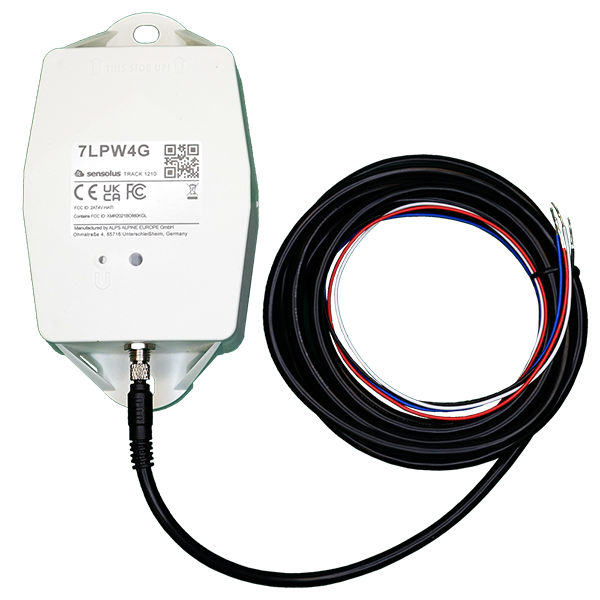
TRACK 1210 cable wiring

External power source - cable wiring

The cable provided with TRACK 1210 has a length of 2 meters. The cable allows connecting the TRACK 1210 to a power source of a vehicle (car / truck / trailer battery). A cable of 6 meters can be purchased separately.
Description: 6 meter power extension cable for TRACK 1215 / TRACK 1210
Access level: end-user
Reference: SDOC-498608282-1044
Download: PDF
September 17, 2024 1:57 PM www.sensolus.com | info@sensolus.com 6-meter power cord for TRACK 1210. CAB 8600 M5 screw Connectors to the power source can be soldered to the cable ends General specification Connector to TRACK 1210 Certifications -40°C - 85°C Temperature range Electrical specifications Rated voltage 60V AC/DC Contact resistance ≤5 mΩ 1A Rated current ≥100 MΩ Insulation resistance > 100 Mating cycles Yes RoHS The 6-meter power cable designed for use with TRACK 1210 features 4 pins and can be securely attached to the TRACK 1210. This power cable does not come with connectors for the power source. Cable terminations IP 67 when connected IP rating 4 pins Connections
The optional power source must be within the range of 10V to 30V, direct current (DC) . Be aware that you need to supply your own connectors (U-shaped or circular clamps) and solder them to the wires (reason: different vehicles batteries have different sizes of connectors). Protect the soldering using heat shrink. The external cable is composed of 4 internal wires:
  • Black : GND / Ground. Connect to black battery terminal (negative, minus sign).
  • Red : VIN External voltage in. Connect to red battery terminal (positive, plus sign).
  • Blue : Digital In / Analog In (not in use currently; pending a future firmware release).
  • White : Digital Out. (not in use currently; pending a future firmware release).