

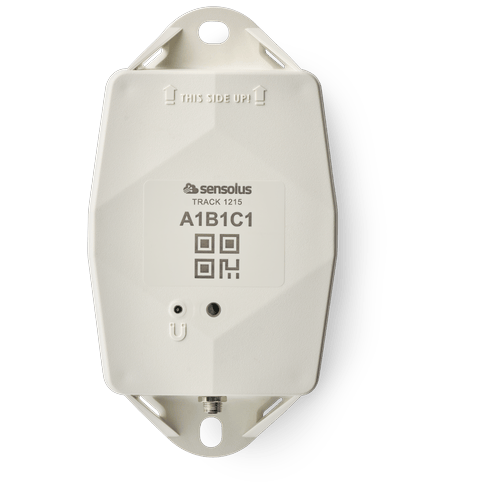
TRACK 1215 (pdf)
TRACK 1215 (pdf)
Description:
Access level: public
Reference: SDOC-498608282-1344
Download: PDF
Access level: public
Reference: SDOC-498608282-1344
Download: PDF
TRACK 1215
GNSS/Wi-Fi/BLE - NB-IoT/LTE-M
www.sensolus.com | info@sensolus.com
Deploy this tracker connected to the vehicle power
source, or only use the internal backup battery to avoid
the wiring effort. It has NB-IoT and LTE-M
connectivity and guaranteed data recovery. Provides
outdoor and indoor localization. Supports external BLE
sensors. Acts as smart BLE gateway to locate
BLE-tagged assets transported by the vehicle.
GNSS
Wi-Fi scanning
Bluetooth geobeacon for zone precision
NB-IoT
LTE-M
Connectivity EXTENDED plan
Data recovery
Large internal backup battery
IP67
IK 09
Flame retardant
130×72×36 mm
212g (7.6 oz)
Connectivity
NB-IoT and LTE-M
•
Energy efficient transceiver
•
Internal omnidirectional antenna
•
Bi-directional communication
•
Data recovery
•
OTA firmware upgrade (NB-IoT and LTE-M)
Bluetooth Low Energy (BLE)
Bluetooth Low Energy 5.0
Connectivity plan
TRACK 1215 comes with the Extended connectivity plan
Geolocalization
GNSS
Multi GNSS constellation chipset (GPS+GALILEO)
BLE Geobeacon
•
Sensolus geobeacon detection
Wi-Fi scanning
•
Wi-Fi based geolocalizationTRACK 1215
GNSS/Wi-Fi/BLE - NB-IoT/LTE-M
www.sensolus.com | info@sensolus.com
Sensing
Internal
•
Activity monitoring
•
Orientation monitoring
•
Virtual tamper detection
•
Temperature monitoring
•
range: -20°C till 60°C (-4°F to 140°F)
•
typical accuracy: +/- 0.25°C (+/- 0.45°F)
•
worst case accuracy: +/- 1°C (+/- 1.8°F)
•
Configurable shock detection
Accessory BLE sensors
•
Temperature, humidity
•
Fill level, contact, magnet
•
Other BLE sensors can be added
Activation and mounting
•
Activation manual
•
Holes 7x9mm (⁹/₃₂ * ²³/₆₄ in) for screws or rivets. 115 mm
(4¹⁷/₃₂ in) distance between the centers of the mounting
holes.
•
Instructions for mounting the device can be found here.
Mechanics & Design
Antennas
All antennas are internal
Water & dust resistance
IP67
Size
130x72x36 mm
(5⅛ x 2⁵³⁄₆₄ x 1²⁷⁄₆₄ in)
Impact resistance
IK09
Weight
218 gram (7.68 oz) without cable
Drop shock and vibration
EN 60068
Color
White and black
Operating temperature
-20°C to 60°C
(-4°F to 140°F)*
Casing
•
PBT/PC 29 TM-Z2 FR UV LS
•
Flame retardant
•
UV-stabilized
Power supply
Voltage
Input voltage: 10 - 30 V DC with overvoltage protection
Typical power consumption
~3mA (idle)
Cable terminations
Connectors to the power source can be soldered to the cable
ends
Max typical power consumption
•
300mA (@10V)
•
70mA (@30V)
Fuse recommendations
•
> 500mA and < 1A fuse
•
The TRACK 1215 contains a non-resettable 1A slow blow
fuse (Bel fuse 0685T1000) at its external power input.TRACK 1215
GNSS/Wi-Fi/BLE - NB-IoT/LTE-M
www.sensolus.com | info@sensolus.com
Back up battery
Standard 3 cell
•
Battery life depending on operating mode.
•
User replaceable battery pack (Li-SoCl₂) 12000 mAh
•
2.94 gram (0.1037oz) lithium
Certifications
Regulatory
•
CE
•
FCC
•
IC
Bluetooth 5.0
Declaration ID D068598
Environmental
Drop shock
Electrical safety
EN 62368-1
User Interaction
Device activation
Magnetic activation
LED feedback
Green & red LED feedback on the device
Synchronize remote settings
•
Instant: Magnet activation
•
Periodic: No user interaction needed
Management Services
Diagnostics
•
Battery lifetime prediction
•
Detailed energy consumption
•
Geolocation diagnostics
•
Installation
•
Communication quality
Management
•
OTA firmware updates over NB-IoT,LTE-M and BLE
•
Remote configuration
•
Tracker usage profiles
•
External environmental sensors
Application services
•
Localization
•
Journeys
•
Activity
•
Utilization
•
Connectable with environmental sensors
•
Temperature detection
•
Tilt detection
•
Shock detectionTRACK 1215
GNSS/Wi-Fi/BLE - NB-IoT/LTE-M
www.sensolus.com | info@sensolus.com
Firmware configuration
Communication service
•
Data recovery strategy
•
Communication conditions
Location service
•
Motion based,context based, periodic or scheduled
•
Configurable update rate and journey detection
•
Priority sequence (GNSS, Wi-Fi scanning , Bluetooth
geobeacon)
•
GNSS fix parameters
•
Indoor detection algo
•
Wi-Fi scan strategy
•
BLE scan strategy
General configuration
•
Rule engine configuration
•
Diagnostic levels
•
Boot methods
•
Accurate time synchronization
Orientation service
Orientation detection parameters
Environmental sensing
•
Polling and aggregation strategy
•
Alerts
•
Edge processing parameters
Activity service
Activity detection parameters
Tamper service
Virtual tamper algo configuration
Shock detection
Shock algo detection parameters
Security
•
Device unique encryption keys
•
End to end payload encryption Chacha 20
•
AES encrypted firmware
•
Firmware upgrade allows only signed firmware images
Accessories
CAB 8600: 6 m power cable for TRACK 1215
Installation manual TRACK 1215 for BLE tag scanning in vehicles (pdf)
Installation manual TRACK 1215 for BLE tag scanning in vehicles (pdf)
Description:
Access level: public
Reference: SDOC-498608282-1402
Download: PDF
Access level: public
Reference: SDOC-498608282-1402
Download: PDF
Installation manual TRACK 1215
for BLE tag scanning in vehicles
www.sensolus.com | info@sensolus.com
January 19, 2026
Tracker activation
Activation of the tracker is preferably done with clear skies, and not inside (e.g. factory or warehouse).
Trackers are not activated when delivered to your premises.
Their subscription in the platform will start within six months of purchase.
1
Hold a magnet for
about 5 seconds on
top of the logo on the
tracker.
→
2
You will first see a red
LED. Do not remove
the magnet yet.
→
3
When the green LED
is blinking you can
remove the magnet.
The tracker is ready
for use.
Activation troubleshooting
Activating a tracker that communicates over the NB-IoT network can sometimes come with a delay. With a delay we mean
that the online status doesn't appear within 5 minutes after holding the magnet to the tracker. This is mostly due to conditions
on the network operator site.
If the activation wasn't successful after 5 minutes the tracker will try again to activate again after waiting 24 hours.
This long period of time is often an obstacle to start installing trackers to assets and makes the timing of the installation of the
trackers cumbersome as it is important to only install trackers when they appeared as online on the platform.
To overcome the 24 hours waiting time, you can do the following:
If after 5 minutes of waiting and the status didn't change yet to “online” hold the magnet again for 5 seconds on top of the
tracker to enforce a new attempt for activation. Keep trying every 5 minutes until the Online status appears.
General installation advice
If your asset is handled in
a rough environment, you
can place the tracker in a
protected location, but
never with metal or
carbonfibre above the
tracker.
Place the tracker as high
as possible on the asset to
ensure good network
coverage.
Make sure the mounting
surface is flat and clean,
for a strong and durable
bond.
Do not install the tracker
on parts that receive
frequent shocks or
vibrations.
Avoid placing the tracker
in a place that can collect
water.Installation manual TRACK 1215
for BLE tag scanning in vehicles
www.sensolus.com | info@sensolus.com
January 19, 2026
Preparing the installation in the vehicle
Tools and equipment
Enough 2 wire cable
Steel fish tape
Cable duct
Male and female spade
connectors
Fork connectors
Cable protector
Wire cutter
Screwdriver
Double sided tape
Wrench set
Stanley knife
Electrical fuse (> 500mA
and < 1A)
Before the actual wiring
- The tracker should be mounted in the middle of the truck or van.
- Detect the best possible path from the vehicle's power source to the place of tracker installation. Estimate the amount of wire needed to cover the complete path.
- Make sure the 2 wire cable can pass everywhere, use the steel fish tape to test.
- Route the cable: Use the steel fish tape to pull the wire through the available shafts of the truck. Preferably work from the ground up. This might take a while, take your time. Make sure not to damage the cable.
- Prepare the cable length: Make sure there is enough 2 wired cable to go to the vehicle's power source. Do not connect anything to the power source yet.
- Protect the cable: Protect the 2 cable wire where needed: • Use cable duct and double sided tape for the inside of the van or truck. • Use cable protector for the outside of the van or truck. Cable duct inside the van or truck Cable protector outside the truck
- Install the fuse: An additional fuse (> 500mA and < 1A) can be installed. Install the fuse on the voltage in red cable in series. The tracker has an internal fuse, see specsheet for details.
- Install connectors on the vehicle wiring: Install the female spade connectors on the installed wires on the inside of the truck.
- Install connectors near the power source: Install the fork connectors to the end of the 2 wired cable near the power source. Do not attach to the battery yet.
- Install connectors on the tracker cable: Install the male spade connectors on the tracker cable. Mounting the tracker Guidelines how to mount the tracker can be found here. Mount the tracker in such a way that you have good access and a good view to the power plug of the tracker. Wrong: No view on tracker plug Correct: Good view on tracker plug Power the tracker Attach the fork connectors to the vehicle's battery. The tracker is now powered.
- Put the magnet on the tracker for less than 5 seconds
- The possible LED feedback options are: Red LED: Tracker is not activated Green LED: Tracker is activated and working properly No LED: Tracker is not functioning (probably dead battery -> contact support) Red LED is blinking: Tracker is busy
- This device may not cause harmful interference, and
- This device must accept any interference received, including interference that may cause undesired operation. This equipment has been tested and found to comply with the limits for a Class B digital device, pursuant to Part 15 of the FCC Rules. These limits are designed to provide reasonable protection against harmful interference in a residential installation. This equipment generates, uses and can radiate radio frequency energy and, if not installed and used in accordance with the instructions, may cause harmful interference to radio communications. However, there is no guarantee that interference will not occur in a particular installation. If this equipment does cause harmful interference to radio or television reception, which can be determined by turning the equipment off and on, the user is encouraged to try to correct the interference by one of the following measures: • Reorient or relocate the receiving antenna. • Increase the separation between the equipment and receiver. • Connect the equipment into an outlet on a circuit different from that to which the receiver is connected. • Consult the dealer or an experienced radio/TV technician for help. FCC Caution: Any changes or modifications not expressly approved by the party responsible for compliance could void the user's authority to operate this equipment. This transmitter must not be co-located or operating in conjunction with any other antenna or transmitter. Radiation Exposure Statement: This equipment complies with FCC radiation exposure limits set forth for an uncontrolled environment. This equipment should be installed and operated with minimum distance 20cm between the radiator & your body. This equipment is not suitable for use in locations where children are likely to be present. Industry Canada Statement This device complies with ISED's licence-exempt RSSs. Operation is subject to the following two conditions: This device may not cause harmful interference, and This device must accept any interference received, including interference that may cause undesired operation. Under Industry Canada regulations, this radio transmitter may only operate using an antenna of a type and maximum (or lesser) gain approved for the transmitter by Industry Canada. To reduce potential radio interference to other users, the antenna type and its gain should be chosen so that the equivalent isotropically radiated power (e.i.r.p.) is not more than that necessary for successful communication. RF Exposure Requirements: This equipment complies with Canada radiation exposure limits set forth for an uncontrolled environment. This equipment should be installed and operated with minimum distance 20cm between the radiator and your body. Le présent appareil est conforme aux CNR d' ISED applicables aux appareils radio exempts de licence. L'exploitation est autorisée aux deux conditions suivantes:
- le dispositif ne doit pas produire de brouillage préjudiciable, et
- ce dispositif doit accepter tout brouillage reçu, y compris un brouillage susceptible de provoquer un fonctionnement indésirable. Conformément à la réglementation d'Industrie Canada, le présent émetteur radio peut fonctionner avec une antenne d'un type et d'un gain maximal (ou inférieur) approuvé pour l'émetteur par Industrie Canada. Dans le but de réduire les risques de brouillage radio électrique à l'intention des autres utilisateurs, il faut choisir le type d'antenne et son gain de sorte que la puissance isotrope rayonnée équivalente (p.i.r.e.) ne dépasse pas l'intensité nécessaire à l'établissement d'une communication satisfaisante. Déclaration d'exposition aux radiations: Cet équipement est conforme aux limites d'exposition aux rayonnements du Canada établies pour un environnement non contrôlé. Cet équipement doit être installé et utilisé avec un minimum de 20 cm de distance entre la source de rayonnement et votre corps.
Installation manual TRACK 1215 (pdf)
Installation manual TRACK 1215 (pdf)
Description:
Access level: public
Reference: SDOC-498608282-1403
Download: PDF
Access level: public
Reference: SDOC-498608282-1403
Download: PDF
Installation manual TRACK 1215
www.sensolus.com | info@sensolus.com
January 19, 2026
Tracker activation
Activation of the tracker is preferably done with clear skies, and not inside (e.g. factory or warehouse).
Trackers are not activated when delivered to your premises.
Their subscription in the platform will start within six months of purchase.
1
Hold a magnet for
about 5 seconds on
top of the logo on the
tracker.
→
2
You will first see a red
LED. Do not remove
the magnet yet.
→
3
When the green LED
is blinking you can
remove the magnet.
The tracker is ready
for use.
Activation troubleshooting
Activating a tracker that communicates over the NB-IoT network can sometimes come with a delay. With a delay we mean
that the online status doesn't appear within 5 minutes after holding the magnet to the tracker. This is mostly due to conditions
on the network operator side.
If the activation wasn't successful after 5 minutes the tracker will try to activate again after waiting 24 hours.
This long period of time is often an obstacle to start installing trackers to assets and makes the timing of the installation of the
trackers cumbersome as it is important to only install trackers when they appeared as online on the platform.
To overcome the 24 hours waiting time, you can do the following:
If after 5 minutes the status still hasn't changed to “online”, hold the magnet again for 5 seconds on top of the tracker to force
a new activation attempt. Keep trying every 5 minutes until the online status appears.
General installation advice
If your asset is handled in
a rough environment, you
can place the tracker in a
protected location, but
never with metal or
carbon fibre above the
tracker.
Place the tracker as high
as possible on the asset to
ensure good network
coverage.
Make sure the mounting
surface is flat and clean,
for a strong and durable
bond.
Do not install the tracker
on parts that receive
frequent shocks or
vibrations.
Avoid placing the tracker
in a place that can collect
water.Installation manual TRACK 1215
www.sensolus.com | info@sensolus.com
January 19, 2026
Mount the tracker onto the vehicle
Guidelines how to mount the tracker can be found here. Mount the tracker in such a way you have good access and a good
view to the power plug of the tracker.Installation manual TRACK 1215
www.sensolus.com | info@sensolus.com
January 19, 2026
1
Put the cable onto the
connector. Only the
black plastic piece will
go into the connector.
Do not force this.
→
2
Tighten the
connection by gently
screwing the cable
into the connector.
Do not force this.
→
3
Check if the power
cable is connected
well.
The tracker cable
The tracker has an internal fuse (see the spec sheet for details). An additional external fuse (> 500mA and < 1A) can be
installed in series on the red wire — this is done during wiring, see the steps below.
The external cable is composed of 4 internal wires:
• Black: GND / Ground. Connect to black battery terminal (negative, minus sign).
• Red: VIN External voltage in. Connect to red battery terminal (positive, plus sign).
• Blue: Digital In / Analog In (not in use currently; pending a future firmware release).
• White: Digital Out (not in use currently; pending a future firmware release).Installation manual TRACK 1215
www.sensolus.com | info@sensolus.com
January 19, 2026
Connect tracker to the vehicle power source
Wiring to a battery
Locate the battery of the trailer or truck and find the ground and power cable. See if you can cut them:
• If you can cut them, you do not need the fork connectors. Follow Option A.
• If you cannot cut them, you need to use the fork connectors. Follow Option B.
#### Option A: Cut the power and ground wires
What do you need?
• Enough 2-wire cable
• Wire stripper
• Heat shrink tubing
• Heat shrink tubing cable lugs
• Tie wraps
• Multi-crimp tool
• Heat gun
• Electrical fuse (> 500mA and < 1A)
- Find the power and ground cable that come from the battery and cut them.
- Strip the cut cable ends for at least 1 cm.
- Install the fuse (> 500mA and < 1A) in series on the red (power) wire.
- Add the ground cable (black) of the tracker to the ground cable of the battery and add the power cable (red) to the power cable of the battery.
- Put around 5 cm of heat shrink tubing over the cables.
- Reconnect the cut cables with heat shrink tubing cable lugs using the multi-crimp tool.
- Seal everything closely by heating the shrink tubes with a heat gun. #### Option B: Use fork connectors What do you need? • Enough 2-wire cable • Fork connectors • Wire stripper • Heat shrink tubing • Heat shrink tubing cable lugs • Tie wraps • Multi-crimp tool • Electrical fuse (> 500mA and < 1A) • Heat gun Choose a good place to mount the tracker and measure the length of the wire you need. The TRACK 1215 comes standard with a 2 meter long cable.
- Find the power and ground terminal on the battery and check if the fork connectors fit the terminals.
- Strip the 2-wire cable at both ends for at least 1 cm.
- Attach the fork connectors to one end of the 2-wire cable — one connector for ground, one for power. Seal securely with heat shrink tubing using the heat gun. Do not fix the fork connectors on the battery yet.
- Install the fuse (> 500mA and < 1A) in series on the red (power) wire.
- Take the heat shrink tubing cable lugs. Put the other side of the cable and the wires of the connector cable to the tracker in them. Use the multi-crimp tool to tighten. Cover the connection with heat shrink tubing and seal them with the heat gun.
- Plug in the connector to the mounted tracker.
- Make sure the wires are in place using the tie wraps.
- Connect the fork connectors to the battery. Wiring to trailer lights In this example the tracker will only be powered by the external power source when it is switched on. In all other cases the tracker will use its backup battery. What do you need? • Wire stripper • Heat shrink tubing • Heat shrink tubing cable lugs • Tie wraps • Multi-crimp tool • Heat gun • Electrical fuse (> 500mA and < 1A)
- Find the power and ground cable of the trailer lights of the truck and cut them.
- Strip the cut cable ends for at least 1 cm.
- Install the fuse (> 500mA and < 1A) in series on the red (power) wire.
- Add the ground cable (black) of the tracker to the ground cable of the trailer lights and add the power cable (red) to the power cable of the trailer lights.
- Put around 5 cm of heat shrink tubing over the cables.
- Reconnect the cut cables with heat shrink tubing cable lugs using the multi-crimp tool.
- Seal everything closely by heating the shrink tubes with a heat gun. Force new configuration download on the tracker A new configuration can be downloaded to the tracker. Queue the configuration in the Sensolus platform first.
- Put the magnet on the tracker for less than 5 seconds
- The possible LED feedback options are: Red LED: Tracker is not activated Green LED: Tracker is activated and working properly No LED: Tracker is not functioning (probably dead battery -> contact support) Red LED is blinking: Tracker is busy
- This device may not cause harmful interference, and
- This device must accept any interference received, including interference that may cause undesired operation. This equipment has been tested and found to comply with the limits for a Class B digital device, pursuant to Part 15 of the FCC Rules. These limits are designed to provide reasonable protection against harmful interference in a residential installation. This equipment generates, uses and can radiate radio frequency energy and, if not installed and used in accordance with the instructions, may cause harmful interference to radio communications. However, there is no guarantee that interference will not occur in a particular installation. If this equipment does cause harmful interference to radio or television reception, which can be determined by turning the equipment off and on, the user is encouraged to try to correct the interference by one of the following measures: • Reorient or relocate the receiving antenna. • Increase the separation between the equipment and receiver. • Connect the equipment into an outlet on a circuit different from that to which the receiver is connected. • Consult the dealer or an experienced radio/TV technician for help. FCC Caution: Any changes or modifications not expressly approved by the party responsible for compliance could void the user's authority to operate this equipment. This transmitter must not be co-located or operating in conjunction with any other antenna or transmitter. Radiation Exposure Statement: This equipment complies with FCC radiation exposure limits set forth for an uncontrolled environment. This equipment should be installed and operated with minimum distance 20cm between the radiator & your body. This equipment is not suitable for use in locations where children are likely to be present. Industry Canada Statement This device complies with ISED's licence-exempt RSSs. Operation is subject to the following two conditions:
- This device may not cause harmful interference, and
- This device must accept any interference received, including interference that may cause undesired operation. Under Industry Canada regulations, this radio transmitter may only operate using an antenna of a type and maximum (or lesser) gain approved for the transmitter by Industry Canada. To reduce potential radio interference to other users, the antenna type and its gain should be chosen so that the equivalent isotropically radiated power (e.i.r.p.) is not more than that necessary for successful communication. RF Exposure Requirements: This equipment complies with Canada radiation exposure limits set forth for an uncontrolled environment. This equipment should be installed and operated with minimum distance 20cm between the radiator and your body. Le présent appareil est conforme aux CNR d' ISED applicables aux appareils radio exempts de licence. L'exploitation est autorisée aux deux conditions suivantes:
- le dispositif ne doit pas produire de brouillage préjudiciable, et
- ce dispositif doit accepter tout brouillage reçu, y compris un brouillage susceptible de provoquer un fonctionnement indésirable. Conformément à la réglementation d'Industrie Canada, le présent émetteur radio peut fonctionner avec une antenne d'un type et d'un gain maximal (ou inférieur) approuvé pour l'émetteur par Industrie Canada. Dans le but de réduire les risques de brouillage radio électrique à l'intention des autres utilisateurs, il faut choisir le type d'antenne et son gain de sorte que la puissance isotrope rayonnée équivalente (p.i.r.e.) ne dépasse pas l'intensité nécessaire à l'établissement d'une communication satisfaisante. Déclaration d'exposition aux radiations: Cet équipement est conforme aux limites d'exposition aux rayonnements du Canada établies pour un environnement non contrôlé. Cet équipement doit être installé et utilisé avec un minimum de 20 cm de distance entre la source de rayonnement et votre corps. Safety advice – device subjected to strong mechanical impact Risk of delayed battery failure and chemical hazard If a device has been hit, crushed, or struck by a heavy object (for example a forklift, container, pallet, or falling load), the internal components and battery may be damaged even if no external damage is visible. Such damage can result in delayed overheating, leakage, or failure.
TRACK 1215 cable wiring
External power source - cable wiring
The cable provided with TRACK 1215 has a length of 2 meters. The cable allows connecting the tracker to a power source of a vehicle (car / truck / trailer battery). A cable of 6 meters can be purchased separately.6 meter power extension cable for TRACK 1215 / TRACK 1210 (pdf)
6 meter power extension cable for TRACK 1215 / TRACK 1210 (pdf)
Description: 6 meter power extension cable for TRACK 1215 / TRACK 1210
Access level: public
Reference: SDOC-498608282-1044
Download: PDF
Access level: public
Reference: SDOC-498608282-1044
Download: PDF
September 17, 2024 1:57 PM
www.sensolus.com | info@sensolus.com
6-meter power cord for TRACK 1210.
CAB 8600
M5 screw
Connectors to the power source can be soldered to the cable
ends
General specification
Connector to TRACK 1210
Certifications
-40°C - 85°C
Temperature range
Electrical specifications
Rated voltage
60V AC/DC
Contact resistance
≤5 mΩ
1A
Rated current
≥100 MΩ
Insulation resistance
> 100
Mating cycles
Yes
RoHS
The 6-meter power cable designed for use with TRACK 1210 features 4 pins and can be
securely attached to the TRACK 1210. This power cable does not come with connectors for
the power source.
Cable terminations
IP 67 when connected
IP rating
4 pins
Connections
- Black : GND / Ground. Connect to black battery terminal (negative, minus sign).
- Red : VIN External voltage in. Connect to red battery terminal (positive, plus sign).
- Blue : Digital In / Analog In (not in use currently; pending a future firmware release).
- White : Digital Out. (not in use currently; pending a future firmware release).