> ## Documentation Index
> Fetch the complete documentation index at: https://doc.sensolus.com/llms.txt
> Use this file to discover all available pages before exploring further.

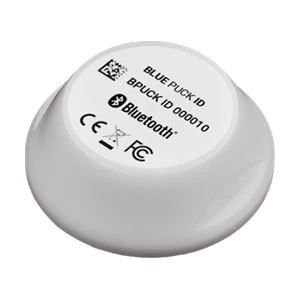
# TAG 2002

> TAG 2002

export const HeaderBadge = ({type, checkDms = false}) => {
  function addGroupBadge(h1Id) {
    const h1Element = document.getElementById(h1Id);
    if (!h1Element) {
      console.error(`Element with ID "${h1Id}" not found`);
      return;
    }
    if (h1Element.querySelector('.header-badge')) {
      console.warn('Header badge already exists on this element');
      return;
    }
    const badge = document.createElement('span');
    badge.className = 'header-badge';
    var badgeText;
    var badgeColor;
    switch (type) {
      case 'public':
        badgeText = 'Public';
        badgeColor = '#858585ff';
        break;
      case 'end-user':
        badgeText = 'End-User';
        badgeColor = '#0071a1';
        break;
      case 'multi-org':
        badgeText = 'Multi-Org';
        badgeColor = '#0071a1';
        break;
      case 'partner':
        badgeText = 'Partner';
        badgeColor = '#0071a1';
        break;
      case 'partner-pricing-eu':
        badgeText = 'Partner-EU';
        badgeColor = '#0071a1';
        break;
      case 'partner-pricing-us':
        badgeText = 'Partner-US';
        badgeColor = '#0071a1';
        break;
      case 'partner-pricing-world':
        badgeText = 'Partner-World';
        badgeColor = '#0071a1';
        break;
      case 'sensolus-internal':
        badgeText = 'Sensolus only';
        badgeColor = '#ffa858';
        break;
      default:
        badgeText = type;
        badgeColor = '#ffa858';
    }
    badge.textContent = badgeText;
    badge.style.cssText = `
        background-color: ${badgeColor};
        color: white;
        padding: 0.3em 0.8em 0.3em 0.8em;
        border-radius: 6px;
        font-size: 0.4em;
        margin-left: 20px;
        vertical-align: middle;
    `;
    h1Element.appendChild(badge);
  }
  function checkDocumentationServerAccess(type) {
    fetch('https://cloud.sensolus.com/documentation/user', {
      method: 'GET',
      headers: {
        'Accept': 'application/json'
      },
      credentials: 'include'
    }).then(response => {
      if (!response.ok) {
        console.error('Could not fetch documentation server user:', response);
      }
      return response.json();
    }).then(user => {
      const compatibleGroups = {
        "NORMAL": ["end-user", "public"],
        "PUBLIC": ["public"],
        "PARTNER": ["partner", "public", "end-user", "multi-org"],
        "MULTI_ORG": ["multi-org", "public", "end-user"],
        "SYSTEM": ["public", "end-user", "multi-org", "partner", "sensolus-internal"]
      };
      const allowedGroups = compatibleGroups[user.orgType] || [];
      const compatiblePriceListGroups = {
        "EU": ["partner-pricing-eu"],
        "US": ["partner-pricing-us"],
        "WORLD": ["partner-pricing-eu", "partner-pricing-us", "partner-pricing-world"]
      };
      allowedGroups.push(...compatiblePriceListGroups[user.orgType === "SYSTEM" ? "WORLD" : user.priceList] || []);
      if (!allowedGroups.includes(type)) {
        if (user.orgType === 'PUBLIC') {
          window.location.href = '/login?redirect=' + encodeURIComponent(window.location.pathname);
        } else {
          window.location.href = '/logout';
        }
      }
      addGroupBadge("page-title");
    }).catch(error => {
      console.error('Could not fetch documentation server user:', error);
      addGroupBadge("page-title");
    });
  }
  useEffect(() => {
    console.info("adding badge");
    addGroupBadge("page-title");
  });
  useEffect(() => {
    console.info("checking server access for type" + type);
    if (type && type !== 'public' && checkDms) {
      checkDocumentationServerAccess(type);
    }
  }, [type]);
  return <></>;
};

<HeaderBadge type={'public'} checkDms={false} />

<Frame>
  <img src="https://mintcdn.com/sensolus/g6Vof8Tz-uQUuC4v/docs/spec_sheets/trackers/images/TAG-2002.png?fit=max&auto=format&n=g6Vof8Tz-uQUuC4v&q=85&s=5a627657f6ead704cd93ccd400b56bc7" width="200" data-path="docs/spec_sheets/trackers/images/TAG-2002.png" />
</Frame>

<AccordionGroup>
  <Accordion title="TAG 2002 installation and activation manual EN (pdf)" icon="file">
    **Description**: <br />
    **Access level**: public<br />
    **Reference**: SDOC-498608282-90<br />
    **Download**:  [PDF](https://cloud.sensolus.com/documentation/dms/SDOC-498608282-90)

    <iframe src="https://cloud.sensolus.com/documentation/dms/SDOC-498608282-90?viewer=true" style={{width: '100%', height: '881px', border: 'none', margin: 0, padding: 0}} />

    <div style={{display: "none"}} data-pdf-text="true">
      [www.sensolus.com](http://www.sensolus.com) | [info@sensolus.com](mailto:info@sensolus.com)
      Tap on the edit icon
      (    ).
      You can now edit the
      name, tags and picture
      of the tag.
      Save the setting by
      tapping the save icon
      (    ).
      Activation and installation manual for TAG 2002
      Activation of the TAG 2002
      Download and install the Sensolus app from the Apple or Android store. Log
      in to the app with your Sensolus credentials.
      Adjust the settings of the Bluetooth tag tracker
      Click on the search bar.
      Click on the barcode
      icon next to the search
      bar. The camera of your
      phone will open.
      Scan the Barcode
      printed on the front of
      the BLE tracker.
      Click on your tracker
      that will appear in
      your screen to go to
      settings.

      [www.sensolus.com](http://www.sensolus.com) | [info@sensolus.com](mailto:info@sensolus.com)
      Installing with double sided tape
      Cleaning the surfaces
      Clean the area on the asset where you
      want to add the tag and also the back
      side of the tag to get rid of any grease/
      oil.
      Sand both surfaces lightly for a few
      seconds to increase surface area.
      Clean it again to remove the dust.
      Installing the Tag 2002
      Add the double sided adhesive tape to
      the tag.
      Push the tracker into place and push on
      the tracker\&#39;s top to ensure it is mounted
      properly.
    </div>
  </Accordion>

  <Accordion title="TAG 2002 (NL) (pdf)" icon="file">
    **Description**: <br />
    **Access level**: public<br />
    **Reference**: SDOC-498608282-1525<br />
    **Download**:  [PDF](https://cloud.sensolus.com/documentation/dms/SDOC-498608282-1525)

    <iframe src="https://cloud.sensolus.com/documentation/dms/SDOC-498608282-1525?viewer=true" style={{width: '100%', height: '881px', border: 'none', margin: 0, padding: 0}} />

    <div style={{display: "none"}} data-pdf-text="true">
      TAG 2002
      BLE locatie-tag tracker
      [www.sensolus.com](http://www.sensolus.com) | [info@sensolus.com](mailto:info@sensolus.com)
      Robuuste locatie-tag tracker voor betrouwbare,
      langdurige asset tracking in zware omgevingen. Met
      Bluetooth Low Energy (BLE)-technologie maakt hij de
      lokalisatie van assets mogelijk wanneer ze zich binnen
      bereik bevinden van Sensolus-apparaten met slimme
      BLE-gateway-mogelijkheden.
      BLE iBeacon-advertentie
      Tot 10 jaar batterijlevensduur
      IP69K-gecertificeerd
      Ø 57mm × 20mm
      41g
      Connectiviteit
      Technologie
      Bluetooth Low Energy (BLE) iBeacon
      Transmissiebereik
      50 meter of meer bij +4 dBm zendvermogen. Het
      daadwerkelijke detectiebereik wordt sterk beïnvloed door de
      fysieke omgeving.
      Mechanica & Design
      Afmetingen
      Ø 57 mm basis, 20 mm dikte
      Gewicht
      41 gram
      Kleur
      Wit
      Behuizingsmateriaal
      DELRIN (POM C) - Geschikt voor contact met levensmiddelen
      (90/128/EEG)
      Water- en stofweerstand
      IP69K
      Bedrijfstemperatuur
      -40°C tot +85°C
      Voeding
      Batterijtype
      Niet-vervangbare interne lithiumbatterij (3 VDC)
      Batterijlevensduur
      Tot 10 jaar. De daadwerkelijke batterijlevensduur kan worden
      verkort door extreme temperaturen.
      Certificeringen
      Europa
      CE: EN 300 328 / EN 301 489 & EN 55032 / EN 62368-1
      VS
      FCC: 15.247 / FCC PT 15B
      Canada
      ISED: RSS-247 / ICES-003
      Milieu
      RoHS-conform
    </div>
  </Accordion>
</AccordionGroup>

Zie de [installatie-instructies](/nl/docs/spec_sheets/installation_instructions).
