

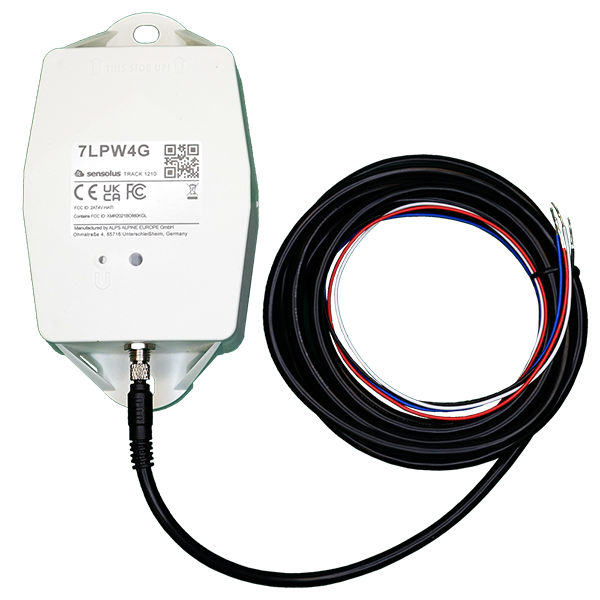
Installation manual of TRACK 1210. (pdf)
Installation manual of TRACK 1210. (pdf)
Description: Installation manual of TRACK 1210.
Access level: end-user
Reference: SDOC-498608282-1041
Download: PDF
Access level: end-user
Reference: SDOC-498608282-1041
Download: PDF
www.sensolus.com | info@sensolus.com
August 18, 2025 3:52 PM
Installation and activation manual TRACK 1210
- Activation of the tracker Hold a magnet for about 5 seconds on top of the logo on the tracker. You will first see a red LED. Do not remove the magnet yet. When the green LED is blinking you can remove the magnet. The tracker is ready for use. Activation of the tracker is preferably done with clear skies, and not inside (e.g. factory or warehouse). Trackers are not activated when delivered to your premises. Their subscription in the platform will start within six month of purchase. Activation troubleshooting Activating a tracker that communicates over the NB-IoT network can sometimes come with a delay. With a delay we mean that the online status doesn't appear within 5 minutes after holding the magnet to the tracker. This is mostly due to conditions on the network operator site. If the activation wasn't successful after 5 minutes the tracker will try again to activate again after waiting 24 hours. This long period of time is often an obstacle to start installing trackers to assets and makes the timing of the installation of the trackers cumbersome as it is important to only install trackers when they appeared as online on the platform. To overcome to 24 hours waiting time, you can do the following: if after 5 minutes of waiting and the status didn't change yet to “online'' hold the magnet again for 5 seconds on top of the tracker to enforce a new attempt for activation. Keep trying every 5 minutes until the Online status appears.
- Put the magnet on the tracker for less than 5 seconds
- The possible LED feedback options are: Red LED: Tracker is not activated Green LED: Tracker is activated and working properly No LED: tracker is not functioning (probably dead battery -> contact support) Red LED is blinking: Tracker is busy
- Installation for shock detection For shock sensing the installation of the way the tracker is installed is important. Testing on real assets is required before you can use the embedded shock sensor.
- Installation for trailers and cooling trucks Place the tracker as high as possible on the asset to ensure good network coverage. Do not install on the chassis or parts with heavy vibration.
EOL TRACK1210 ZA3510 notice (pdf)
EOL TRACK1210 ZA3510 notice (pdf)
Description: End-of-life notification for the TRACK 1210 and ZA 3510
Access level: partner
Reference: SDOC-498608282-1318
Download: PDF
Access level: partner
Reference: SDOC-498608282-1318
Download: PDF
Ghent, 12/dec, 2025
Dear Partner, Valued Customer,This letter is the official notification that the following products will be discontinued as
detailed below:Product types:
TRACK 1210 Vehicle tracker with external power option (NB-IOT only) ZA 3510
Zone Anchor with external power option (NB-IOT only)Reason / background: End-of-Life of the product has been decided by product management. They are replaced by the NB-IOT/LTE-M combo products (see below).Replacement products: TRACK 1215 Vehicle tracker with external power option (NB-IOT/LTE-M) ZA 3515
Zone Anchor with external power option (NB-IOT/LTE-M)Thank you for reviewing the above information. Should you have any questions, please contact the Sensolus representative in your area.Johan Criel
CTO and Product Lead at Sensolus
TRACK 1210 Vehicle tracker with external power option (NB-IOT only) ZA 3510
Zone Anchor with external power option (NB-IOT only)Reason / background: End-of-Life of the product has been decided by product management. They are replaced by the NB-IOT/LTE-M combo products (see below).Replacement products: TRACK 1215 Vehicle tracker with external power option (NB-IOT/LTE-M) ZA 3515
Zone Anchor with external power option (NB-IOT/LTE-M)Thank you for reviewing the above information. Should you have any questions, please contact the Sensolus representative in your area.Johan Criel
CTO and Product Lead at Sensolus
TRACK 1210 (NL) (pdf)
TRACK 1210 (NL) (pdf)
Description:
Access level: public
Reference: SDOC-498608282-1552
Download: PDF
Access level: public
Reference: SDOC-498608282-1552
Download: PDF
TRACK 1210
GNSS/Wi-Fi/BLE - NB-IoT
www.sensolus.com | info@sensolus.com
De robuuste low-power tracker kan worden
aangesloten op een externe voedingsbron. De tracker
beschikt over NB-IoT-connectiviteit en gegarandeerde
gegevensherstel. De tracker biedt algemene lokalisatie,
zone- en hoge-precisielokalisatie. De tracker is
uitgerust met een ingebouwde temperatuursensor en
schokdetectie. Compatibel met meerdere externe
omgevingssensoren. De trackerfirmware kan
draadloos worden bijgewerkt.
GNSS
Wi-Fi scanning
Bluetooth geobeacon voor zoneprecisie
NB-IoT
Europa en Noord-Amerika
Gegevensherstel
Tot 12 jaar back-upbatterij
IP67
IK 09
Vlamvertragend
130×72×36 mm
212 g (7,6 oz)
Connectiviteit
NB-IoT
•
Energiezuinige transceiver
•
Interne omnidirectionele antenne
•
Bidirectionele communicatie
•
NB-IoT-banden: Europa en Noord-Amerika
•
Gegevensherstel
•
OTA-firmware-upgrade (NB-IoT)
Bluetooth Low Energy (BLE)
Bluetooth Low Energy 5.0
Geolokalisatie
GNSS
Multi-GNSS-constellatiechipset (GPS+GALILEO)
BLE
•
Sensolus nabijheidsbeacondetectie
•
Detecteerbaar door zone- en hoge-precisie-ankers
Wi-Fi scanning
•
Wi-Fi-gebaseerde geolokalisatie
•
Wi-Fi 2,4 GHzTRACK 1210
GNSS/Wi-Fi/BLE - NB-IoT
www.sensolus.com | info@sensolus.com
Sensoriek
Intern
•
Activiteitsbewaking
•
Oriëntatiebewaking
•
Virtuele sabotagedetectie
•
Temperatuurbewaking
•
Bereik: -20°C tot 60°C (-4°F tot 140°F)
•
Typische nauwkeurigheid: +/- 0,25°C (+/- 0,45°F)
•
Nauwkeurigheid in het slechtste geval: +/- 1°C (+/-
1,8°F)
•
Configureerbare schokdetectie
Aansluitbare BLE-omgevingssensoren
•
Temperatuur, vochtigheid
•
Vulniveau, contact, magneet
•
Andere BLE-sensoren kunnen worden toegevoegd
Activering en montage
•
Activeringshandleiding
•
Gaten 7x9 mm (⁹/₃₂ * ²³/₆₄ in) voor schroeven of
klinknagels. 115 mm (4¹⁷/₃₂ in) afstand tussen de
middelpunten van de bevestigingsgaten.
•
Instructies voor het monteren van het apparaat zijn hier te
vinden.
Mechanica en ontwerp
Antennes
Alle antennes zijn intern
Water- en stofbestendigheid
IP67
Afmetingen
130x72x36 mm
(5⅛ x 2⁵³⁄₆₄ x 1²⁷⁄₆₄ in)
Stootbestendigheid
IK09
Gewicht
218 gram (7,68 oz) zonder kabel
Valschok en trillingen
EN 60068
Kleur
Wit en zwart
Bedrijfstemperatuur
-20°C tot 60°C
(-4°F tot 140°F)*
De specifieke gegevens met betrekking tot de bedrijfstemperatuur zijn
afhankelijk van de toepassing, de installatieomstandigheden en
omgevingsfactoren zoals blootstelling aan zonlicht. Neem voor meer informatie
contact op met Sensolus. De batterijlevensduur kan worden beïnvloed wanneer
apparaten gedurende langere perioden aan de uitersten van dit bereik worden
blootgesteld.
Behuizing
•
PBT/PC 29 TM-Z2 FR UV LS
•
Vlamvertragend
•
UV-gestabiliseerdTRACK 1210
GNSS/Wi-Fi/BLE - NB-IoT
www.sensolus.com | info@sensolus.com
Voeding
Spanning
Ingangsspanning: 10 - 30 V DC met overspanningsbeveiliging
Typisch stroomverbruik
~3 mA (inactief)
Kabelaansluitingen
Connectoren naar de voedingsbron kunnen aan de
kabeluiteinden worden gesoldeerd
Maximaal typisch stroomverbruik
•
300 mA (@10 V)
•
70 mA (@30 V)
Zekeringaanbevelingen
•
> 500 mA en < 1 A zekering
•
De TRACK1210 bevat een niet-herstelbare 1 A
traagzekering (Bel Fuse 0685T1000) op de externe
voedingsingang.
Back-upbatterij
Standaard 3 cellen
•
Batterijlevensduur afhankelijk van de bedrijfsmodus.
•
Door gebruiker vervangbaar batterijpakket (Li-SoCl₂)
12000 mAh
•
2,94 gram (0,1037 oz) lithium
Certificeringen
Regelgevend
•
CE
•
FCC
•
IC
Bluetooth 5.0
Declaratie-ID D068598
Omgeving
Valschok
Elektrische veiligheid
EN 62368-1
Gebruikersinteractie
Apparaatactivering
Magnetische activering
LED-feedback
Groene en rode LED-feedback op het apparaat
Externe instellingen synchroniseren
•
Direct: Magnetische activering
•
Periodiek: Geen gebruikersinteractie vereist
Beheerservices
Diagnostiek
•
Voorspelling van de batterijlevensduur
•
Gedetailleerd energieverbruik
•
Geolokalisatiediagnostiek
•
Installatie
•
Communicatiekwaliteit
Beheer
•
OTA-firmware-updates via NB-IoT en BLE
•
Externe configuratie
•
Tracker-gebruiksprofielen
•
Externe omgevingssensorenTRACK 1210
GNSS/Wi-Fi/BLE - NB-IoT
www.sensolus.com | info@sensolus.com
Applicatieservices
•
Lokalisatie
•
Ritten
•
Activiteit
•
Gebruik
•
Aansluitbaar met omgevingssensoren
•
Temperatuurdetectie
•
Kanteldetectie
•
Schokdetectie
Firmwareconfiguratie
Communicatieservice
•
Gegevensherstellingstrategie
•
Communicatievoorwaarden
Lokalisatieservice
•
Op beweging gebaseerd, contextgebaseerd, periodiek of
gepland
•
Configureerbare updatefrequentie en ritdetectie
•
Prioriteitsvolgorde (GNSS, Wi-Fi scanning, Bluetooth
geobeacon)
•
GNSS-fixparameters
•
Binnendetectie-algoritme
•
Wi-Fi-scanstrategie
•
BLE-scanstrategie
Algemene configuratie
•
Regelmotor-configuratie
•
Diagnostiekniveaus
•
Opstartmethoden
•
Nauwkeurige tijdsynchronisatie
Oriëntatieservice
Oriëntatiedetectieparameters
Omgevingssensoriek
•
Polling- en aggregatiestrategie
•
Meldingen
•
Randverwerkingsparameters
Activiteitsservice
Activiteitsdetectieparameters
Sabotageservice
Virtuele sabotage-algoritme-configuratie
Schokdetectie
Schokdetectie-algoritme-parameters
Beveiliging
•
Apparaatspecifieke versleutelingssleutels
•
End-to-end payload-versleuteling ChaCha20
•
AES-versleutelde firmware
•
Firmware-upgrade staat alleen ondertekende
firmware-images toe
Accessoires
CAB 8600: 6 m voedingskabel voor TRACK 1210
6 meter power extension cable for TRACK 1215 / TRACK 1210 (pdf)
6 meter power extension cable for TRACK 1215 / TRACK 1210 (pdf)
Description: 6 meter power extension cable for TRACK 1215 / TRACK 1210
Access level: public
Reference: SDOC-498608282-1044
Download: PDF
Access level: public
Reference: SDOC-498608282-1044
Download: PDF
September 17, 2024 1:57 PM
www.sensolus.com | info@sensolus.com
6-meter power cord for TRACK 1210.
CAB 8600
M5 screw
Connectors to the power source can be soldered to the cable
ends
General specification
Connector to TRACK 1210
Certifications
-40°C - 85°C
Temperature range
Electrical specifications
Rated voltage
60V AC/DC
Contact resistance
≤5 mΩ
1A
Rated current
≥100 MΩ
Insulation resistance
> 100
Mating cycles
Yes
RoHS
The 6-meter power cable designed for use with TRACK 1210 features 4 pins and can be
securely attached to the TRACK 1210. This power cable does not come with connectors for
the power source.
Cable terminations
IP 67 when connected
IP rating
4 pins
Connections
TRACK 1210 kabelbedrading
Externe voedingsbron - kabelbedrading
De bij de TRACK 1210 meegeleverde kabel heeft een lengte van 2 meter. De kabel maakt het mogelijk om de TRACK 1210 aan te sluiten op een voedingsbron van een voertuig (auto / vrachtwagen / trailerbatterij). Een kabel van 6 meter kan apart worden aangeschaft. De optionele voedingsbron moet binnen het bereik van 10V tot 30V, gelijkstroom (DC) liggen. Houd er rekening mee dat u zelf connectoren moet voorzien (U-vormige of ronde klemmen) en deze aan de draden moet solderen (reden: verschillende voertuigbatterijen hebben verschillende maten connectoren). Bescherm het soldeerwerk met krimpkous. De externe kabel bestaat uit 4 interne draden:- Zwart : GND / Massa. Aansluiten op de zwarte batterijaansluiting (negatief, minteken).
- Rood : VIN Externe spanning in. Aansluiten op de rode batterijaansluiting (positief, plusteken).
- Blauw : Digital In / Analog In (momenteel niet in gebruik; in afwachting van een toekomstige firmware-update).
- Wit : Digital Out. (momenteel niet in gebruik; in afwachting van een toekomstige firmware-update).