

Understanding MCP
Model Context Protocol (MCP) is an open standard that enables Large Language Models (LLMs) and AI assistants to interact with external systems and data sources. Think of it as a bridge that allows AI tools like Claude, ChatGPT, or other LLM-based assistants to directly access and manipulate data in your applications.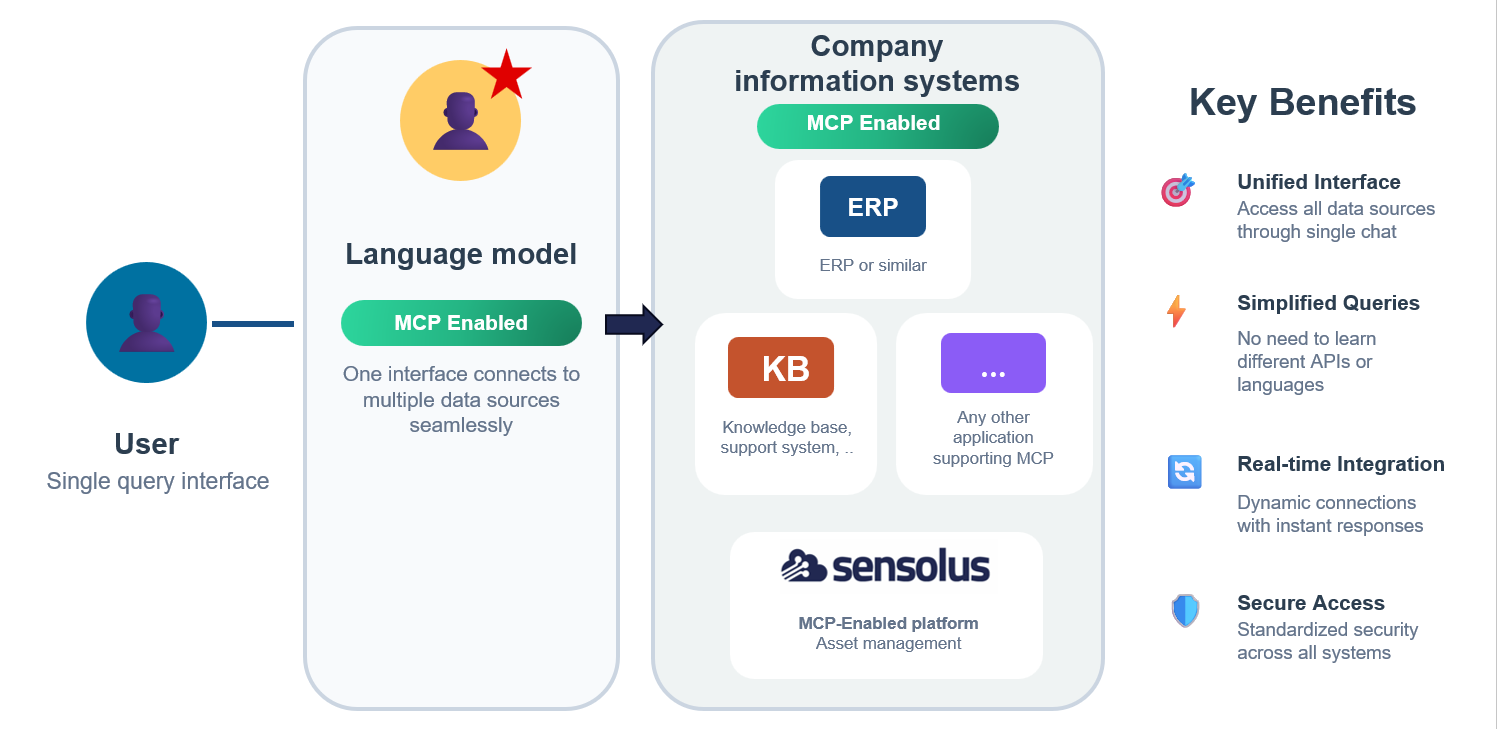
How MCP Works
Instead of copying and pasting data between your AI assistant and various systems, MCP creates a direct connection. The AI can:- Query real-time data from connected systems
- Perform actions and operations
- Aggregate and analyze information across multiple sources
- Maintain context about the systems it’s working with
The Sensolus MCP Connector
The Sensolus MCP connector provides AI assistants with comprehensive access to the Sensolus IoT platform. This enables intelligent automation, advanced analytics, and natural language interaction with your asset tracking infrastructure.Key Capabilities
The connector exposes a rich set of functions organized into several categories:Organization Management
- Query and filter organizations by various criteria (status, tracker count, metrics)
- Aggregate organization statistics and performance metrics
- Access detailed organization schemas and metadata
Device Operations
- Retrieve device states and real-time status information
- Query device messages with advanced filtering (by type, time range, signal quality)
- Access device location history and perform geographic clustering analysis
- Analyze device diagnostics including battery health, connectivity metrics, and transmission patterns
Location Intelligence
- Retrieve and analyze device location data over time periods
- Perform geographic clustering to identify frequently visited areas
- Calculate distances between locations
- Filter locations by source (GPS, WiFi, network) and state (moving, stopped)
Geofencing
- Query, create, and manage geozones
- Filter geozones by type (circle, polygon) and properties
- Perform spatial analysis with device locations
Diagnostic Analysis
- Comprehensive device health monitoring
- Transmission analysis to identify communication gaps
- Battery consumption patterns
- Network quality and connectivity metrics
- Bulk diagnostics across multiple devices
User Management
- Query user information and access patterns
- Aggregate user statistics by organization
Documentation Search
- Search through Sensolus platform documentation
- Find relevant guides and troubleshooting information
- Access technical documentation and best practices
Use Cases
The MCP connector enables powerful AI-driven workflows:- Intelligent Monitoring: “Show me all devices with battery below 20% that haven’t reported in 24 hours”
- Pattern Analysis: “Identify clusters of devices that frequently visit the same locations”
- Predictive Maintenance: “Analyze transmission patterns to predict potential device failures”
- Natural Language Queries: “Which warehouses had the most asset movements last week?”
- Automated Reporting: “Generate a summary of offline devices grouped by region”
Getting Started
To use the Sensolus MCP connector with your AI assistant:- Ensure your AI tool supports MCP (like Claude with MCP support)
- Configure the connector using OAuth2 authentication through the platform
- Start querying your IoT data using natural language