

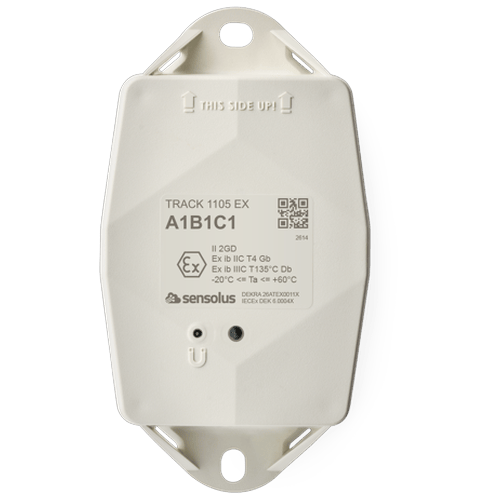
TRACK 1105 EX user manual: TRACK 1105 EX User Manual Technical data Installation guide Certifications www.sensolus.com Sensolus NV Moutstraat 54 9000 Gent Belgium UM-TRACK1105EX-001 UM-TRACK1105EX-001 www.sensolus.com © 2026 www.sensolus.com August 6, 2026 12:05 PM Version: 1.0 2 1. Revision history Contents version author publishing date reason of revision 1.0 Sensolus NV 06 August 2026 Initial version 1. Revision history 2 2. Technical data 3 3. Certifications and statements 4 4. Product information 5 4.1. Safety notice 5 4.2. Function description 5 4.3. Installation safety instructions 5 4.4.Replacing batteries 5 4.5.Label information 5 5. Special conditions of Use (X) 5 6. Device installation and mounting guide 6 6.1. Recommended installation equipment 6 6.2. Device outline and mounting 6 6.3. Mounting advice for optimal working 6 7. Tracker activation, troubleshooting and downloading a new device configuration 7 7.1. Tracker activation 7 7.2. Activation delays 7 7.3. Troubleshooting 7 7.4 Download a new configuration on the tracker 8 UM-TRACK1105EX-001 www.sensolus.com © 2026 www.sensolus.com August 6, 2026 12:05 PM Version: 1.0 3 Product TRACK 1105 EX Physical * The specifics regarding operational temperature are contingent upon the application, installation circumstances, and environmental factors such as sunlight exposure. Size 130x72x36 mm Weight 270 gram Mounting hole spacing 115 mm Environmental Operating temperature -20°C to 60°C (-4°F to 140°F) * Ingress protection IP68 & IP69K Maximum operational altitude • ATEX: 2000 m • IECEx: 4000 m Energy Battery type Li-SoCl2 Nominal battery voltage 3.6V Battery capacity 10800 mAh Replacable battery No Shock detection Range 16g GNSS Supported networks GPS + GALILEO Cellular NB-IoT frequency bands B1, B2, B3, B4, B5, B8, B12, B13, B17, B19, B20, B25, B26, B28, B65, B66, B85. B106 LTE-M frequency bands B1, B2, B3, B4, B5, B8, B12, B13, B18, B19, B20, B25, B26, B28, B66, B85, B106 Bluetooth Low Energy (BLE) Bluetooth Low Energy 5 Wi-Fi scanning Wi-Fi based geolocalization Wi-Fi 2.4 GHz Lifetime Maintenance free Up to 10 years, depending on environmental conditions and use of the device. Impact protection rating IK09 2. Technical data UM-TRACK1105EX-001 www.sensolus.com © 2026 www.sensolus.com August 6, 2026 12:05 PM Version: 1.0 4 Environment • Dust Ingress Test IP6X: EN 60529:1992+A2:2013 • Water Ingress Test IPX8: EN 60529:1992+A2:2013 • Water Ingress Test IPX9: EN 60529:1992+A2:2013 • Mechanical IMPACT IK09: EN 62262:2002+A1:2021 • Random Vibration Test: EN 60068-2-64:2008 +A1:2019 Test Fh • Mechanical Shock Test: EN 60068-2-27:2009 Test Ea • ROHS • REACH ATEX & IECEx • ATEX Certifate Number DEKRA 26ATEX0011X • IECEx Certifcate Number IECEx DEK 26.0004X • Directive 2014/34/EU • EN 60079-0 and IEC 60079-0 • EN 60079-11 and IEC 60079-11 • II 2 GD Ex ib IIC T4 Gb Ex ib IIIC T135°C Db Product safety • IEC 62368-1:2023 Radio equipment and EMC • EN 300 328 V2.2.2 • EN 301 908-1 V15.2.1 • EN 301 908-13 V13.2.1 • EN 303 413 V1.2.1 • EN 55032:2015 +A11:2020 • EN 301 489-1 V2.2.3 • EN 301 489-17 V3.2.4 • EN 301 489-19 V2.2.1 • EN 301 489-52 V1.2.1 USA FCC ID: 2AT4V-HATICOMBO This device complies with Part 15 of the FCC Rules. Operation is subject to the following two conditions: (1) this device may not cause harmful interference, and (2) this device must accept any interference received, including interference that may cause undesired operation. CAUTION TO USERS Changes or modifications not expressly approved by the party responsible for compliance could void the user`s authority to operate the equipment. Canada IC: 26629-HATICOMBO This device contains licence-exempt transmitter(s)/receiver(s) that comply with Innovation, Science and Economic Development Canada’s licence- exempt RSS(s). Operation is subject to the following two conditions: (1) This device may not cause interference. (2) This device must accept any interference, including interference that may cause undesired operation of the device. L’émetteur/récepteur exempt de licence contenu dans le présent appareil est conforme aux CNR d’Innovation, Sciences et Développement économique Canada applicables aux appareils radio exempts de licence. L’exploitation est autorisée aux deux conditions suivantes: (1) L’appareil ne doit pas produire de brouillage; (2) L’appareil doit accepter tout brouillage radioélectrique subi, même si le brouillage est susceptible d’en compromettre le fonctionnement. 3. Certifications and statements UM-TRACK1105EX-001 www.sensolus.com © 2026 www.sensolus.com August 6, 2026 12:05 PM Version: 1.0 5 4. Product information 4.1. Safety notice 1. Do not open the device. 2. Do not drop the device. 3. Do not change the batteries. 4. Do not expose device to conditions other than those in chapter “Technical Data”. 4.3. Installation safety instructions 4.2. Function description TRACK 1105 EX is rugged low-power asset tracker with NB-IoT and LTE-M connectivity and guaranteed data recovery. The tracker provides general localization, zone and high precision. TRACK 1105 EX comes with an onboard temperature sensor and shock detection. Compatible with multiple external environmental sensors. The tracker firmware can be upgraded over the air. The battery cannot be replaced and lasts around 10 years. Only permitted to install the Sensolus TRACK 1105 EX in hazardous areas applicable to the certificate . Before installing the device at the intended location, verify that drilling mounting holes will not damage the mechani cal structure of the equipment. If uncertain, consult the equipment manufacturer to determine appropriate mounting locations. Batteries cannot be replaced. 4.4.Replacing batteries 5. Special conditions of Use (X) 4.5.Label information Serial number Model WARNING – POTENTIAL ELECTROSTATIC CHARGE HAZARD • The enclosure is made of non-metallic material and may present an electrostatic charging hazard. • The equipment shall be installed as a fixed installation. • The equipment shall be installed in a location where electrostatic charge build-up is avoided (e.g. flowing dust, high air flow, rubbing surfaces). • Cleaning shall only be performed with a damp cloth. Do not clean with a dry cloth. Ex marking Certificate Manufacturing date code in YYWW format Manufacturer UM-TRACK1105EX-001 www.sensolus.com © 2026 www.sensolus.com August 6, 2026 12:05 PM Version: 1.0 6 6.2. Device outline and mounting 6.3. Mounting advice for optimal working Avoid blocking the tracker’s view with metal or carbonfibre walls. They weaken or block the radiofrequency signals. Place the tracker has high as possible on the asset to ensure good network coverage. Make sure the mounting surface is flat and clean, for a strong and durable bond. Do not install the tracker on parts that receive frequent shocks or vibrations. Install the tracker vertically, with the logo facing up. If your asset is handled in a rough environment, you can place the tracker in a protected location, but never with metal or car bonfibre above the tracker. Make sure the tracker has a clear view on the sky. Avoid placing the tracker in a place that can collect water. If you can't install vertically, do not mount the tracker upside down. It is advisable to place a thermal insulation material, such as wood or plastic, between the tracker and the metal asset if the latter is subjected to prolonged exposure to sunlight. Height Mounting hole distance (115 mm) Top of the device facing the sky Device label 6. Device installation and mounting guide Guidelines how to mount the tracker can be found in the Sensolus documentation center. Sensolus allows different mounting methods. Installation of the device must only be done by appropriately qualified personnel. 6.1. Recommended installation equipment UM-TRACK1105EX-001 www.sensolus.com © 2026 www.sensolus.com August 6, 2026 12:05 PM Version: 1.0 7 7.3. Troubleshooting 1. Put the magnet on the tracker for less than 5 seconds 2. The possible LED feedback options are: Red LED: Tracker is not activated Green LED: Tracker is activated and working properly No LED: tracker is not functioning (probably dead battery -> contact support) Red LED is blinking: Tracker is busy Activation of the trackers is preferably done with clear skies, and not inside (e.g. factory or warehouse). Trackers are not activated when delivered to your premises. Their subscription in the platform will start within six month of purchase. Hold a magnet for about 5 seconds on top of the logo on the asset tracker. 7. Tracker activation, troubleshooting and downloading a new device configuration You will first see a red LED. Do not remove the magnet yet. When the green LED is blinking you can remove the magnet. Your tracker is ready for use. Activating a tracker that communicates over the NB-IoT or LTE-M network can sometimes come with a delay. With a delay we mean that the online status doesn't appear within 5 minutes after holding the magnet to the tracker. This is mostly due to conditions on the network operator site. If the activation wasn't successful after 5 minutes the tracker will try again to activate again after waiting 24 hours. This long period of time is often an obstacle to start installing trackers to assets and makes the timing of the installation of the trackers cumbersome as it is important to only install trackers when they appeared as online on the platform. To overcome to 24 hours waiting time, you can do the following: if after 5 minutes of waiting and the status didn't change yet to “online'' hold the magnet again for 5 seconds on top of the tracker to enforce a new attempt for activation. Keep trying every 5 minutes until the Online status appears. 7.1. Tracker activation 7.2. Activation delays UM-TRACK1105EX-001 www.sensolus.com © 2026 www.sensolus.com August 6, 2026 12:05 PM Version: 1.0 8 7.4 Download a new configuration on the tracker You will see a green LED. You will see a red and green Hold a magnet for about 5 seconds on top of the logo on LED. the asset tracker. Now remove the Magnet Green LED is blinking for minimum 30 seconds. Your tracker is checking for new configurations You see a red LED: No new configuration received You see a green LED: New configuration setting receivedSensolus drill hole template: 115 mm Drilling hole patterns for TRACK 1000 1001 1040 1100 Do not scale this drawing! Print on A4 paper