

TRACK 1115 WL (NL) (pdf)
TRACK 1115 WL (NL) (pdf)
Description:
Access level: public
Reference: SDOC-498608282-1621
Download: PDF
Access level: public
Reference: SDOC-498608282-1621
Download: PDF
TRACK 1115 WL
GNSS/Wi-Fi/BLE - NB-IoT/LTE-M
www.sensolus.com | info@sensolus.com
De compacte tracker met laag stroomverbruik en lange
batterijduur. Lokalisatie binnen en buiten, zone- en
hoognauwkeurig. Compatibel met meerdere externe
omgevingssensoren.
GNSS
Wi-Fi scanning
Bluetooth geobeacon voor zoneprecisie
NB-IoT
LTE-M
Europa en Noord-Amerika
Dataherstel
IP68
Vlamvertragend
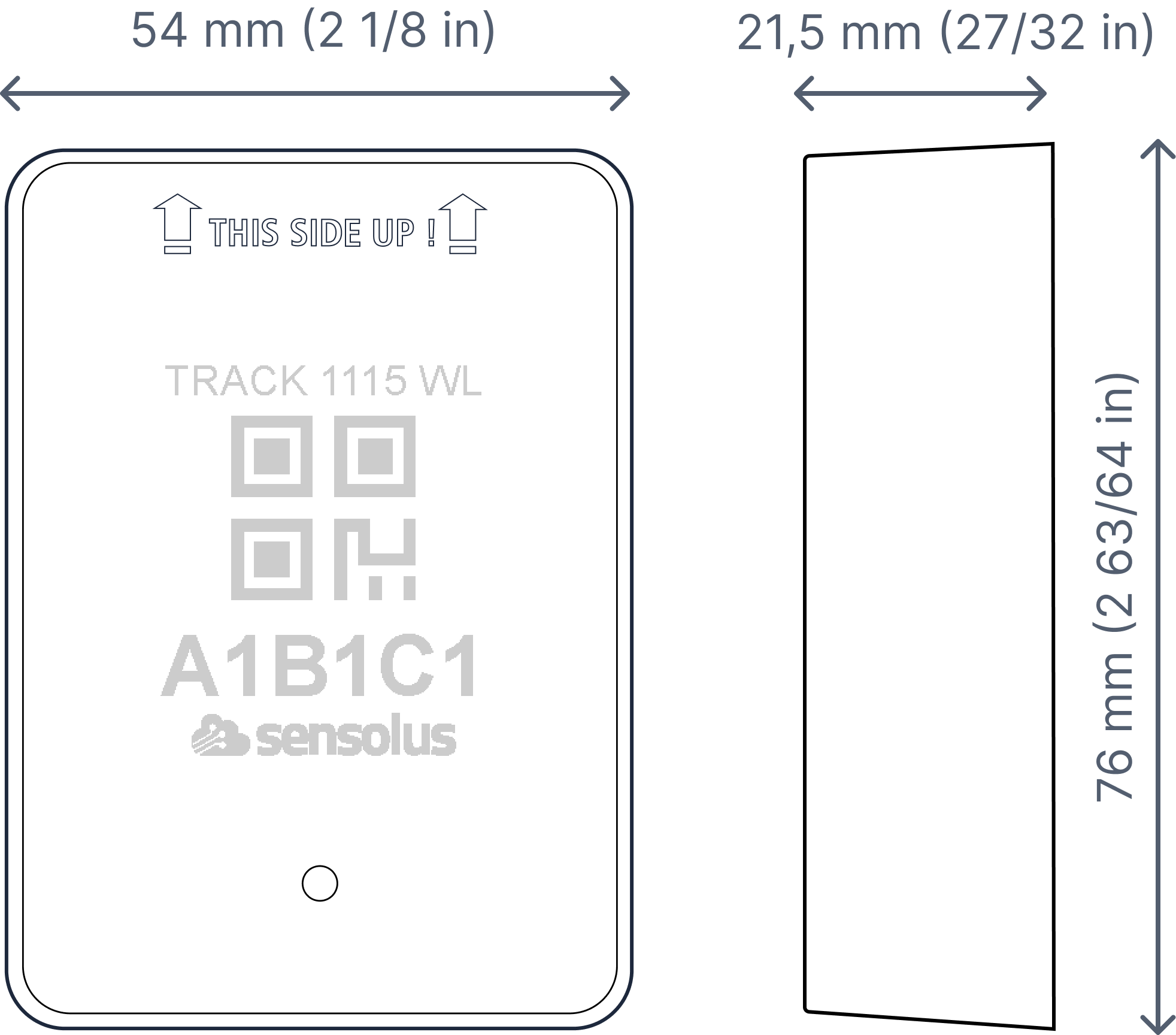
76×54×21,5 mm
95 g (7,6 oz)
Connectiviteit
NB-IoT en LTE-M
•
Energiezuinige transceiver
•
Interne omnidirectionele antenne
•
Bidirectionele communicatie
•
NB-IoT- en LTE-M-banden: Europa/Noord-Amerika
•
Dataherstel
•
OTA-firmware-upgrade (NB-IoT of LTE-M)
Connectiviteitsplan
•
TRACK 1115 WL wordt geleverd met het
Extended-connectiviteitsplan
Bluetooth Low Energy (BLE)
Bluetooth Low Energy 5.0
Geolokalisatie
GNSS
Multi-GNSS-constellatiechipset (GPS+GALILEO)
BLE
•
Sensolus proximity-beacondetectie
•
Detecteerbaar door zone- en hoognauwkeurige ankers
Wi-Fi scanning
•
Wi-Fi-gebaseerde geolokalisatie
•
Wi-Fi 2,4 GHzTRACK 1115 WL
GNSS/Wi-Fi/BLE - NB-IoT/LTE-M
www.sensolus.com | info@sensolus.com
Sensoriek
Intern
•
Activiteitsmonitoring
•
Oriëntatiemonitoring
•
Virtuele sabotagedetectie
•
Temperatuurmonitoring
•
Bereik: -20°C tot 60°C (-4°F tot 140°F)
•
Typische nauwkeurigheid: +/- 0,25°C (+/- 0,45°F)
•
Worst-case nauwkeurigheid: +/- 1°C (+/- 1,8°F)
•
Instelbare schokdetectie
Externe BLE-omgevingssensoren
•
Temperatuur, luchtvochtigheid
•
Vulniveau, contact, magneet
•
Andere BLE-sensoren kunnen worden toegevoegd
Mechanica & Design
Antennes
Alle antennes zijn intern
Water- en stofbestendigheid
IP68
Afmetingen
76×54×21,5 mm (LBH)
Gewicht
95 gram
Kleur
Wit
Bedrijfstemperatuur
-20°C tot 60°C*
De specifieke bedrijfstemperatuur is afhankelijk van de toepassing,
installatieomstandigheden en omgevingsfactoren zoals blootstelling aan
zonlicht. Neem voor meer informatie contact op met Sensolus. De batterijduur
kan worden beïnvloed wanneer apparaten gedurende langere perioden aan de
uitersten van dit bereik worden gebruikt.
Behuizing
•
Polycarbonaat (Lexan943A)
•
Vlamvertragend
•
UV-gestabiliseerd
Batterij
•
3 tot 8 jaar batterijduur afhankelijk van de bedrijfsmodus
•
Verwisselbaar batterijpak 4600 mAh 3,0 V (Li-MnO₂)
Certificeringen
Regelgevend
In behandeling
Bluetooth 5.0
In behandeling
Elektrische veiligheid
In behandelingTRACK 1115 WL
GNSS/Wi-Fi/BLE - NB-IoT/LTE-M
www.sensolus.com | info@sensolus.com
Gebruikersinteractie
Apparaatactivering
Magnetische activering
LED-feedback
Groene en rode LED-feedback op het apparaat
Externe instellingen synchroniseren
•
Direct: Magneetactivering
•
Periodiek: Geen gebruikersinteractie vereist
Beheerservices
Diagnostiek
•
Voorspelling van batterijduur
•
Gedetailleerd energieverbruik
•
Geolokalisatiediagnostiek
•
Installatie
•
Communicatiekwaliteit
Beheer
•
OTA-firmware-updates via NB-IoT, LTE-M en BLE
•
Externe configuratie
•
Tracker-gebruiksprofielen
•
Externe omgevingssensoren
Applicatieservices
•
Lokalisatie
•
Trajecten
•
Activiteit
•
Bezettingsgraad
•
Verbindbaar met omgevingssensoren
•
Temperatuurdetectie
•
Kanteldetectie
•
Schokdetectie
Firmwareconfiguratie
Communicatieservice
•
Dataherstelstrategie
•
Communicatieomstandigheden
Locatieservice
•
Bewegingsgebaseerd, contextgebaseerd, periodiek of
gepland
•
Instelbare updatefrequentie en trajectdetectie
•
Prioriteitsvolgorde (GNSS, Wi-Fi scanning, Bluetooth
geobeacon)
•
GNSS-fixparameters
•
Quuppa-gecertificeerd voor hoge precisie
•
Binnendetectie-algoritme
•
Wi-Fi-scanstrategie
•
BLE-scanstrategie
Algemene configuratie
•
Regelmotor-configuratie
•
Diagnostiekniveaus
•
Opstartmethoden
•
Nauwkeurige tijdsynchronisatie
Oriëntatieservice
Oriëntatiedetectieparameters
Omgevingssensoriek
•
Polling- en aggregatiestrategie
•
Meldingen
•
Edge-verwerkingsparameters
Activiteitsservice
Activiteitsdetectieparameters
Sabotageservice
Configuratie van het virtuele sabotage-algoritme
Schokdetectie
Parameters van het schokdetectie-algoritmeTRACK 1115 WL
GNSS/Wi-Fi/BLE - NB-IoT/LTE-M
www.sensolus.com | info@sensolus.com
Beveiliging
•
Apparaatunieke versleutelingssleutels
•
End-to-end payload-versleuteling ChaCha 20
•
AES-versleutelde firmware
•
Firmware-upgrade staat alleen ondertekende
firmware-images toe
Installation and activation manual TRACK 1115 and TRACK 1115 WL (pdf)
Installation and activation manual TRACK 1115 and TRACK 1115 WL (pdf)
Description:
Access level: sensolus-internal
Reference: SDOC-498608282-1622
Download: PDF
Access level: sensolus-internal
Reference: SDOC-498608282-1622
Download: PDF
Installation and activation manual
TRACK 1115 and TRACK 1115 WL
www.sensolus.com | info@sensolus.com
November 21, 2025 9:47 AM
Mounting the tracker
Guidelines how to mount the tracker can be found here.
Tracker activation
Activation of the trackers is preferably done with clear skies, and not inside (e.g. factory or warehouse).
Trackers are not activated when delivered to your premises.
Their subscription in the platform will start within six months of purchase.
1
Hold a magnet for
about 5 seconds on
top of the logo on the
asset tracker.
→
2
You will first see a red
LED. Do not remove
the magnet yet.
→
3
When the green LED
is blinking you can
remove the magnet.
Your tracker is ready
for use.
Activation troubleshooting
Activating a tracker that communicates over the NB-IoT or LTE-M network can sometimes come with a delay. With a delay we
mean that the online status doesn't appear within 5 minutes after holding the magnet to the tracker. This is mostly due to
conditions on the network operator site.
If the activation wasn't successful after 5 minutes the tracker will try again to activate again after waiting 24 hours.
This long period of time is often an obstacle to start installing trackers to assets and makes the timing of the installation of the
trackers cumbersome as it is important to only install trackers when they appeared as online on the platform.
To overcome to 24 hours waiting time, you can do the following:
If after 5 minutes of waiting and the status didn't change yet to “online” hold the magnet again for 5 seconds on top of the
tracker to enforce a new attempt for activation. Keep trying every 5 minutes until the Online status appears.
Installation advice
Avoid blocking the tracker's view
with metal or carbonfibre walls.
They weaken or block the
radiofrequency signals.
Place the tracker as high as
possible on the asset to ensure
good network coverage.
Make sure the mounting surface
is flat and clean, for a strong and
durable bond.
Do not install the tracker on
parts that receive frequent
shocks or vibrations.Installation and activation manual
TRACK 1115 and TRACK 1115 WL
www.sensolus.com | info@sensolus.com
November 21, 2025 9:47 AM
Install the tracker vertically, with
the logo facing up.
If your asset is handled in a rough
environment, you can place the
tracker in a protected location,
but never with metal or
carbonfibre above the tracker.
Make sure the tracker has a clear
view on the sky.
Avoid placing the tracker in a
place that can collect water.
If you can't install vertically, do
not mount the tracker upside
down.
Do not install the tracker on the
car dashboard.
Troubleshooting
- Put the magnet on the tracker for less than 5 seconds
- The possible LED feedback options are: Red LED: Tracker is not activated Green LED: Tracker is activated and working properly No LED: tracker is not functioning (probably dead battery -> contact support) Red LED is blinking: Tracker is busy
- This device may not cause harmful interference, and
- This device must accept any interference received, including interference that may cause undesired operation. This equipment has been tested and found to comply with the limits for a Class B digital device, pursuant to Part 15 of the FCC Rules. These limits are designed to provide reasonable protection against harmful interference in a residential installation. This equipment generates, uses and can radiate radio frequency energy and, if not installed and used in accordance with the instructions, may cause harmful interference to radio communications. However, there is no guarantee that interference will not occur in a particular installation. If this equipment does cause harmful interference to radio or television reception, which can be determined by turning the equipment off and on, the user is encouraged to try to correct the interference by one of the following measures: • Reorient or relocate the receiving antenna. • Increase the separation between the equipment and receiver. • Connect the equipment into an outlet on a circuit different from that to which the receiver is connected. • Consult the dealer or an experienced radio/TV technician for help. FCC Caution: Any changes or modifications not expressly approved by the party responsible for compliance could void the user's authority to operate this equipment. This transmitter must not be co-located or operating in conjunction with any other antenna or transmitter. Radiation Exposure Statement: This equipment complies with FCC radiation exposure limits set forth for an uncontrolled environment. This equipment should be installed and operated with minimum distance 20cm between the radiator & your body. This equipment is not suitable for use in locations where children are likely to be present. Industry Canada Statement This device complies with ISED's licence-exempt RSSs. Operation is subject to the following two conditions: This device may not cause harmful interference, and This device must accept any interference received, including interference that may cause undesired operation. Under Industry Canada regulations, this radio transmitter may only operate using an antenna of a type and maximum (or lesser) gain approved for the transmitter by Industry Canada. To reduce potential radio interference to other users, the antenna type and its gain should be chosen so that the equivalent isotropically radiated power (e.i.r.p.) is not more than that necessary for successful communication. RF Exposure Requirements: This equipment complies with Canada radiation exposure limits set forth for an uncontrolled environment. This equipment should be installed and operated with minimum distance 20cm between the radiator and your body. Le présent appareil est conforme aux CNR d' ISED applicables aux appareils radio exempts de licence. L'exploitation est autorisée aux deux conditions suivantes:
- le dispositif ne doit pas produire de brouillage préjudiciable, et
- ce dispositif doit accepter tout brouillage reçu, y compris un brouillage susceptible de provoquer un fonctionnement indésirable. Conformément à la réglementation d'Industrie Canada, le présent émetteur radio peut fonctionner avec une antenne d'un type et d'un gain maximal (ou inférieur) approuvé pour l'émetteur par Industrie Canada. Dans le but de réduire les risques de brouillage radio électrique à l'intention des autres utilisateurs, il faut choisir le type d'antenne et son gain de sorte que la puissance isotrope rayonnée équivalente (p.i.r.e.) ne dépasse pas l'intensité nécessaire à l'établissement d'une communication satisfaisante. Déclaration d'exposition aux radiations: Cet équipement est conforme aux limites d'exposition aux rayonnements du Canada établies pour un environnement non contrôlé. Cet équipement doit être installé et utilisé avec un minimum de 20 cm de distance entre la source de rayonnement et votre corps.