

Tracker activation
Tracker activation is needed so it will perform localization and communicate with the platform. Trackers may be shipped in non-activated mode to conserve battery life while they are not effectively deployed. It is also possible that trackers are already activated upon delivery to you - depending on what was requested with the purchase order. For most tracker models, a magnet is used for tracker activation.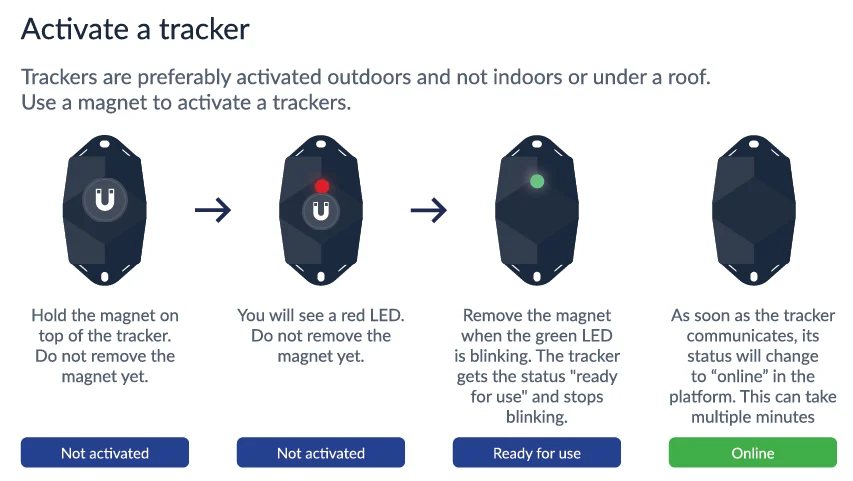
 state to the
  state.
Each time you install a tracker on one of your assets, please make sure to keep track of which tracker (identified by its serial number) is installed on which asset (identified by the asset’s identifier).
The most effective way to create this link between a particular asset and a particular tracker is by using the Sensolus mobile application, where you can scan the tracker’s QR code or barcode, and type in or scan the asset’s unique identifier as well.
It is very important to verify that the tracker that is installed on an asset has been correctly activated, before allowing the asset to be used again. To verify that the tracker has been activated, make sure your tracker has the marker in the Sensolus platform. The Online status should appear within 5 minutes after holding the magnet to the tracker and the green LED blinking has stopped.
Before mounting the tracker to the asset it is important to activate the tracker.
state.
Each time you install a tracker on one of your assets, please make sure to keep track of which tracker (identified by its serial number) is installed on which asset (identified by the asset’s identifier).
The most effective way to create this link between a particular asset and a particular tracker is by using the Sensolus mobile application, where you can scan the tracker’s QR code or barcode, and type in or scan the asset’s unique identifier as well.
It is very important to verify that the tracker that is installed on an asset has been correctly activated, before allowing the asset to be used again. To verify that the tracker has been activated, make sure your tracker has the marker in the Sensolus platform. The Online status should appear within 5 minutes after holding the magnet to the tracker and the green LED blinking has stopped.
Before mounting the tracker to the asset it is important to activate the tracker.
Magnet activation