

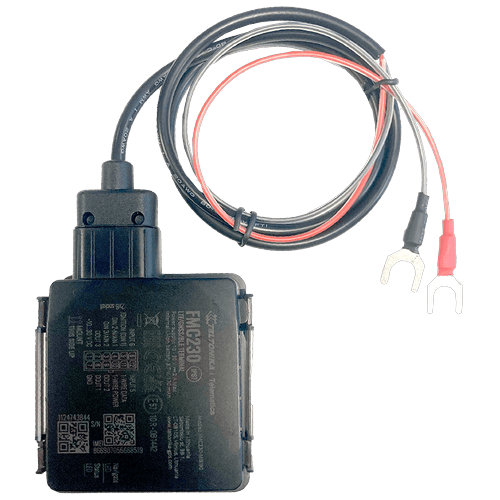
TRACK 1203 spec sheet EN (pdf)
TRACK 1203 spec sheet EN (pdf)
Description:
Access level: public
Reference: SDOC-498608282-599
Download: PDF
Access level: public
Reference: SDOC-498608282-599
Download: PDF
December 12, 2024 10:20 AM
www.sensolus.com | info@sensolus.com
Waterproof 4G LTE Cat 1 tracker with flexible inputs
TRACK 1203
GNSS
67 mm
IP67
External power source
Internal back up battery
Track 1203 wired is a smart and waterproof GNSS tracker
with internal backup battery.
Mounting
·
Tie wraps
·
Double sided tape
Geolocalization
GNSS
GPS, GLONASS, GALILEO, BEIDOU, QZSS, AGPS
Connectivity
Mobile network
4G (SIM-card is required) with fallback to 3G (UMTS), 2G
(GSM) networks
25.6 mm
110 mmDecember 12, 2024 10:20 AM
www.sensolus.com | info@sensolus.com
Power
· Input voltage: 10 - 30 V DC with overvoltage protection
· Back up battery : 170 mAh Li-Ion, 3.7 V battery (0.63 Wh)
Certifications
Regulatory
CE-RED, E-Mark,RCM,Anatel, REACH, RoHS, TRA, CITC
Configuration
Configuration and firmware update
· FOTA
· Remote device configuration
Time synchronisation
· GNSS
· NITZ
· NTP
Application services
· Localization
· Journeys
· Activity
· Utilization
· Speed
· Travelled distance
Mechanics & design
Size
Weight
110 mm x 67 mm x 25,6 mm
80 gram (without power cable)
Color
·
Internal High Gain GNSS antenna
·
Internal GSM High Gain Celullar antenna
Antenna
IP67
Water & dust resistance casing
-20 to 85°C
Operating temperature
-20 to 85°C (without battery)
Storage temperature
Light Gray
Sensors
Accelerometer
Memory
128MB internal flash memory
5% to 95% non-condensing
Operating humidity
Power cable
·
2 fork connectors for battery connection
·
90 cm
TRACK 1203 installation manual (pdf)
TRACK 1203 installation manual (pdf)
Description:
Access level: public
Reference: SDOC-498608282-1401
Download: PDF
Access level: public
Reference: SDOC-498608282-1401
Download: PDF
TRACK 1203 installation manual
www.sensolus.com | info@sensolus.com
January 22, 2025 1:43 PM
Advice before installation
- Orientation of the tracker Install with connection plug in line of the driving direction. Do not install perpendicular to the driving direction. Install with connection plug in line of the driving direction. Do not install perpendicular to the driving direction.
- Do not install upside down
- Avoid placement of TRACK 1203 under metal surfaces
- Connect the plug