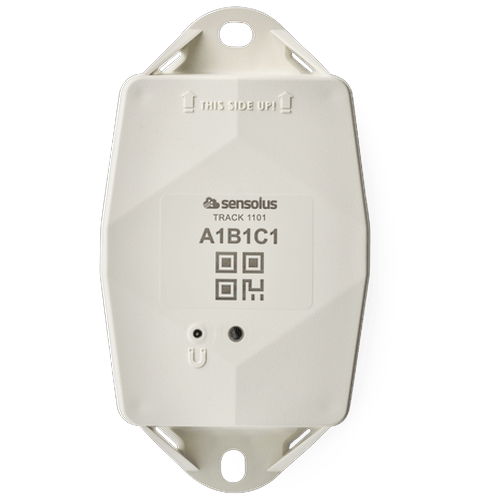
track1101 (pdf)
track1101 (pdf)
Description:
Access level: public
Reference: SDOC-498608282-1356
Download: PDF
Access level: public
Reference: SDOC-498608282-1356
Download: PDF
sensolus
TRACK 1101 White
GNSS/Wi-Fi/BLE - NB-IoT
www.sensolus.com | info@sensolus.com
The rugged low-power tracker with long battery life
with NB-IoT connectivity and guaranteed data
recovery. The tracker provides general localization,
zone and high precision. The tracker comes with an
onboard temperature sensor and shock detection.
Compatible with multiple external environmental
sensors. The tracker firmware can be upgraded over
the air.
GNSS
Wi-Fi scanning
Bluetooth geobeacon for zone precision
Quuppa tested for high precision
NB-IoT
Europe and USA
Data recovery
IP69K & IP68
IK 09
Flame retardant
130×72×36 mm
212g (7.6 oz)
Connectivity
NB-IoT
•
Energy efficient transceiver
•
Internal omnidirectional antenna
•
Bi-directional communication
•
NB-IoT bands: Europe/North America
•
Data recovery
•
OTA firmware upgrade (NB-IoT)
Bluetooth Low Energy (BLE)
Bluetooth Low Energy 5.0
Geolocalization
GNSS
Multi GNSS constellation chipset (GPS+GALILEO)
BLE
•
Sensolus proximity beacon detection
•
Detectable by zone and high precision anchors
Wi-Fi scanning
•
Wi-Fi based geolocalization
•
Wi-Fi 2.4 GHzsensolus
TRACK 1101 White
GNSS/Wi-Fi/BLE - NB-IoT
www.sensolus.com | info@sensolus.com
Sensing
Internal
•
Activity monitoring
•
Orientation monitoring
•
Virtual tamper detection
•
Temperature monitoring
•
range: -20°C till 60°C (-4°F to 140°F)
•
typical accuracy: +/- 0.25°C (+/- 0.45°F)
•
worst case accuracy: +/- 1°C (+/- 1.8°F)
•
Configurable shock detection
Environmental BLE sensors
•
Temperature, humidity
•
Fill level, contact, magnet
•
Other BLE sensors can be added
Activation and mounting
•
Activation and mounting
•
Activation manual
•
Holes 7x9mm (⁹/₃₂ * ²³/₆₄ in) for screws or rivets. 115 mm
(4¹⁷/₃₂ in) distance between the centers of the mounting
holes.
•
Instructions for mounting the device are available in the
Sensolus documentation center.
Mechanics & Design
Antennas
All antennas are internal
Water & dust resistance
IP68 & IP69K
Size
130x72x36 mm
(5⅛ x 2⁵³⁄₆₄ x 1²⁷⁄₆₄ in)
Impact resistance
IK09
Weight
212 gram (7.6 oz)
Drop shock and vibration
EN 60068
Color
White
Operating temperature
-20°C to 60°C
(-4°F to 140°F)*
The specifics regarding operational temperature are contingent upon the
application, installation circumstances, and environmental factors such as
sunlight exposure. For further information, please reach out to Sensolus.
Battery life can be affected when devices function for extended periods at the
extremes of this range.
Casing
•
Shell: PBT + PC Cover: PBT GF30% + TPE
•
Flame retardant
•
UV-stabilized
Battery
Standard 3 cell
•
User replaceable battery pack (Li-SoCl₂) 10500 mAh
•
2.94 gram (0.1037oz) lithiumsensolus
TRACK 1101 White
GNSS/Wi-Fi/BLE - NB-IoT
www.sensolus.com | info@sensolus.com
Certifications
Regulatory
•
CE
•
FCC
•
IC
Bluetooth 5.0
Declaration ID D068598
Environmental
IK9
Electrical safety
EN 62368-1
User Interaction
Device activation
Magnetic activation
LED feedback
Green & red LED feedback on the device
Synchronize remote settings
•
Instant: Magnet activation
•
Periodic: No user interaction needed
Management Services
Diagnostics
•
Battery lifetime prediction
•
Detailed energy consumption
•
Geolocation diagnostics
•
Installation
•
Communication quality
Management
•
OTA firmware updates over NB-IoT and BLE
•
Remote configuration
•
Tracker usage profiles
•
External environmental sensors
Application services
•
Localization
•
Journeys
•
Activity
•
Utilization
•
Connectable with environmental sensors
•
Temparture detection
•
Tilt detection
•
Shock detectionsensolus
TRACK 1101 White
GNSS/Wi-Fi/BLE - NB-IoT
www.sensolus.com | info@sensolus.com
Firmware configuration
Communication service
•
Data recovery strategy
•
Communication conditions
Location service
•
Motion based,context based, periodic or scheduled
•
Configurable update rate and journey detection
•
Priority sequence (GNSS, Wi-Fi scanning , Bluetooth
geobeacon)
•
GNSS fix parameters
•
Quuppa certified for high precision
•
Indoor detection algo
•
Wi-Fi scan strategy
•
BLE scan strategy
General configuration
•
Rule engine configuration
•
Diagnostic levels
•
Boot methods
•
Accurate time synchronization
Orientation service
Orientation detection parameters
Environmental sensing
•
Polling and aggregation strategy
•
Alerts
•
Edge processing parameters
Activity service
Activity detection parameters
Tamper service
Virtual tamper algo configuration
Shock detection
Shock algo detection parameters
Security
•
Device unique encryption keys
•
End to end payload encryption Chacha 20
•
AES encrypted firmware
•
Firmware upgrade allows only signed firmware images
track1101_fr (pdf)
track1101_fr (pdf)
Description:
Access level: public
Reference: SDOC-498608282-1361
Download: PDF
Access level: public
Reference: SDOC-498608282-1361
Download: PDF
sensolus
TRACK 1101 Blanc
GNSS/Wi-Fi/BLE - NB-IoT
www.sensolus.com | info@sensolus.com
Le tracker robuste basse consommation avec longue
autonomie de batterie doté d'une connectivité NB-IoT
et d'une récupération de données garantie. Le tracker
offre une localisation générale, de zone et haute
précision. Le tracker est équipé d'un capteur de
température intégré et d'une détection de chocs.
Compatible avec plusieurs capteurs
environnementaux externes. Le firmware du tracker
peut être mis à jour à distance.
GNSS
Balayage Wi-Fi
Géobalise Bluetooth pour précision de zone
Testé Quuppa pour haute précision
NB-IoT
Europe et Amérique du Nord
Récupération de données
IP69K & IP68
IK 09
Ignifuge
130×72×36 mm
212 g (7,6 oz)
Connectivité
NB-IoT
•
Émetteur-récepteur économe en énergie
•
Antenne omnidirectionnelle interne
•
Communication bidirectionnelle
•
Bandes NB-IoT : Europe/Amérique du Nord
•
Récupération de données
•
Mise à jour du firmware à distance (NB-IoT)
Bluetooth Low Energy (BLE)
Bluetooth Low Energy 5.0
Géolocalisation
GNSS
Chipset multi-constellation GNSS (GPS+GALILEO)
BLE
•
Détection de balises de proximité Sensolus
•
Détectable par les ancres de zone et haute précision
Balayage Wi-Fi
•
Géolocalisation basée sur Wi-Fi
•
Wi-Fi 2,4 GHzsensolus
TRACK 1101 Blanc
GNSS/Wi-Fi/BLE - NB-IoT
www.sensolus.com | info@sensolus.com
Capteurs
Internes
•
Surveillance de l'activité
•
Surveillance de l'orientation
•
Détection de manipulation virtuelle
•
Surveillance de température
•
plage : -20°C à 60°C (-4°F à 140°F)
•
précision typique : +/- 0,25°C (+/- 0,45°F)
•
précision dans le pire des cas : +/- 1°C (+/- 1,8°F)
•
Détection de chocs configurable
Capteurs BLE environnementaux
•
Température, humidité
•
Niveau de remplissage, contact, aimant
•
D'autres capteurs BLE peuvent être ajoutés
Activation et montage
•
Activation et montage
•
Manuel d'activation
•
Trous de 7x9 mm (⁹/₃₂ * ²³/₆₄ po) pour vis ou rivets.
Distance de 115 mm (4¹⁷/₃₂ po) entre les centres des trous
de montage.
•
Les instructions pour monter l'appareil sont disponibles
dans le centre de documentation Sensolus.
Mécanique et conception
Antennes
Toutes les antennes sont internes
Résistance à l'eau et à la poussière
IP68 & IP69K
Dimensions
130x72x36 mm
(5⅛ x 2⁵³⁄₆₄ x 1²⁷⁄₆₄ po)
Résistance aux chocs
IK09
Poids
212 grammes (7,6 oz)
Choc de chute et vibrations
EN 60068
Couleur
Blanc
Température de fonctionnement
-20°C à 60°C
(-4°F à 140°F)*
Les spécificités concernant la température de fonctionnement dépendent de
l'application, des circonstances d'installation et des facteurs
environnementaux tels que l'exposition au soleil. Pour plus d'informations,
veuillez contacter Sensolus. La durée de vie de la batterie peut être affectée
lorsque les appareils fonctionnent pendant de longues périodes aux extrémités
de cette plage.
Boîtier
•
Coque : PBT + PC Couvercle : PBT GF30% + TPE
•
Ignifuge
•
Stabilisé aux UV
Batterie
Standard 3 cellules
•
Pack de batteries remplaçable par l'utilisateur (Li-SoCl₂)
10500 mAh
•
2,94 grammes (0,1037 oz) de lithiumsensolus
TRACK 1101 Blanc
GNSS/Wi-Fi/BLE - NB-IoT
www.sensolus.com | info@sensolus.com
Certifications
Réglementaire
•
CE
•
FCC
•
IC
Bluetooth 5.0
ID de déclaration D068598
Environnementale
Choc de chute en cours
Sécurité électrique
EN 62368-1
Interaction utilisateur
Activation de l'appareil
Activation magnétique
Retour LED
Retour LED vert et rouge sur l'appareil
Synchroniser les paramètres à distance
•
Instantané : Activation magnétique
•
Périodique : Aucune interaction utilisateur nécessaire
Services de gestion
Diagnostics
•
Prédiction de la durée de vie de la batterie
•
Consommation d'énergie détaillée
•
Diagnostics de géolocalisation
•
Installation
•
Qualité de communication
Gestion
•
Mises à jour du firmware à distance via NB-IoT et BLE
•
Configuration à distance
•
Profils d'utilisation du tracker
•
Capteurs environnementaux externes
Services applicatifs
•
Localisation
•
Trajets
•
Activité
•
Utilisation
•
Connectable avec des capteurs environnementaux
•
Détection de température
•
Détection d'inclinaison
•
Détection de chocssensolus
TRACK 1101 Blanc
GNSS/Wi-Fi/BLE - NB-IoT
www.sensolus.com | info@sensolus.com
Configuration du firmware
Service de communication
•
Stratégie de récupération de données
•
Conditions de communication
Service de localisation
•
Basé sur le mouvement, basé sur le contexte, périodique
ou planifié
•
Taux de mise à jour configurable et détection de trajet
•
Séquence de priorité (GNSS, balayage Wi-Fi, géobalise
Bluetooth)
•
Paramètres de fix GNSS
•
Certifié Quuppa pour haute précision
•
Algorithme de détection intérieure
•
Stratégie de balayage Wi-Fi
•
Stratégie de balayage BLE
Configuration générale
•
Configuration du moteur de règles
•
Niveaux de diagnostic
•
Méthodes de démarrage
•
Synchronisation temporelle précise
Service d'orientation
Paramètres de détection d'orientation
Détection environnementale
•
Stratégie d'interrogation et d'agrégation
•
Alertes
•
Paramètres de traitement en périphérie
Service d'activité
Paramètres de détection d'activité
Service de manipulation
Configuration de l'algorithme de manipulation virtuelle
Détection de chocs
Paramètres de détection de l'algorithme de chocs
Sécurité
•
Clés de chiffrement uniques par appareil
•
Chiffrement de bout en bout de la charge utile Chacha 20
•
Firmware chiffré AES
•
La mise à jour du firmware autorise uniquement les
images de firmware signées
track1101_de (pdf)
track1101_de (pdf)
Description:
Access level: public
Reference: SDOC-498608282-1358
Download: PDF
Access level: public
Reference: SDOC-498608282-1358
Download: PDF
sensolus
TRACK 1101 Weiß
GNSS/Wi-Fi/BLE - NB-IoT
www.sensolus.com | info@sensolus.com
Der robuste stromsparende Tracker mit langer
Batterielaufzeit, NB-IoT-Konnektivität und
garantierter Datenwiederherstellung. Der Tracker
bietet allgemeine Lokalisierung, Zonen- und
Hochpräzisions- ortung. Der Tracker verfügt über
einen integrierten Temperatur- sensor und
Stoßerkennung. Kompatibel mit mehreren externen
Umgebungssensoren. Die Tracker-Firmware kann
drahtlos aktualisiert werden.
GNSS
Wi-Fi scanning
Bluetooth Geobeacon für Zonenpräzision
Quuppa-getestet für hohe Präzision
NB-IoT
Europa und Nordamerika
Datenwiederherstellung
IP69K & IP68
IK 09
Flammhemmend
130×72×36 mm
212 g (7,6 oz)
Konnektivität
NB-IoT
•
Energieeffizienter Sendeempfänger
•
Interne omnidirektionale Antenne
•
Bidirektionale Kommunikation
•
NB-IoT-Bänder: Europa/Nordamerika
•
Datenwiederherstellung
•
OTA-Firmware-Update (NB-IoT)
Bluetooth Low Energy (BLE)
Bluetooth Low Energy 5.0
Geolokalisierung
GNSS
Multi-GNSS-Konstellations-Chipsatz (GPS+GALILEO)
BLE
•
Sensolus Proximity Beacon-Erkennung
•
Erkennbar durch Zonen- und Hochpräzisionsanker
Wi-Fi scanning
•
Wi-Fi-basierte Geolokalisierung
•
Wi-Fi 2,4 GHzsensolus
TRACK 1101 Weiß
GNSS/Wi-Fi/BLE - NB-IoT
www.sensolus.com | info@sensolus.com
Sensorik
Intern
•
Aktivitätsüberwachung
•
Orientierungsüberwachung
•
Virtuelle Manipulationserkennung
•
Temperaturüberwachung
•
Bereich: -20°C bis 60°C (-4°F bis 140°F)
•
Typische Genauigkeit: +/- 0,25°C (+/- 0,45°F)
•
Worst-Case-Genauigkeit: +/- 1°C (+/- 1,8°F)
•
Konfigurierbare Stoßerkennung
BLE-Umgebungssensoren
•
Temperatur, Luftfeuchtigkeit
•
Füllstand, Kontakt, Magnet
•
Weitere BLE-Sensoren können hinzugefügt werden
Aktivierung und Montage
•
Aktivierung und Montage
•
Aktivierungsanleitung
•
Löcher 7x9 mm (⁹/₃₂ * ²³/₆₄ in) für Schrauben oder Nieten.
115 mm (4¹⁷/₃₂ in) Abstand zwischen den Mittelpunkten
der Montagelöcher.
•
Anleitungen zur Montage des Geräts sind im Sensolus
Dokumentationszentrum verfügbar.
Mechanik & Design
Antennen
Alle Antennen sind intern
Wasser- und Staubschutz
IP68 & IP69K
Abmessungen
130x72x36 mm
(5⅛ x 2⁵³⁄₆₄ x 1²⁷⁄₆₄ in)
Stoßfestigkeit
IK09
Gewicht
212 Gramm (7,6 oz)
Fallschock und Vibration
EN 60068
Farbe
Weiß
Betriebstemperatur
-20°C bis 60°C
(-4°F bis 140°F)*
Die Spezifikationen bezüglich der Betriebstemperatur hängen von der
Anwendung, den Installationsumständen und Umgebungsfaktoren wie
Sonneneinstrahlung ab. Für weitere Informationen wenden Sie sich bitte an
Sensolus. Die Batterielaufzeit kann beeinträchtigt werden, wenn Geräte über
längere Zeiträume an den Extremen dieses Bereichs betrieben werden.
Gehäuse
•
Gehäuse: PBT + PC Abdeckung: PBT GF30% + TPE
•
Flammhemmend
•
UV-stabilisiert
Batterie
Standard 3-Zellen
•
Vom Benutzer austauschbarer Batteriepack (Li-SoCl₂)
10.500 mAh
•
2,94 Gramm (0,1037 oz) Lithiumsensolus
TRACK 1101 Weiß
GNSS/Wi-Fi/BLE - NB-IoT
www.sensolus.com | info@sensolus.com
Zertifizierungen
Regulatorisch
•
CE
•
FCC
•
IC
Bluetooth 5.0
Erklärung ID D068598
Umwelt
Fallschock in Bearbeitung
Elektrische Sicherheit
EN 62368-1
Benutzerinteraktion
Geräteaktivierung
Magnetische Aktivierung
LED-Rückmeldung
Grüne und rote LED-Rückmeldung am Gerät
Ferneinstellungen synchronisieren
•
Sofort: Magnetaktivierung
•
Periodisch: Keine Benutzerinteraktion erforderlich
Management-Services
Diagnose
•
Batterielaufzeitvorhersage
•
Detaillierter Energieverbrauch
•
Geolokalisierungsdiagnose
•
Installation
•
Kommunikationsqualität
Verwaltung
•
OTA-Firmware-Updates über NB-IoT und BLE
•
Fernkonfiguration
•
Tracker-Nutzungsprofile
•
Externe Umgebungssensoren
Anwendungsdienste
•
Lokalisierung
•
Routen
•
Aktivität
•
Auslastung
•
Mit Umgebungssensoren verbindbar
•
Temperaturerkennung
•
Neigungserkennung
•
Stoßerkennungsensolus
TRACK 1101 Weiß
GNSS/Wi-Fi/BLE - NB-IoT
www.sensolus.com | info@sensolus.com
Firmware-Konfiguration
Kommunikationsdienst
•
Datenwiederherstellungsstrategie
•
Kommunikationsbedingungen
Lokalisierungsdienst
•
Bewegungsbasiert, kontextbasiert, periodisch oder
geplant
•
Konfigurierbare Aktualisierungsrate und Routenerkennung
•
Prioritätsreihenfolge (GNSS, Wi-Fi scanning, Bluetooth
Geobeacon)
•
GNSS-Fix-Parameter
•
Quuppa-zertifiziert für hohe Präzision
•
Innenraumerkennungsalgorithmus
•
Wi-Fi-Scan-Strategie
•
BLE-Scan-Strategie
Allgemeine Konfiguration
•
Regelmaschinen-Konfiguration
•
Diagnosestufen
•
Boot-Methoden
•
Präzise Zeitsynchronisation
Orientierungsdienst
Orientierungserkennungsparameter
Umgebungssensorik
•
Abruf- und Aggregationsstrategie
•
Alarme
•
Edge-Processing-Parameter
Aktivitätsdienst
Aktivitätserkennungsparameter
Manipulationsschutz-Dienst
Virtuelle Manipulationsalgorithmus-Konfiguration
Stoßerkennung
Stoßerkennungsalgorithmus-Parameter
Sicherheit
•
Gerätespezifische Verschlüsselungsschlüssel
•
End-to-End-Payload-Verschlüsselung ChaCha20
•
AES-verschlüsselte Firmware
•
Firmware-Update erlaubt nur signierte Firmware-Images
track1101_es (pdf)
track1101_es (pdf)
Description:
Access level: public
Reference: SDOC-498608282-1357
Download: PDF
Access level: public
Reference: SDOC-498608282-1357
Download: PDF
sensolus
TRACK 1101 Blanco
GNSS/Wi-Fi/BLE - NB-IoT
www.sensolus.com | info@sensolus.com
El tracker robusto de bajo consumo con larga vida útil
de batería, conectividad NB-IoT y recuperación de
datos garantizada. El tracker proporciona localización
general, zona y alta pre- cisión. El tracker viene con un
sensor de temperatura integrado y detección de
choques. Compatible con múltiples sensores
ambientales externos. El firmware del tracker puede
actualizarse de forma remota.
GNSS
Escaneo Wi-Fi
Baliza geográfica Bluetooth para precisión de zona
Probado con Quuppa para alta precisión
NB-IoT
Europa y Norteamérica
Recuperación de datos
IP69K & IP68
IK 09
Retardante de llama
130×72×36 mm
212 g (7,6 oz)
Conectividad
NB-IoT
•
Transceptor eficiente energéticamente
•
Antena omnidireccional interna
•
Comunicación bidireccional
•
Bandas NB-IoT: Europa/Norteamérica
•
Recuperación de datos
•
Actualización de firmware remota (NB-IoT)
Bluetooth Low Energy (BLE)
Bluetooth Low Energy 5.0
Geolocalización
GNSS
Chipset de constelación multi GNSS (GPS+GALILEO)
BLE
•
Detección de baliza de proximidad Sensolus
•
Detectable por anclas de zona y alta precisión
Escaneo Wi-Fi
•
Geolocalización basada en Wi-Fi
•
Wi-Fi 2,4 GHzsensolus
TRACK 1101 Blanco
GNSS/Wi-Fi/BLE - NB-IoT
www.sensolus.com | info@sensolus.com
Sensores
Internos
•
Monitoreo de actividad
•
Monitoreo de orientación
•
Detección de manipulación virtual
•
Monitoreo de temperatura
•
Rango: -20°C a 60°C (-4°F a 140°F)
•
Precisión típica: +/- 0,25°C (+/- 0,45°F)
•
Precisión en peor caso: +/- 1°C (+/- 1,8°F)
•
Detección de choques configurable
Sensores ambientales BLE
•
Temperatura, humedad
•
Nivel de llenado, contacto, imán
•
Se pueden agregar otros sensores BLE
Activación y montaje
•
Activación y montaje
•
Manual de activación
•
Orificios 7x9 mm (⁹/₃₂ * ²³/₆₄ in) para tornillos o remaches.
115 mm (4¹⁷/₃₂ in) de distancia entre los centros de los
orificios de montaje.
•
Las instrucciones para montar el dispositivo están
disponibles en el centro de documentación de Sensolus.
Mecánica y diseño
Antenas
Todas las antenas son internas
Resistencia al agua y al polvo
IP68 & IP69K
Dimensiones
130x72x36 mm
(5⅛ x 2⁵³⁄₆₄ x 1²⁷⁄₆₄ in)
Resistencia al impacto
IK09
Peso
212 gramos (7,6 oz)
Choque por caída y vibración
EN 60068
Color
Blanco
Temperatura de funcionamiento
-20°C a 60°C
(-4°F a 140°F)*
Las especificaciones respecto a la temperatura de funcionamiento dependen
de la aplicación, las circunstancias de instalación y factores ambientales como
la exposición al sol. Para más información, por favor contacte con Sensolus.
La vida útil de la batería puede verse afectada cuando los dispositivos
funcionan durante periodos prolongados en los extremos de este rango.
Carcasa
•
Carcasa: PBT + PC Cubierta: PBT GF30% + TPE
•
Retardante de llama
•
Estabilizado UV
Batería
Estándar 3 celdas
•
Paquete de baterías reemplazable por el usuario (Li-SoCl₂)
10.500 mAh
•
2,94 gramos (0,1037 oz) de litiosensolus
TRACK 1101 Blanco
GNSS/Wi-Fi/BLE - NB-IoT
www.sensolus.com | info@sensolus.com
Certificaciones
Regulatorio
•
CE
•
FCC
•
IC
Bluetooth 5.0
ID de declaración D068598
Ambiental
Choque por caída en progreso
Seguridad eléctrica
EN 62368-1
Interacción del usuario
Activación del dispositivo
Activación magnética
Retroalimentación LED
Retroalimentación LED verde y roja en el dispositivo
Sincronizar ajustes remotos
•
Instantáneo: Activación magnética
•
Periódico: No se requiere interacción del usuario
Servicios de gestión
Diagnósticos
•
Predicción de vida útil de la batería
•
Consumo de energía detallado
•
Diagnósticos de geolocalización
•
Instalación
•
Calidad de comunicación
Gestión
•
Actualizaciones de firmware remotas por NB-IoT y BLE
•
Configuración remota
•
Perfiles de uso del tracker
•
Sensores ambientales externos
Servicios de aplicación
•
Localización
•
Trayectos
•
Actividad
•
Utilización
•
Conectable con sensores ambientales
•
Detección de temperatura
•
Detección de inclinación
•
Detección de choquessensolus
TRACK 1101 Blanco
GNSS/Wi-Fi/BLE - NB-IoT
www.sensolus.com | info@sensolus.com
Configuración del firmware
Servicio de comunicación
•
Estrategia de recuperación de datos
•
Condiciones de comunicación
Servicio de localización
•
Basado en movimiento, basado en contexto, periódico o
programado
•
Tasa de actualización configurable y detección de
trayecto
•
Secuencia de prioridad (GNSS, escaneo Wi-Fi, baliza
geográfica Bluetooth)
•
Parámetros de fijación GNSS
•
Certificado Quuppa para alta precisión
•
Algoritmo de detección interior
•
Estrategia de escaneo Wi-Fi
•
Estrategia de escaneo BLE
Configuración general
•
Configuración del motor de reglas
•
Niveles de diagnóstico
•
Métodos de arranque
•
Sincronización temporal precisa
Servicio de orientación
Parámetros de detección de orientación
Detección ambiental
•
Estrategia de sondeo y agregación
•
Alertas
•
Parámetros de procesamiento en el borde
Servicio de actividad
Parámetros de detección de actividad
Servicio de manipulación
Configuración del algoritmo de manipulación virtual
Detección de choques
Parámetros del algoritmo de detección de choques
Seguridad
•
Claves de cifrado únicas por dispositivo
•
Cifrado de carga útil de extremo a extremo ChaCha 20
•
Firmware cifrado AES
•
La actualización de firmware solo permite imágenes de
firmware firmadas
TRACK 1101 spec sheet EN (pdf)
Description: TRACK 1101 spec sheet EN
Access level: public
Reference: SDOC-498608282-935
Download: PDF
Access level: public
Reference: SDOC-498608282-935
Download: PDF
November 12, 2025 10:58 AM
www.sensolus.com | info@sensolus.com
GNSS/Wi-Fi/BLE - NB-IoT
TRACK 1101 White
· Energy efficient transceiver
· Internal omnidirectional antenna
· Bi-directional communication
· NB-IoT bands: Europe/North America
· Data recovery
· OTA firmware upgrade (NB-IoT)
Bluetooth Low Energy 5.0
Connectivity
Geolocalization
72mm (2⁵³/₆₄ in)
36 mm (1²⁷/₆₄ in)
130 mm (5 ¹/₈ in)
IP69K & IP68
IK 09
Flame retardant
The rugged low-power tracker with long battery life with
NB-IoT connectivity and guaranteed data recovery. The
tracker provides general localization, zone and high pre
cision. The tracker comes with an onboard temperature
sensor and shock detection. Compatible with multiple
external environmental sensors. The tracker firmware can
be upgraded over the air.
NB-IoT
Bluetooth Low Energy (BLE)
GNSS
Multi GNSS constellation chipset (GPS+GALILEO)
BLE
· Sensolus proximity beacon detection
· Detectable by zone and high precision anchors
Wi-Fi scanning
· Wi-Fi based geolocalization
· Wi-Fi 2.4 GHz
NB-IoT
Europe and North America
Data recovery
115 mm (4 ¹⁷/₃₂ in)
GNSS
Wi-Fi scanning
Bluetooth geobeacon for zone precision
Quuppa tested for high precision
Up to 10 years of battery life (read the details)
· TRACK 1101 comes with the Standard connectivity plan.
Connectivity planNovember 12, 2025 10:58 AM
www.sensolus.com | info@sensolus.com
IP68 & IP69K
Mechanics & design
Water & dust resistance
Size
130x72x36 mm (5¹/₈ x 2⁵³/₆₄ x 1²⁷/₆₄ in )(L W H)
Weight
212 gram (7.6 oz)
Color
White
Casing
· Shell: PBT + PC Cover: PBT GF30% + TPE
· Flame retardant
· UV-stabilized
IK09
Impact resistance
-20°C to 60°C (-4°F to 140°F) *
Operating temperature
Certifications
Antennas
All antennas are internal
Electrical safety
EN 62368-1
Regulatory
·
CE
·
FCC
·
IC
Activation and mounting
· Activation manual
· Holes 7x9mm (⁹/₃₂ * ²³/₆₄ in) for screws or rivets. 115 mm (4¹⁷/₃₂ in) distance between the centers of the mounting holes.
· Instructions for mounting the device are available in the Sensolus documentation center.
Battery
Standard 3 cell
· User replaceable battery pack (Li-SoCl2) 10500 mAh
· 2.94 gram (0.1037oz) lithium
Declaration ID D068598
Bluetooth 5.0
EN 60068
Drop shock and vibration
Sensing
Internal
· Activity monitoring
· Orientation monitoring
· Virtual tamper detection
· Temperature monitoring
· range: -20°C till 60°C (-4°F to 140°F)
· typical accuracy: +/- 0,25°C (+/- 0.45°F)
· worst case accuracy: +/- 1°C (+/- 1.8°F)
· Configurable shock detection
Environmental BLE sensors
· Temperature, humidity
· Fill level, contact, magnet
· Other BLE sensors can be added
The specifics regarding operational temperature are contingent upon the
application, installation circumstances, and environmental factors such as
sunlight exposure. For further information, please reach out to Sensolus.
Battery life can be affected when devices function for extended periods at
the extremes of this range.
Drop shock in progress
EnvironmentalNovember 12, 2025 10:58 AM
www.sensolus.com | info@sensolus.com
Firmware configuration
Location service
· Motion based,context based, periodic or scheduled
· Configurable update rate and journey detection
· Priority sequence (GNSS, Wi-Fi scanning , Bluetooth geo
beacon)
· GNSS fix parameters
· Quuppa certified for high precision
· Indoor detection algo
· Wi-Fi scan strategy
· BLE scan strategy
Communication service
· Data recovery strategy
· Communication conditions
Activity service
Activity detection parameters
Orientation service
Orientation detection parameters
Environmental sensing
· Polling and aggregation strategy
· Alerts
· Edge processing parameters
General configuration
· Rule engine configuration
· Diagnostic levels
· Boot methods
· Accurate time synchronization
Application services
· Connectable with
environmental sensors · Temparture detection · Localization · Journeys · Activity · Utilization · Tilt detection · Shock detection Management services · OTA firmware updates over NB-IoT and BLE · Remote configuration · Tracker usage profiles · External environmental sensors · Battery lifetime prediction · Detailed energy consumption · Geolocation diagnostics · Installation · Communication quality Security · Device unique encryption keys · End to end payload encryption Chacha 20 Diagnostics Management Tamper service Virtual tamper algo configuration User interaction Device activation Magnetic activation LED feedback Green & red LED feedback on the device Synchronize remote settings · Instant: Magnet activation · Periodic: No user interaction needed Shock detection Shock algo detection parameters · AES encrypted firmware · Firmware upgrade allows only signed firmware images
TRACK 1101 Installation and activation manual EN.pdf (pdf)
Description: TRACK 1101 Installation and activation manual EN.pdf
Access level: public
Reference: SDOC-498608282-896
Download: PDF
Access level: public
Reference: SDOC-498608282-896
Download: PDF
www.sensolus.com | info@sensolus.com
November 4, 2024 2:59 PM
Installation and activation manual TRACK 1101
Activation of the trackers is preferably done with clear skies, and not inside (e.g. factory or warehouse).
Trackers are not activated when delivered to your premises.
Their subscription in the platform will start within six month of purchase.
Hold a magnet for about 5
seconds on top of the logo
on the asset tracker.
Guidelines how to mount the tracker can be found in the Sensolus documentation center.
Mounting the tracker
Tracker activation
You will first see a red
LED. Do not remove the
magnet yet.
When the green LED is
blinking you can remove
the magnet.
Your tracker is ready for
use.
Activation troubleshooting
Activating a tracker that communicates over the NB-IoT network can sometimes come with a delay.
With a delay we mean that the online status doesn't appear within 5 minutes after holding the magnet to the tracker.
This is mostly due to conditions on the network operator site.
If the activation wasn't successful after 5 minutes the tracker will try again to activate again after waiting 24 hours.
This long period of time is often an obstacle to start installing trackers to assets and makes the timing of the installation of the trackers
cumbersome as it is important to only install trackers when they appeared as online on the platform.
To overcome to 24 hours waiting time, you can do the following:
if after 5 minutes of waiting and the status didn't change yet to “online'' hold the magnet again for 5 seconds on top of the tracker to enforce a
new attempt for activation. Keep trying every 5 minutes until the Online status appears.www.sensolus.com | info@sensolus.com
November 4, 2024 2:59 PM
Installation advice
Avoid blocking the
tracker’s view with metal
or carbonfibre walls.
They weaken or block the
radiofrequency signals.
Place the tracker has high
as possible on the asset
to ensure good network
coverage.
Make sure the mounting
surface is flat and clean,
for a strong and durable
bond.
Do not install the tracker
on parts that receive
frequent shocks or
vibrations.
Install the tracker
vertically, with the logo
facing up.
If your asset is handled
in a rough environment,
you can place the tracker
in a protected location,
but never with metal or
carbonfibre above the
tracker.
Make sure the tracker has
a clear view on the sky.
Avoid placing the tracker
in a place that can collect
water.
If you can't install
vertically, do not mount
the tracker upside down.
- It is advisable to place a thermal insulation material, such as wood or plastic, between the tracker and the metal asset if the latter is subjected to prolonged exposure to sunlight.
- Put the magnet on the tracker for less than 5 seconds
- The possible LED feedback options are: Red LED: Tracker is not activated Green LED: Tracker is activated and working properly No LED: tracker is not functioning (probably dead battery -> contact support) Red LED is blinking: Tracker is busy Force new configuration download on the tracker Hold a magnet for about 5 seconds on top of the logo on the asset tracker. You will see a green LED. You will see a red and green LED. Now remove the Magnet Green LED is blinking for minimum 30 seconds. Your tracker is checking for new configurations You see a red LED: No new configuration received You see a green LED: New configuration setting received
TRACK 1000 1001 1040 1100 drill hole template (pdf)
Description: TRACK 1000 1001 1040 1100 drill hole template. Use this to drill holes at the correct distances when installing a tracker on an asset.
Access level: public
Reference: SDOC-498608282-64
Download: PDF
Access level: public
Reference: SDOC-498608282-64
Download: PDF
115 mm
Drilling hole patterns for
TRACK 1000 1001 1040 1100
Do not scale this drawing!
Print on A4 paper
Sensolus product mounting instructions (pdf)
Description: Mounting instructions for installation of Sensolus devices
Access level: public
Reference: SDOC-498608282-1048
Download: PDF
Access level: public
Reference: SDOC-498608282-1048
Download: PDF
Product
mounting advice
How to install Sensolus productsLast update: Monday, December 22, 2025
2Sensolus product mounting advice
This document is for all installers of our products and gives an overview and advice for the
mounting options of standard Sensolus products.
Choosing the right mounting method is important to make sure the product doesn’t get damaged or falls of.
MOUNTING OPTIONS PER PRODUCT … 3 RIVETS … 4 RIVET DIMENSIONS … 4 THE WAY TO FIND YOUR RIVETS … 5 RIVET MATERIAL … 6 BOLTS AND SCREWS … 7 DOUBLE SIDED TAPE … 8 TIE WRAPS … 9 GLUE … 10 MAGNET MOUNTING KIT … 11 SENSOR AND TAG HOLDERS … 12 MOUNTING ADVICE FOR TRACKERS ON SPECIFIC MATERIALS … 13 VIBRATING PLASTICS IN OUTDOOR CONDITIONS … 13 PLASTIC BOXES … 13 METAL IN OUTDOOR CONDITIONS … 13 Trackers … 13 Tags … 13 FILL LEVEL SENSOR INSTALLATION INSTRUCTIONS … 14 MOUNTING OVERVIEW … 14 TOOLS AND MATERIALS NEEDED … 14 INSTALLATION STEPS … 14Last update: Monday, December 22, 2025 3Mounting options per productProduct Rivets Bolts/screws Glue Double sided tape Tie wraps Holder Magnet mounting kit Battery powered trackers• TRACK 1000 ✓ ✓ ✓ ✓ ✓✓ • TRACK 1020 ✓ ✓✓• TRACK 1030 ✓ ✓✓• TRACK 1100 ✓ ✓ ✓ ✓ ✓✓ • TRACK 1140 ✓ ✓ ✓ ✓ ✓✓ • TRACK 1110 ✓ ✓ ✓ ✓ ✓• TRACK 1130 ✓ ✓ ✓ ✓ ✓• TRACK 1101 ✓ ✓ ✓ ✓ ✓✓ • TRACK 1141 ✓ ✓ ✓ ✓ ✓✓Vehicle trackers• TRACK 1203✓ ✓ ✓• TRACK 1210 ✓ ✓ ✓ ✓ ✓✓ • TRACK 1215 ✓ ✓ ✓ ✓ ✓✓Tag trackers• TAG 2001 ✓ ✓ ✓ ✓ ✓• TAG 2002✓ ✓✓• TAG 2002 ✓ ✓ ✓ ✓ ✓• TAG 2007✓ ✓Sensors• SENSE T 4000✓ ✓✓• SENSE HT 4050✓ ✓✓• SENSE M 4201✓ ✓✓• SENSE T 4004✓ ✓✓• SENSE FL 4300✓ ✓ ✓ ✓ ✓Infrastructure• GB 3000 ✓ ✓ ✓ ✓• ZA 3500✓ ✓ ✓• ZA 3505 ✓ ✓ ✓ ✓ ✓✓ • ZA 3510✓ ✓ ✓ ✓✓ • ZA 3515 ✓ ✓ ✓ ✓ ✓✓Last update: Monday, December 22, 2025 4 Rivets We recommend rivets because they are easy in installation and strong. Use the appropriate size and length of the rivets. So how to choose the correct dimension of your rivets?
Rivet dimensionsFigure 1: Rivet dimensions D2: 12-14 mm is a good head diameter for 1100/1101 (dome or flat head) D1: 5-6 mm is a good diameter for 1100/1101 L: Rivet body length (decision depends on S) S: Grip range Rivet manufacturers give you the dimensions in D1 x L (e.g. 6 x 20). The rivet manufacturer gives the grip range for the different rivet dimensions that he provides,
e.g. GESIPA Blind rivets alu/steel dome head 6 x 20 has a Grip range of 13,00 - 15,00 mmDrillhole diameter: D1 + 0,1mm d: Mandrel diameter (needs to fit in your tool, a lot of rivet manufacturer/dealers don‘t have/show this information)
Tracker Thickes 8mm Asset material thicknessLast update: Monday, December 22, 2025 5 For example: The length of the rivet should be equal to the thickness of both objects you are fastening the tracker to (mounting holes height + thickness material), plus 1.5 times the diameter of the rivet’s stem. Do not use rivets with a smaller diameter, this will not firmly attach the tracker. Do not use rivets with bigger diameter as you might damage the casing. The way to find your rivets • Choose the correct material of the rivet body • Determine the correct grip range (S) by adding tracker material thickness 8mm + material thickness of the asset • Choose your preferred rivet body diameter (5 or 6 mm) • Choose your preferred rivet head diameter (12 or 14 mm) • Make sure the mandrel diameter fits into your rivet tool. If you don’t know the maximum mandrel diameter that your tool can handle, you can determine that by sticking drills with different diameters into your rivet tool. There are often values on the rivet inserts of the riveting tool. These usually refer to rivet body diameters. However, since there are hundreds of different rivet variants on the market and almost every manufacturer does what they want, you should ignore this information and follow the recommendations in this document. Measuring is the best way. Other than others, GESIPA gives you the diameter of the mandrels). • Make sure you have enough drills with correct diameter, it can happen that you will break one or the other drill (rivet body diameter + 0,1mm (e.g. 6,1mm).
GESIPA – The experts in blind riveting: Standard blind rivetsTracker mount hole Diameters and height overviewProduct Distance between mounting holes Rivet diameter Height of mounting holes TRACK 1110 90 mm 5 mm 5 mm TRACK 1130 125 mm 5 mm 5mm TRACK 1100/1101/1140/1141 115 mm 6 mm 8 mm TRACK 1210/1215 115 mm 6 mm 8 mm SENSE FL 4300 111,5 mm 4 mm 5 mm TAG 2001 49 mm 4 mm 3 mm TAG 2006 60 mm 4 mm 7 mm GB 3000 84 mm 4 mm
2 mm ZA 3505/ZA 3510/ ZA 3515 115 mm 6 mm 8 mmℹ GESIPA is a good manufacturer of high quality rivets and has a wizard on their website toLast update: Monday, December 22, 2025 6 Rivet material Stainless steel Use Stainless steel rivets when mounting trackers on outdoor assets.Steel Steel rivets can be used for indoor purposes when mounting on steel assets.Aluminium Use aluminum rivets for mountin the tracker on materials such as aluminum, fabrics, plastics, leather,Figure 2 Moun!ng with rivets⚠ Using aluminium rivets on steel can cause the rivet to corrode.
⚠ Do not use stainless steel rivets on aluminium assets. They cause corrosion on the asset . ⚠ Do not use steel rivets on aluminium assets. They can cause corrosion on the asset.Last update: Monday, December 22, 2025 7 Bolts and screws Bolts and screws are harder to install than rivets because you need access to both the bolt and the nut. This is not always possible, for example when installing tracker on sidewall of a large container. The advantage of bolts and screws is that it is easier to remove them, rivets/glue/tape is harder.
Using glue in combination with bolts and screws is common practice but requires more work.
• 3M Acrylic Plus Tape Series PT1000 : h”ps://www.3m.com/3M/en_US/p/d/b40065692/ • 3M™ VHB™ Tape GPH-110GF : h”ps://www.3mbelgie.be/3M/nl_BE/p/d/b40065748 Follow these steps when applying double sided tape:
In some cases, plastic tie wraps are also useful: if you need to remove the trackers often and fast for example. Consider that tie wraps can be easily cut to take away the trackerProduct Tie wrap width TRACK 1110 6 mm TRACK 1100/1101/1140/1141/1210/1215 5 mm SENSE FL 4300 / TAG 2001 4 mm TAG 2006 4 mm ZA 3505/3510/3515 6 mmFigure 5 Moun!ng with !e wraps⚠ TRACK 1020 and TRACK 1030 cannot be mounted with tie wraps. The anti-tamper button needs to be pushed continuously to ensure proper working of the tracker.Last update: Monday, December 22, 2025 10 Glue Glue can be very strong but also once it is glued, it is very hard to remove the device. You will probably damage the device and break warranty when removing a glued device.
Avoid gluing a tracker or tag on an asset that is regularly exposed to vibrations or shocks. Our devices are best paired with these recommended glue types.Product Glue type TRACK 1100/1110/1140/1101/1141/1210/1215 MS Polymer ZA3505/3510/3515 MS Polymer SENSE FL 4300 MS Polymer SENSE T 4000/ SENSE T 4004 / SENSE M 4201
Polyurethane glue TAG 2001 MS Polymer TAG 2002 Polyurethane glue TAG 2006 MS Polymer TAG 2007 MS Polymer Apply these steps when using glue
Magnet mounting kit for SENSE FL 4300 MNT MAG 8111 ZA 3505/3510/3515 Magnet mounting kit for 1 TRACK 1100/1101/1140 tracker MNT MAG 8110Figure 7 Moun!ng with magnet kit⚠ All other products cannot be mounted with a magnet mounting kit.Last update: Monday, December 22, 2025 12 Sensor and tag holders Sensolus offers a holder and sticker kit to mount the sensors.
Use the holder if you can drill holes in the asset. The holder with screws is the safest mounting method for the listed sensors. Glue and double-sided tape can react to heavy heat or cold temperatures.
You can mount the sensor using only the sticker (see mount with double sided tape). Or you can use the holder. You can mount the holder with double sided tape (see mount with double sided tape) or screws.Product Description Sensolus reference • SENSE T 4000 • SENSE T 4004 • SENSE HT 4050 • SENSE M 4201 • TAG 2002 ELA sensor mounting holder MNT ELA 8140Figure 8 Moun!ng with holdersLast update: Monday, December 22, 2025 13 Mounting advice for trackers on specific materials Vibrating plastics in outdoor conditions Plastic may deteriorate over time from exposure to weather and vibrations. By using a combination of glue and bolts or rivets, you can securely fasten the device to the asset. Plastic boxes
Plastic boxes are handled by people, the stack them, let them drop sometimes, load them onto carriers and so on. Attaching trackers or Bluetooth tag trackers seems easy by gluing them. Check the material of the plastic box and look for a glue or silicone that is suited for the material. When glued, wait for at least 6 hours to handle the plastic box.
Metal in outdoor conditions Trackers We recommend to use mechanical mounting on metal in outdoor conditions. Rivets or blots and screws are a good solution. Please check the mounting advice for rivets and bolts.
Tags Glueing Bluetooth tag trackers onto metal assets works fine. Use of correct glue and respect drying times is essential. You can find the correct type of glue and drying times in the glue chapter of this document.Last update: Monday, December 22, 2025 14 Fill Level Sensor Installation Instructions Mounting Overview The fill level sensor can be securely mounted using double-sided tape or industrial-grade polymer glue. Proper adhesion and sealing are critical to ensure accurate readings and long- term durability, especially in environments exposed to moisture. Tools and Materials Needed • Clean cloth or isopropyl alcohol wipes • Industrial-grade polymer glue (if chosen) • High-quality waterproof double-sided tape (if chosen) • Sensor unit • Personal protective equipment (if using glue) Installation Steps
Choosing the right mounting method is important to make sure the product doesn’t get damaged or falls of.
MOUNTING OPTIONS PER PRODUCT … 3 RIVETS … 4 RIVET DIMENSIONS … 4 THE WAY TO FIND YOUR RIVETS … 5 RIVET MATERIAL … 6 BOLTS AND SCREWS … 7 DOUBLE SIDED TAPE … 8 TIE WRAPS … 9 GLUE … 10 MAGNET MOUNTING KIT … 11 SENSOR AND TAG HOLDERS … 12 MOUNTING ADVICE FOR TRACKERS ON SPECIFIC MATERIALS … 13 VIBRATING PLASTICS IN OUTDOOR CONDITIONS … 13 PLASTIC BOXES … 13 METAL IN OUTDOOR CONDITIONS … 13 Trackers … 13 Tags … 13 FILL LEVEL SENSOR INSTALLATION INSTRUCTIONS … 14 MOUNTING OVERVIEW … 14 TOOLS AND MATERIALS NEEDED … 14 INSTALLATION STEPS … 14Last update: Monday, December 22, 2025 3Mounting options per productProduct Rivets Bolts/screws Glue Double sided tape Tie wraps Holder Magnet mounting kit Battery powered trackers• TRACK 1000 ✓ ✓ ✓ ✓ ✓✓ • TRACK 1020 ✓ ✓✓• TRACK 1030 ✓ ✓✓• TRACK 1100 ✓ ✓ ✓ ✓ ✓✓ • TRACK 1140 ✓ ✓ ✓ ✓ ✓✓ • TRACK 1110 ✓ ✓ ✓ ✓ ✓• TRACK 1130 ✓ ✓ ✓ ✓ ✓• TRACK 1101 ✓ ✓ ✓ ✓ ✓✓ • TRACK 1141 ✓ ✓ ✓ ✓ ✓✓Vehicle trackers• TRACK 1203✓ ✓ ✓• TRACK 1210 ✓ ✓ ✓ ✓ ✓✓ • TRACK 1215 ✓ ✓ ✓ ✓ ✓✓Tag trackers• TAG 2001 ✓ ✓ ✓ ✓ ✓• TAG 2002✓ ✓✓• TAG 2002 ✓ ✓ ✓ ✓ ✓• TAG 2007✓ ✓Sensors• SENSE T 4000✓ ✓✓• SENSE HT 4050✓ ✓✓• SENSE M 4201✓ ✓✓• SENSE T 4004✓ ✓✓• SENSE FL 4300✓ ✓ ✓ ✓ ✓Infrastructure• GB 3000 ✓ ✓ ✓ ✓• ZA 3500✓ ✓ ✓• ZA 3505 ✓ ✓ ✓ ✓ ✓✓ • ZA 3510✓ ✓ ✓ ✓✓ • ZA 3515 ✓ ✓ ✓ ✓ ✓✓Last update: Monday, December 22, 2025 4 Rivets We recommend rivets because they are easy in installation and strong. Use the appropriate size and length of the rivets. So how to choose the correct dimension of your rivets?
Rivet dimensionsFigure 1: Rivet dimensions D2: 12-14 mm is a good head diameter for 1100/1101 (dome or flat head) D1: 5-6 mm is a good diameter for 1100/1101 L: Rivet body length (decision depends on S) S: Grip range Rivet manufacturers give you the dimensions in D1 x L (e.g. 6 x 20). The rivet manufacturer gives the grip range for the different rivet dimensions that he provides,
e.g. GESIPA Blind rivets alu/steel dome head 6 x 20 has a Grip range of 13,00 - 15,00 mmDrillhole diameter: D1 + 0,1mm d: Mandrel diameter (needs to fit in your tool, a lot of rivet manufacturer/dealers don‘t have/show this information)
Tracker Thickes 8mm Asset material thicknessLast update: Monday, December 22, 2025 5 For example: The length of the rivet should be equal to the thickness of both objects you are fastening the tracker to (mounting holes height + thickness material), plus 1.5 times the diameter of the rivet’s stem. Do not use rivets with a smaller diameter, this will not firmly attach the tracker. Do not use rivets with bigger diameter as you might damage the casing. The way to find your rivets • Choose the correct material of the rivet body • Determine the correct grip range (S) by adding tracker material thickness 8mm + material thickness of the asset • Choose your preferred rivet body diameter (5 or 6 mm) • Choose your preferred rivet head diameter (12 or 14 mm) • Make sure the mandrel diameter fits into your rivet tool. If you don’t know the maximum mandrel diameter that your tool can handle, you can determine that by sticking drills with different diameters into your rivet tool. There are often values on the rivet inserts of the riveting tool. These usually refer to rivet body diameters. However, since there are hundreds of different rivet variants on the market and almost every manufacturer does what they want, you should ignore this information and follow the recommendations in this document. Measuring is the best way. Other than others, GESIPA gives you the diameter of the mandrels). • Make sure you have enough drills with correct diameter, it can happen that you will break one or the other drill (rivet body diameter + 0,1mm (e.g. 6,1mm).
GESIPA – The experts in blind riveting: Standard blind rivetsTracker mount hole Diameters and height overviewProduct Distance between mounting holes Rivet diameter Height of mounting holes TRACK 1110 90 mm 5 mm 5 mm TRACK 1130 125 mm 5 mm 5mm TRACK 1100/1101/1140/1141 115 mm 6 mm 8 mm TRACK 1210/1215 115 mm 6 mm 8 mm SENSE FL 4300 111,5 mm 4 mm 5 mm TAG 2001 49 mm 4 mm 3 mm TAG 2006 60 mm 4 mm 7 mm GB 3000 84 mm 4 mm
2 mm ZA 3505/ZA 3510/ ZA 3515 115 mm 6 mm 8 mmℹ GESIPA is a good manufacturer of high quality rivets and has a wizard on their website toLast update: Monday, December 22, 2025 6 Rivet material Stainless steel Use Stainless steel rivets when mounting trackers on outdoor assets.Steel Steel rivets can be used for indoor purposes when mounting on steel assets.Aluminium Use aluminum rivets for mountin the tracker on materials such as aluminum, fabrics, plastics, leather,Figure 2 Moun!ng with rivets⚠ Using aluminium rivets on steel can cause the rivet to corrode.
⚠ Do not use stainless steel rivets on aluminium assets. They cause corrosion on the asset . ⚠ Do not use steel rivets on aluminium assets. They can cause corrosion on the asset.Last update: Monday, December 22, 2025 7 Bolts and screws Bolts and screws are harder to install than rivets because you need access to both the bolt and the nut. This is not always possible, for example when installing tracker on sidewall of a large container. The advantage of bolts and screws is that it is easier to remove them, rivets/glue/tape is harder.
Using glue in combination with bolts and screws is common practice but requires more work.
- Use the appropriate size of screws, see table below. If you don't use the correct sizes you risk damaging the tracker or having an unsafe installa!on.
- It is recommended to use thread locking glue on the bolts. Thread locking glue is used to prevent bolts coming lose due to vibra!ons. Pay addi!onal a”en!on to this if you are installing the tracker on a vibra!ng asset. We recommend Loc!te Thread Locker Blue 242.
- Protect the tracker casing appropriately: protect the casing with a washer and use a spring washer to mi!gate the effects of vibra!on and temperature varia!ons.
- Do not apply more torque than found in the below table. You risk damaging the casing if you exceed it.
• 3M Acrylic Plus Tape Series PT1000 : h”ps://www.3m.com/3M/en_US/p/d/b40065692/ • 3M™ VHB™ Tape GPH-110GF : h”ps://www.3mbelgie.be/3M/nl_BE/p/d/b40065748 Follow these steps when applying double sided tape:
- Make sure the surface of the asset and device are clean and dry.
- Sand the surface of the asset.
- Sand the backside of the device.
- Apply the double-sided tape.
- Press the device firm onto the asset for a minute.
- Let it dry for at least 1 hours before moving the asset.
In some cases, plastic tie wraps are also useful: if you need to remove the trackers often and fast for example. Consider that tie wraps can be easily cut to take away the trackerProduct Tie wrap width TRACK 1110 6 mm TRACK 1100/1101/1140/1141/1210/1215 5 mm SENSE FL 4300 / TAG 2001 4 mm TAG 2006 4 mm ZA 3505/3510/3515 6 mmFigure 5 Moun!ng with !e wraps⚠ TRACK 1020 and TRACK 1030 cannot be mounted with tie wraps. The anti-tamper button needs to be pushed continuously to ensure proper working of the tracker.Last update: Monday, December 22, 2025 10 Glue Glue can be very strong but also once it is glued, it is very hard to remove the device. You will probably damage the device and break warranty when removing a glued device.
Avoid gluing a tracker or tag on an asset that is regularly exposed to vibrations or shocks. Our devices are best paired with these recommended glue types.Product Glue type TRACK 1100/1110/1140/1101/1141/1210/1215 MS Polymer ZA3505/3510/3515 MS Polymer SENSE FL 4300 MS Polymer SENSE T 4000/ SENSE T 4004 / SENSE M 4201
Polyurethane glue TAG 2001 MS Polymer TAG 2002 Polyurethane glue TAG 2006 MS Polymer TAG 2007 MS Polymer Apply these steps when using glue
- Make sure the surface of the asset and device are clean and dry.
- Sand the surface of the asset.
- Sand the backside of the device.
- Apply the glue to the sanded surface.
- Press the device firm onto the asset for a minute.
- Let it dry for at least 6 hours before moving the asset.
Magnet mounting kit for SENSE FL 4300 MNT MAG 8111 ZA 3505/3510/3515 Magnet mounting kit for 1 TRACK 1100/1101/1140 tracker MNT MAG 8110Figure 7 Moun!ng with magnet kit⚠ All other products cannot be mounted with a magnet mounting kit.Last update: Monday, December 22, 2025 12 Sensor and tag holders Sensolus offers a holder and sticker kit to mount the sensors.
Use the holder if you can drill holes in the asset. The holder with screws is the safest mounting method for the listed sensors. Glue and double-sided tape can react to heavy heat or cold temperatures.
You can mount the sensor using only the sticker (see mount with double sided tape). Or you can use the holder. You can mount the holder with double sided tape (see mount with double sided tape) or screws.Product Description Sensolus reference • SENSE T 4000 • SENSE T 4004 • SENSE HT 4050 • SENSE M 4201 • TAG 2002 ELA sensor mounting holder MNT ELA 8140Figure 8 Moun!ng with holdersLast update: Monday, December 22, 2025 13 Mounting advice for trackers on specific materials Vibrating plastics in outdoor conditions Plastic may deteriorate over time from exposure to weather and vibrations. By using a combination of glue and bolts or rivets, you can securely fasten the device to the asset. Plastic boxes
Plastic boxes are handled by people, the stack them, let them drop sometimes, load them onto carriers and so on. Attaching trackers or Bluetooth tag trackers seems easy by gluing them. Check the material of the plastic box and look for a glue or silicone that is suited for the material. When glued, wait for at least 6 hours to handle the plastic box.
Metal in outdoor conditions Trackers We recommend to use mechanical mounting on metal in outdoor conditions. Rivets or blots and screws are a good solution. Please check the mounting advice for rivets and bolts.
Tags Glueing Bluetooth tag trackers onto metal assets works fine. Use of correct glue and respect drying times is essential. You can find the correct type of glue and drying times in the glue chapter of this document.Last update: Monday, December 22, 2025 14 Fill Level Sensor Installation Instructions Mounting Overview The fill level sensor can be securely mounted using double-sided tape or industrial-grade polymer glue. Proper adhesion and sealing are critical to ensure accurate readings and long- term durability, especially in environments exposed to moisture. Tools and Materials Needed • Clean cloth or isopropyl alcohol wipes • Industrial-grade polymer glue (if chosen) • High-quality waterproof double-sided tape (if chosen) • Sensor unit • Personal protective equipment (if using glue) Installation Steps
- Surface Preparation o Clean the mounting surface thoroughly to remove any dust, oil, or moisture. o Ensure the surface is smooth and dry before proceeding.
- Apply Adhesive (Choose One Method) Option A: Double-Sided Tape o Cut the tape to match the size of the sensor’s mounting surface. o Important: Apply the tape so it covers 100% of the mounting area. o Press the tape firmly onto the back of the sensor. Option B: Industrial-Grade Polymer Glue o Apply the glue evenly across the entire mounting surface of the sensor. o Important: Avoid gaps or air pockets—coverage must be complete for a secure bond.
- Mount the Sensor o Press the sensor firmly against the mounting surface. o Hold or support the sensor for the adhesive’s recommended curing or bonding time.
- Final Check o Inspect the bond to ensure the sensor is flat and secure. o Allow glue to fully cure before exposing the sensor to operational conditions (refer to manufacturer’s glue curing time).
TRACK 1101 Battery replacement manual EN.pdf (pdf)
Description: TRACK 1101 Battery replacement manual EN.pdf
Access level: public
Reference: SDOC-498608282-928
Download: PDF
Access level: public
Reference: SDOC-498608282-928
Download: PDF
www.sensolus.com | info@sensolus.com
February 18, 2025 3:00 PM
TRACK 1101/1141 Battery replacement manual
The TRACK 1101 and 1141 ship with a standard battery pack BAT 8206.
Please order these battery packs and replace with these battery packs. All info on the battery pack are on the documentation center.
Step 1
Make sure that the serial
number and logo are facing
the right way up. Then turn
the tracker face down.
Unscrew the 6 screws.
Tip: If using a power drill, use power
setting 7, on low. (Note: not all power
drills have the same settings!)
Step 2
Remove the back plate and
the 6 screws.
Step 3
Take the module (Battery pack
- battery holder + PCB) out of the casing. You might need to tilt the casing a bit Step 4 Turn around the module (Battery pack + battery holder
- PCB) so the PCB is on top. Step 5 Lift the module and move the battery pack from the insert to the side. Step 6 Align the battery pack next to the PCB and insert. Step 7 Disconnect the battery pack from the PCB. Be carefull in disconnecting the battery pack. Step 8 Connect the new the battery pack to the PCB. A green LED will flash for some seconds. Step 9 Move the battery pack back under the insert and PCB and flip the module. Step 10 Align the battery pack onto the insert. Step 11 Place the module in the tracker. Use the alignment marks on the casing. Do not use force. There is only one way to put the module back in the tracker. Step 12 Close the tracker carefully. Your tracker is ready to use again.