

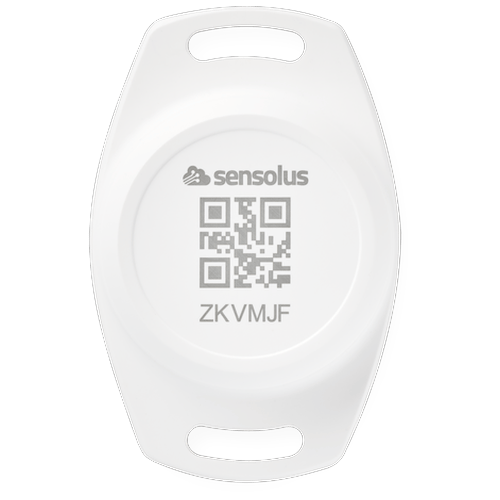
TAG 2006: Installation All mounting options for this device can be found in the Sensolus product mounting instructions. Documentation public TAG 2006 BLE Location Tag Tracker Rugged location tag tracker built for reliable, long-term asset tracking in harsh environments. Using Bluetooth Low Energy (BLE) technology, it enables the localization of assets when in range of Sensolus devices with smart BLE gateway capabilities. BLE iBeacon advertising Up to 10 years battery life IP67 rated TAG 2006 70 × 46 × 21mm 33.5g Connectivity Technology Bluetooth Low Energy (BLE) iBeacon Transmission Range 50 meters or more at +4dBm emission power. Actual detection range is strongly influenced by physical environment. Mechanics & Design Dimensions 70 × 46 × 21mm Weight 33.5 grams Casing Material PC + ABS Water & Dust Resistance IP67 Operating Temperature -20°C to +60°C Power Battery Type User replaceable lithium coin CR2477 battery Battery Life Up to 10 years. Actual battery life may be reduced by extreme temperatures. Mounting Tamper Protection The battery and internal board can only be reached when the device is unmounted, providing extra tamper protection. Certifications Europe CE-RED, CE-LVD, CE-EMC, REACH USA FCC Environmental RoHS compliantInstallation and activation manual TAG 2006: Activation The TAG 2006 is already activated when you receive it. No activation steps are required. Mounting the TAG 2006 Guidelines for mounting the tracker can be found in the Sensolus Documentation center. Mounting with screws, rivets, or bolts The TAG 2006 has mounting holes for affixing with rivets, screws, or bolts. The spacing between the mounting holes is 60mm. Important mounting warning Do not install the TAG 2006 close to magnets. Magnets can interfere with the tag's operation. Battery replacement The battery is replaceable in case of defect. The TAG 2006 uses a CR 2477 battery. Edit tag information with the mobile app The Sensolus mobile app allows you to edit the name, tags, and picture of a TAG 2006. Download the Sensolus mobile app from the App Store or Google Play. Open the Sensolus smartphone app and login with your credentials. Go to the tag you want to edit via the asset list, map, or search function. In the search function, use the QR code scanner to open the tag details page. Tap on the edit button. You can now edit the name, tags, and picture of the tag. Save the settings by tapping the save icon. Safety advice – device subjected to strong mechanical impact Risk of delayed battery failure and chemical hazard If a device has been hit, crushed, or struck by a heavy object (for example a forklift, container, pallet, or falling load), the internal components and battery may be damaged even if no external damage is visible. Such damage can result in delayed overheating, leakage, or failure. If a device has been subjected to a strong mechanical impact, the following mandatory safety actions must be taken: Action Details :— :------- :-------- 1 Do not touch the device Do not move, lift, open, shake, or inspect the device immediately after the impact. Internal damage may cause delayed reactions. 2 Keep a minimum safety distance Maintain a clear distance of at least 5 meters from the device. Keep all personnel away during this period. 3 Wait at least 10 minutes The device must remain untouched and undisturbed for a minimum of 10 minutes following the impact. This waiting time allows potential delayed thermal or chemical reactions to become evident. 4 Observe from a safe distance Watch for warning signs: smoke, vapor, or unusual odor; heat generation; fluid leakage; hissing, cracking, or popping noises. 5 After the waiting period If any abnormal condition is observed, isolate the area immediately and notify responsible safety or supervisory personnel. The device must be quarantined and handled according to battery safety and disposal procedures. The device must not be used. A device may appear undamaged and still be unsafe. Normal operation after impact does NOT mean the device is safe. Failure to follow this safety advice may result in serious injury, fire, or chemical exposure. sensolus-internal 300px 20px 0 ./images/TAG 2006 BACK BATTERY CHANGE STEP 1.svg Unmount the tag Unmount the tag and put it face down. ./images/TAG 2006 BACK BATTERY CHANGE STEP 2.svg Unscrew the backplate Unscrew the backplate by turning it counterclockwise. ./images/TAG 2006 BACK BATTERY CHANGE STEP 3.svg Replace the battery Replace the empty CR 2477 battery with a new one. ./images/TAG 2006 BACK BATTERY CHANGE STEP 4.svg Screw the backplate back on Screw the backplate on again by turning it clockwise. Installation and activation manual TAG 2006 Mounting hole spacing - 60mm Open the app Navigate to the tag Edit the tag Save changes